• Regeln für den Software-Bereich:


    Allgemeines:

    - In erster Linie sind unsere Boardregeln zu beachten, zu finden HIER.
    - Software zur Audiobearbeitung sollte ausschließlich im Unterforum "Audio" eingestellt werden.
    - Für Cracks, Keygens oder sonstige Freischaltungssoftware gibt es das Unterforum "Freischaltung".
    - Portable Software bitte im entsprechenden Unterforum "Portable Software" eintragen.
    - Diskussionen zur Installation und anderen Problemen mit der Software, bitte im enstprechenden Unterforum "Talk" führen.
    - Bei Unklarheiten und Fragen zu den Regeln bitte die Moderatoren kontaktieren.


    Angebot erstellen

    - Die Struktur des Threadtitels muss wie folgt umgesetzt werden: Herstellername - Softwarename - Versionsnummer
    - Unnötige Zusätze im Threadtitel wie "HOT", "NEW" oder Punkte zwischen den Wörtern sind nicht erlaubt.
    - Achtet darauf immer nur die Hauptversion und deren Updates in einem Thread zusammenfassen, konkretes Beispiel: SoftwareXY v3.12 gehört in den selben Thread mit SoftwareXY v3.13; SoftwareXY v.4.1 gehört in einen neuen eigenen Thread. Ausgenommen hiervon sind Sammelthreads und Dauerangebote.
    - Bei nicht bekannten Herstellern oder Angebote einer privaten Software, ist die Programmbezeichnung + Versionsnummer ausreichend.
    - Besondere Beachtung gilt für den ersten Beitrag eines Angebots. Dort muss eine kurze Beschreibung der Software in deutscher Sprache angegeben werden. Für offizielle Releases ist es Pflicht die NFO im Beitrag einzustellen(Spoiler, siehe nächster Punkt).
    - Weitere Informationen wie NFOs oder Changelogs, versteckt ihr bitte in einem Spoiler.


    Software Suche

    - Für Suchanfragen haben wir das Unterforum "Suche" erstellt.
    - Auch hier sollte vorher die Suchfunktion benutzt werden, um Doppelthreads vorzubeugen. Sollte es bereits eine Suchanfrage geben, könnt ihr den Thread gerne mit einem "Danke" pushen.


    Trojaner- und Virusalarm

    - Falls Euer Virenscanner bei einem Angebot Alarm schlägt, solltet ihr zunächst Ruhe bewahren. Viele Virenscanner erkennen Cracks/Keygens oft fälschlicherweise als Bedrohung.
    - Prüft die verdächtige Datei zuerst mit http://virustotal.com , sollte es sich hierbei wirklich um eine Bedrohung handeln, meldet den Beitrag und/oder wendet euch mit dem Bericht von VirusTotal.com an einen Moderator.


    Unerwünschte Angebote

    - Keylogger, Spionagetools, alles rund ums Thema Hacking/Cracking ist nicht erwünscht.
  • Bitte registriere dich zunächst um Beiträge zu verfassen und externe Links aufzurufen.

*** Bestes IPTV *** bester Preis *** gratis Test ***


CoolUtils Total Image Converter v8

KAMAL

MyBoerse.bz Pro Member
CoolUtils Total Image Converter 8.2.0.222 Multilingual

848df906fa432528c4500caf100b353f.jpeg


CoolUtils Total Image Converter 8.2.0.222 Multilingual | 59 MB | Language: Multilanguage


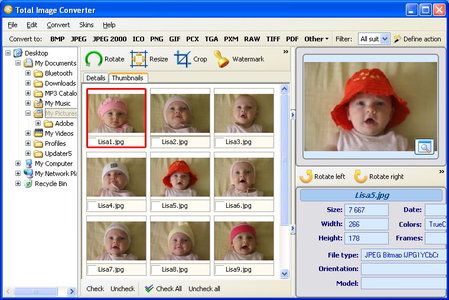
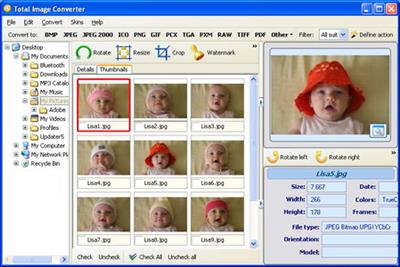
Total Image Converter allows you to take an image and create a new one with a different size or format, or perform the task for huge batches of graphic files with one click. It is invaluable for web designers and other IT professionals.


Total Image Converter helps you to convert image sizes and formats. A must-have utility for all web designers. ImageConverter is unique - it supports almost all popular formats (JPG, GIF, BMP, PBM, PGM, PCX, PNG, PPM, TGA, TIF, WMF, EMF). All you have to do is to set the required size or format and Total Image Converter automatically does the rest.

With Total Image Converter, you can also resize, rotate or perform mirror images and change color resolutions. If you have lists of images to be converted, use our batch processing. You'll get hundreds of images converted or resized with one click! ImageConverter is the best solution for converting images at a most reasonable price.

Here are some key features of "Total Image Converter":
· All image formats
· Total Image Converter supports almost all image formats (see the list ->). It's all-in-one solution for those who do not want to waste time and effort searching for 10 different converters to deal with different formats.
· Batch conversion
· If you have hundreds of images to be converted, you can use its batch file convert option. Just check the files that you want to process or just press Select All button to save your time. Get any amount of image files converted or resized in one click!
· 3 ways of handling
· First, there is well-thought user interface. Second, Total Image Converter seamlessly integrates into Windows. That means that you may select the file in your desktop and make right-button mouse click. You will see ConvertTo item in the standart Windows popup menu. And there is also Command line support. Run Total Image Converter from the command line within other programs.
· Built-in viewer and thumbnails
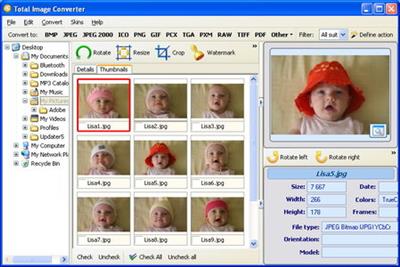
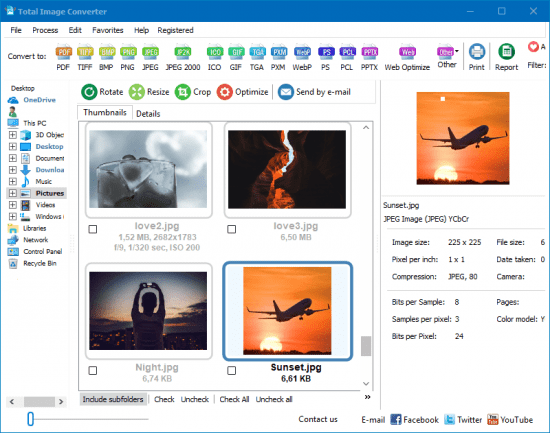
· Total Image Converter has built-in viewer. You may easily view your images inside the program before or after the conversion. You can either work with detailed list of files (name, size, type, modify, attributes) or with their thumbnails.
· Resize, rotate, crop, mirror
· With Total Image Converter you can also resize, crop, rotate or mirror images and change the color resolution (include convert to black and white color) of your graphics. Besides, you may adjust White Balance and make gamma correction. Adjust or set Brightness, Contrast or Saturation, apply shadow or use some filter. All this done when converting your image with Total Image Converter!
· Watermarking
· Total Image Converter lets you apply watermarks to your images! You may add your comment, logo or date to a single photo or a bunch of them.
· No special knowledge required
· Even if you never dealt with image converters before you will master the program in seconds. The program will itself ask you all the questions about the conversion settings and in case you are at a loss it will advise you the best setting for each conversion. Click here to make a quick tour on the program and see how simple it is to use it.
· High quality

Home Page -


DOWNLOAD LINKS:



CoolUtils Total Image Converter 8.2.0.225 Multilingual
Requirements: Windows 10, 8, 7, Vista, 2003
Overview:
Total Image Converter allows you to take an image and create a new one with a different size or format, or perform the task for huge batches of graphic files with one click. It is invaluable for web designers and other IT professionals.

Total Image Converter helps you to convert image sizes and formats. A must-have utility for all web designers. ImageConverter is unique - it supports almost all popular formats (JPG, GIF, BMP, PBM, PGM, PCX, PNG, PPM, TGA, TIF, WMF, EMF). All you have to do is to set the required size or format and Total Image Converter automatically does the rest.

With Total Image Converter, you can also resize, rotate or perform mirror images and change color resolutions. If you have lists of images to be converted, use our batch processing. You'll get hundreds of images converted or resized with one click! ImageConverter is the best solution for converting images at a most reasonable price.

oie4veh.jpg

Here are some key features of "Total Image Converter":
· All image formats
· Total Image Converter supports almost all image formats (see the list ->). It's all-in-one solution for those who do not want to waste time and effort searching for 10 different converters to deal with different formats.
· Batch conversion
· If you have hundreds of images to be converted, you can use its batch file convert option. Just check the files that you want to process or just press Select All button to save your time. Get any amount of image files converted or resized in one click!
· 3 ways of handling
· First, there is well-thought user interface. Second, Total Image Converter seamlessly integrates into Windows. That means that you may select the file in your desktop and make right-button mouse click. You will see ConvertTo item in the standart Windows popup menu. And there is also Command line support. Run Total Image Converter from the command line within other programs.
· Built-in viewer and thumbnails
· Total Image Converter has built-in viewer. You may easily view your images inside the program before or after the conversion. You can either work with detailed list of files (name, size, type, modify, attributes) or with their thumbnails.
· Resize, rotate, crop, mirror
· With Total Image Converter you can also resize, crop, rotate or mirror images and change the color resolution (include convert to black and white color) of your graphics. Besides, you may adjust White Balance and make gamma correction. Adjust or set Brightness, Contrast or Saturation, apply shadow or use some filter. All this done when converting your image with Total Image Converter!
· Watermarking
· Total Image Converter lets you apply watermarks to your images! You may add your comment, logo or date to a single photo or a bunch of them.
· No special knowledge required
· Even if you never dealt with image converters before you will master the program in seconds. The program will itself ask you all the questions about the conversion settings and in case you are at a loss it will advise you the best setting for each conversion. Click here to make a quick tour on the program and see how simple it is to use it.
· High quality

More Info:
Download Instructions:
Platform: Windows
Size: 59.18 Mb
Format:".rar/.zip" archive.. ".exe" after extracting
Language: Multilingual
Hoster: uploadship / uploaded


CoolUtils Total Image Converter v8.2.0.226 Multilingual


b889b4a6a8e796a8d67710e4c569756c.jpeg


CoolUtils Total Image Converter v8.2.0.226 Multilingual | 59 MB | Language: Multilanguage


Total Image Converter allows you to take an image and create a new one with a different size or format, or perform the task for huge batches of graphic files with one click. It is invaluable for web designers and other IT professionals.


Total Image Converter helps you to convert image sizes and formats. A must-have utility for all web designers. ImageConverter is unique - it supports almost all popular formats (JPG, GIF, BMP, PBM, PGM, PCX, PNG, PPM, TGA, TIF, WMF, EMF). All you have to do is to set the required size or format and Total Image Converter automatically does the rest.

With Total Image Converter, you can also resize, rotate or perform mirror images and change color resolutions. If you have lists of images to be converted, use our batch processing. You'll get hundreds of images converted or resized with one click! ImageConverter is the best solution for converting images at a most reasonable price.

Here are some key features of "Total Image Converter":
· All image formats
· Total Image Converter supports almost all image formats (see the list ->). It's all-in-one solution for those who do not want to waste time and effort searching for 10 different converters to deal with different formats.
· Batch conversion
· If you have hundreds of images to be converted, you can use its batch file convert option. Just check the files that you want to process or just press Select All button to save your time. Get any amount of image files converted or resized in one click!
· 3 ways of handling
· First, there is well-thought user interface. Second, Total Image Converter seamlessly integrates into Windows. That means that you may select the file in your desktop and make right-button mouse click. You will see ConvertTo item in the standart Windows popup menu. And there is also Command line support. Run Total Image Converter from the command line within other programs.
· Built-in viewer and thumbnails
· Total Image Converter has built-in viewer. You may easily view your images inside the program before or after the conversion. You can either work with detailed list of files (name, size, type, modify, attributes) or with their thumbnails.
· Resize, rotate, crop, mirror
· With Total Image Converter you can also resize, crop, rotate or mirror images and change the color resolution (include convert to black and white color) of your graphics. Besides, you may adjust White Balance and make gamma correction. Adjust or set Brightness, Contrast or Saturation, apply shadow or use some filter. All this done when converting your image with Total Image Converter!
· Watermarking
· Total Image Converter lets you apply watermarks to your images! You may add your comment, logo or date to a single photo or a bunch of them.
· No special knowledge required
· Even if you never dealt with image converters before you will master the program in seconds. The program will itself ask you all the questions about the conversion settings and in case you are at a loss it will advise you the best setting for each conversion. Click here to make a quick tour on the program and see how simple it is to use it.
· High quality

Home Page -


DOWNLOAD LINKS:



CoolUtils Total Image Converter 8.2.0.237 Multilingual
Requirements: Windows 10, 8, 7, Vista, 2003
Overview:
Total Image Converter allows you to take an image and create a new one with a different size or format, or perform the task for huge batches of graphic files with one click. It is invaluable for web designers and other IT professionals.

Total Image Converter helps you to convert image sizes and formats. A must-have utility for all web designers. ImageConverter is unique - it supports almost all popular formats (JPG, GIF, BMP, PBM, PGM, PCX, PNG, PPM, TGA, TIF, WMF, EMF). All you have to do is to set the required size or format and Total Image Converter automatically does the rest.

With Total Image Converter, you can also resize, rotate or perform mirror images and change color resolutions. If you have lists of images to be converted, use our batch processing. You'll get hundreds of images converted or resized with one click! ImageConverter is the best solution for converting images at a most reasonable price.
wH9K2pp.png

Here are some key features of "Total Image Converter":
· All image formats
· Total Image Converter supports almost all image formats (see the list ->). It's all-in-one solution for those who do not want to waste time and effort searching for 10 different converters to deal with different formats.
· Batch conversion
· If you have hundreds of images to be converted, you can use its batch file convert option. Just check the files that you want to process or just press Select All button to save your time. Get any amount of image files converted or resized in one click!
· 3 ways of handling
· First, there is well-thought user interface. Second, Total Image Converter seamlessly integrates into Windows. That means that you may select the file in your desktop and make right-button mouse click. You will see ConvertTo item in the standart Windows popup menu. And there is also Command line support. Run Total Image Converter from the command line within other programs.
· Built-in viewer and thumbnails
· Total Image Converter has built-in viewer. You may easily view your images inside the program before or after the conversion. You can either work with detailed list of files (name, size, type, modify, attributes) or with their thumbnails.
· Resize, rotate, crop, mirror
· With Total Image Converter you can also resize, crop, rotate or mirror images and change the color resolution (include convert to black and white color) of your graphics. Besides, you may adjust White Balance and make gamma correction. Adjust or set Brightness, Contrast or Saturation, apply shadow or use some filter. All this done when converting your image with Total Image Converter!
· Watermarking
· Total Image Converter lets you apply watermarks to your images! You may add your comment, logo or date to a single photo or a bunch of them.
· No special knowledge required
· Even if you never dealt with image converters before you will master the program in seconds. The program will itself ask you all the questions about the conversion settings and in case you are at a loss it will advise you the best setting for each conversion. Click here to make a quick tour on the program and see how simple it is to use it.
· High quality
More Info:
Download Instructions:
Platform: Windows
Size: 54
Format:".rar/.zip" archive.. ".exe" after extracting
Language: Multilingual
Hoster: uploaded


CoolUtils Total Image Converter 8.2.0.246 Multilingual


aac6df186390a94c66b71d41c38f4d0f.png


CoolUtils Total Image Converter 8.2.0.246 Multilingual


Total Image Converter konvertiert Bilder in andere Formate, beschneidet, skaliert und dreht sie. Konvertieren Sie große TIFFs in kleine JPEGs, machen Sie Fotos für das Web geeignet oder stellen Sie alte Fotos in nicht unterstützten Formaten wieder her - Total Image Converter wird alles tun, was Sie brauchen.


Sprache: Deutsch, Multi | Größe: 86 MB | Format: RAR, EXE | Plattform: Windows 7, 8, 8.1, 10 (32/64Bit)


Hoster:
UploadGig.com | RapidGator.net | DDownload.com


DOWNLOAD Links:


CoolUtils Total Image Converter v8.2.0.250

9-xp-srk-j67sks-cc-mw2yksq.png


CoolUtils Total Image Converter v8.2.0.250

Größe: 146 MB
Sprache: Multi/Deutsch
Format: RAR/EXE
Plattform: Windows 7/8/10/11
(32-64-Bit)

Hoster:
RapidGator
Ddownload


Total Image Converter konvertiert Bilder in andere Formate, schneidet sie zu, ändert die Größe und dreht sie. Konvertieren Sie große TIFFs in kleine JPEGs, machen Sie Fotos für das Web geeignet oder stellen Sie alte Fotos in nicht unterstützten Formaten wieder her - Total Image Converter erledigt alles, was Sie brauchen.

Merkmale

JPEG, TIFF, PSD, PNG usw.
Total Image Converter unterstützt die breiteste Liste von Ausgabedateitypen: PDF, TIFF, BMP, PNG, JPEG, JPEG2000, ICO, GIF, TGA, PXM, PS, PCL! Außerdem konvertiert es viele seltene Formate wie PALM, PICT, XPM, FIX.

Bild zu PDF
Erhalten Sie ordentliche PDF-Dokumente mit allen Bildern darin. Kombinieren Sie mehrere Bilddateien ganz einfach zu einem PDF!

Optimieren Sie Bilder für das Web
TIC verwendet 2 Packer, um Bilder zu optimieren. Guetzli eignet sich hervorragend für Fotos. Aber es ist langsam - ungefähr 1 Minute pro Foto. Wenn die Quelle nur ein Screenshot oder ein Symbol ist, verwendet TIC den MozJpeg-Packer. Es ist 10 mal schneller. Das Beste daran ist, dass die App je nach Quelldatei selbst auswählt, welcher Packer verwendet werden soll, um Zeit zu sparen (Auto-Modus).

Bildgröße ändern
Mit Total Image Converter ist es sehr einfach, die Größe Ihrer Fotos oder Bilder im Stapel zu ändern. Machen Sie sie für das Web oder den E-Mail-Versand geeignet.

RAW-Fotos
Total Image Converter unterstützt fast alle RAW-Kamerafotos (CRW, CR2, NEF, PEF, RAF, X3F, RAW, BAY, ORF, NRW, SRF, MRW). Speichern Sie sie als TIFF- oder JPEG-Dateien, um sie einfach zu veröffentlichen oder zu teilen.

Wasserzeichen
Fügen Sie der Kopf- oder Fußzeile der Ausgabedatei Textwasserzeichen hinzu, um eine unbefugte Verwendung zu verhindern.

Übersichtliche Oberfläche
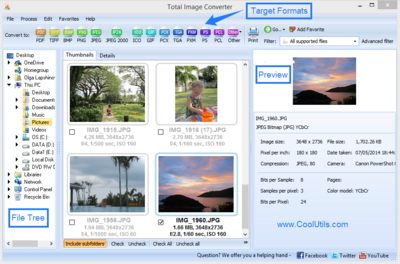
Die Oberfläche der pss ist übersichtlich und unkompliziert. Das integrierte Vorschaufenster hilft Ihnen, jede Datei in voller Größe anzuzeigen und die Informationen darüber zu erfahren.

ECE07E9CA6.png


CoolUtils Total Image Converter 8.2.0.253 Multilingual

aac6df186390a94c66b71d41c38f4d0f.png


beschreibungdgjj7.png

Total Image Converter konvertiert Bilder in andere Formate, schneidet sie zu, ändert die Größe und dreht sie. Konvertieren Sie große TIFFs in kleine JPEGs, machen Sie Fotos für das Web geeignet oder stellen Sie alte Fotos in nicht unterstützten Formaten wieder her - Total Image Converter erledigt alles, was Sie brauchen.
fusszeilefinal1mkv0.png


Platform: x86/64
System: Windows 7+
Format: .exe
Paket: .rar / .zip
Größe: 63 MB
Version: 8.2.0.253
Sprache: Multi
Update: 08042022

downloadfinali2jbi.png


fusszeilefinal1mkv0.png


Zuletzt bearbeitet:
CoolUtils Total Image Converter 8.2.0.253 Multilingual

a15a0e650dbce0a0eb12385850368659.png


Größe: 55.57 MB
Sprache: Multi-Deutsch
Format: RAR/EXE
Plattform: Windows 7 / 8 / 8.1 / 10 / 11 (x86/x64)


Hoster: RapidGator, UploadGig, NitroFlare


CoolUtils Total Image Converter 8.2.0.254 Multilingual


aac6df186390a94c66b71d41c38f4d0f.png


CoolUtils Total Image Converter 8.2.0.254 Multilingual


Total Image Converter konvertiert Bilder in andere Formate, schneidet sie zu, ändert die Größe und dreht sie. Konvertieren Sie große TIFFs in kleine JPEGs, machen Sie Fotos für das Web geeignet oder stellen Sie alte Fotos in nicht unterstützten Formaten wieder her - Total Image Converter erledigt alles, was Sie brauchen.


Sprache: Deutsch, Multi | Größe: 55 MB | Format: RAR, EXE | Plattform: Windows 7, 8/8.1, 10, 11 (32/64Bit)


Hoster:
UploadGig.com | RapidGator.net | DDownload.com | NitroFlare.com


DOWNLOAD Links:


CoolUtils Total Image Converter 8.2.0.254 Multilingual

aac6df186390a94c66b71d41c38f4d0f.png


beschreibungdgjj7.png

Total Image Converter konvertiert Bilder in andere Formate, schneidet sie zu, ändert die Größe und dreht sie. Konvertieren Sie große TIFFs in kleine JPEGs, machen Sie Fotos für das Web geeignet oder stellen Sie alte Fotos in nicht unterstützten Formaten wieder her - Total Image Converter erledigt alles, was Sie brauchen.
fusszeilefinal1mkv0.png


Platform: x86/64
System: Windows 7+
Format: .exe
Paket: .rar / .zip
Größe: 63 MB
Version: 8.2.0.254
Sprache: Multi
Update: 20042022

downloadfinali2jbi.png


fusszeilefinal1mkv0.png


Zuletzt bearbeitet:
Zurück
Oben Unten