• Regeln für den Video-Bereich:

    In den Börsenbereich gehören nur Angebote die bereits den Allgemeinen Regeln entsprechen.

    Einteilung

    - Folgende Formate gehören in die angegeben Bereiche:
    - Filme: Encodierte Filme von BluRay, DVD, R5, TV, Screener sowie Telesyncs im Format DivX, XviD und x264.
    - DVD: Filme im Format DVD5, DVD9 und HD2DVD.
    - HD: Encodierte Filme mit der Auflösung 720p oder darüber von BluRay, DVD, R5, TV, Screener sowie Telesyncs im Format x264.
    - 3D: Encodierte Filme von BluRay, die in einem 3D Format vorliegen. Dies gilt auch für Dokus, Animation usw.
    - Serien: Cartoon/Zeichentrick, Anime, Tutorials, Dokumentationen, Konzerte/Musik, Sonstiges sind demnach in die entsprechenden Bereiche einzuordnen, auch wenn sie beispielsweise im High Definition-Format oder als DVD5/DVD9/HD2DVD vorliegen. Ausnahme 3D.
    - Bereich Englisch: Englische Releases gehören immer in diesen Bereich.
    - Bereich Talk: Der Bereich, in dem über die Releases diskutiert werden kann, darf, soll und erwünscht ist.


    Angebot/Beitrag erstellen

    - Ein Beitrag darf erst dann erstellt werden, wenn der Upload bei mindestens einem OCH komplett ist. Platzhalter sind untersagt.
    - Bei einem Scenerelease hat der Threadtitel ausschließlich aus dem originalen, unveränderten Releasenamen zu bestehen. Es dürfen keine Veränderungen wie z.B. Sterne, kleine Buchstaben o.ä. vorgenommen werden. Ausnahme Serienbörse:
    - Bei einem Sammelthread für eine Staffel entfällt aus dem Releasename natürlich der Name der Folge. Beispiel: Die Simpsons S21 German DVDRip XviD - ITG
    - Dementsprechend sind also u.a. verboten: Erweiterungen wie "Tipp", "empfehlenswert", "only", "reup", usw. / jegliche andere Zusatzinformation oder Ergänzung, welche nicht in obiger Beschreibung zu finden ist.

    Aufbau des Angebots und Threadtitel

    Der Titel nach folgendem Muster erstellt zu werden. <Name> [3D] [Staffel] [German] <Jahr> <Tonspur> [DL] [Auflösung] <Quelle> <Codec> - <Group>
    Beispiel: The Dark Knight German 2008 AC3 DVDRip XviD - iND
    Beispiel: The Dark Knight 2008 DTS DL BDRip x264 - iND
    Beispiel: The Dark Knight 2008 AC3 DL BDRip XviD - iND
    Beispiel: The Dark Knight German 2008 AC3 720p BluRay x264 iND
    Beispiel: The Dark Knight 2008 DTS DL 1080p BluRay x264 iND
    Beispiel: Die Simpsons S01 German AC3 DVDRip XviD iND
    Beispiel: Die Simpsons S20 German AC3 720p BluRay x264 iND
    Beispiel: Sword Art Online II Ger Sub 2014 AAC 1080p WEBRip x264 - peppermint
    Entsprechend sind also u.a. verboten: Sonderzeichen wie Klammern, Sterne, Ausrufezeichen, Unterstriche, Anführungszeichen / Erweiterungen wie "Tipp", "empfehlenswert", "only", "reup", usw. / jegliche andere Zusatzinformation oder Ergänzung, welche nicht in obiger Beschreibung zu finden ist
    Ausnahmen hiervon können in den Bereichen geregelt sein.

    Die Beiträge sollen wie folgt aufgebaut werden:
    Überschrift entspricht dem Threadtitel
    Cover
    kurze Inhaltsbeschreibung
    Format, Größe, Dauer sind gut lesbar für Downloader außerhalb des Spoilers zu vermerken
    Nfo sind immer Anzugeben und selbige immer im Spoiler in Textform.
    Sind keine Nfo vorhanden z.B. Eigenpublikationen, sind im Spoiler folgende Dateiinformationen zusätzlich anzugeben :
    Quelle
    Video (Auflösung und Bitrate)
    Ton (Sprache, Format und Bitrate der einzelnen Spuren)
    Untertitel (sofern vorhanden)
    Hosterangabe in Textform außerhalb eines Spoiler mit allen enthaltenen Hostern.
    Bei SD kann auf diese zusätzlichen Dateiinformationen verzichtet werden.

    Alle benötigten Passwörter sind, sofern vorhanden, in Textform im Angebot anzugeben.
    Spoiler im Spoiler mit Kommentaren :"Schon Bedankt?" sind unerwünscht.


    Releases

    - Sind Retail-Release verfügbar, sind alle anderen Variationen untersagt. Ausnahmen: Alle deutschen Retail-Release sind CUT, in diesem Fall sind dubbed UNCUT-Release zulässig.
    - Im Serien-Bereich gilt speziell: Wenn ein Retail vor Abschluss einer laufenden Staffel erscheint, darf diese Staffel noch zu Ende gebracht werden.62
    - Gleiche Releases sind unbedingt zusammenzufassen. Das bedeutet, es ist zwingend erforderlich, vor dem Erstellen eines Themas per Suchfunktion zu überprüfen, ob bereits ein Beitrag mit demselben Release besteht. Ist dies der Fall, ist der bereits vorhandene Beitrag zu verwenden.
    - P2P und Scene Releases dürfen nicht verändert oder gar unter einem iND Tag eingestellt werden.


    Support, Diskussionen und Suche

    - Supportanfragen sind entweder per PN oder im Bereich Talk zu stellen.
    - Diskussionen und Bewertungen sind im Talk Bereich zu führen. Fragen an die Uploader haben ausschließlich via PN zu erfolgen, und sind in den Angeboten untersagt.
    - Anfragen zu Upload-Wünschen sind nur im Bereich Suche Video erlaubt. Antworten dürfen nur auf Angebote von MyBoerse.bz verlinkt werden.


    Verbote

    - Untersagt sind mehrere Formate in einem einzigen Angebotsthread, wie beispielsweise das gleichzeitige Anbieten von DivX/XviD, 720p und 1080p in einem Thread. Pro Format, Release und Auflösung ist ein eigener Thread zu eröffnen.
    - Grundsätzlich ebenso verboten sind Dupes. Uploader haben sich an geeigneter Stelle darüber zu informieren, ob es sich bei einem Release um ein Dupe handelt.
    - Gefakte, nur teilweise lauffähige oder unvollständige Angebote sind untersagt. Dies gilt auch für eigene Publikationen, die augenscheinlich nicht selbst von z.B. einer DVD gerippt wurden. Laufende Serien, bei denen noch nicht alle Folgen verfügbar sind, dürfen erstellt und regelmäßig geupdatet werden.
    - Untersagt sind Angebote, welche nur und ausschließlich in einer anderen Sprache als deutsch oder englisch vorliegen. Ausnahmen sind VORHER mit den Moderatoren zu klären.


    Verstoß gegen die Regeln

    - Angebote oder Beiträge, die gegen die Forenregeln verstoßen, sind über den "Melden"-Button im Beitrag zu melden.
  • Bitte registriere dich zunächst um Beiträge zu verfassen und externe Links aufzurufen.

*** Bestes IPTV *** bester Preis *** gratis Test ***


Comptia Network+ (N10-009) Crash Course (All New For 2024!)

babymore87

MyBoerse.bz Pro Member
a3e407789819153ee7768a1d7f296ff7.jpeg

Free Download Comptia Network+ (N10-009) Crash Course (All New For 2024!)
Published 10/2024
MP4 | Video: h264, 1920x1080 | Audio: AAC, 44.1 KHz
Language: English | Size: 14.07 GB | Duration: 17h 21m
Get ready to CRUSH your CompTIA Network+ exam, as you're guided through every topic on the N10-009 exam blueprint.

What you'll learn
Gain the prerequisite knowledge to pass the CompTIA Network+ Exam (N10-009)
The skills you learn as part of the CompTIA Network+ Certification can help you land a job
Learn how to subnet a network
Learn how networks actually work
Learn how to configure and manage network devices
Learn how to implement network security, standards and protocols
Learn how to support the creation of virtualized networks
Understand the differences between routers and switches and learn how to segment network traffic to create resilient networks
Learn network troubleshooting skills and the tools to use to troubleshoot networks
Requirements
Basic computer skills
Willingness to learn
Description
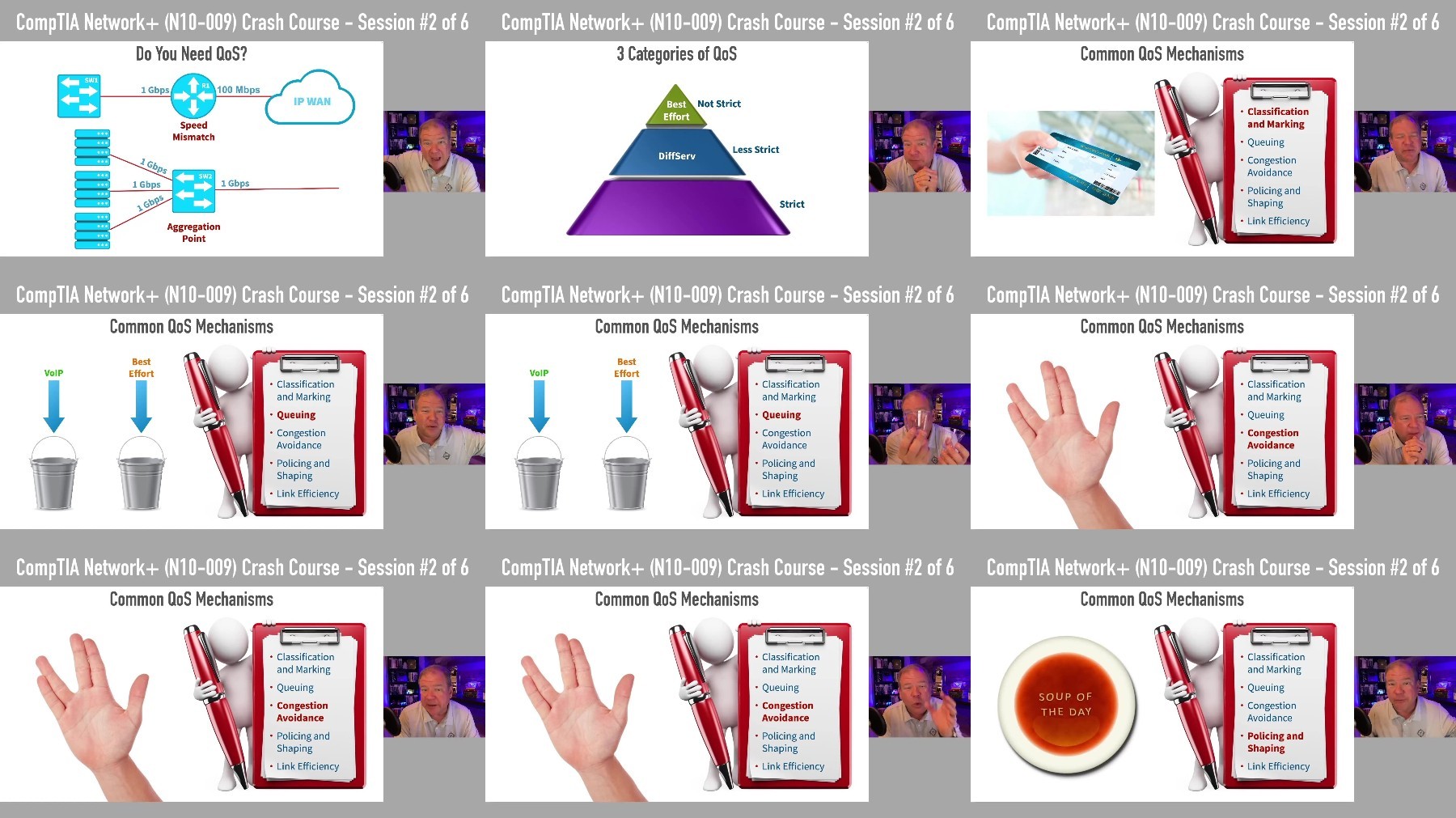
** Get Ready to Crush Your CompTIA Network+ (N10-009) Exam **Embark on (or continue) your IT certification journey with CompTIA's Network+ certification. The Network+ certification acts as a "sampler platter" of networking, where you get to "taste test" a wide variety of technologies, like cloud, wireless, software defined networking, route/switch, security, troubleshooting, network management, and so many others.Guiding you through each step of your journey is award-winning instructor and double CCIE (Cisco Certified Internetworking Expert) Kevin Wallace. With over 3 decades of IT experience, Kevin's real-life "tales from the trenches" are sprinkled throughout this course, including his time as a network designer for Walt Disney World.Animations, demonstrations, memory aids, and real-life stories all come together in this course to create the connective tissue you need to understand the interrelationships between all of the topics on the Network+ exam blueprint.You'll validate your learning with 2 Practice Exams (82 questions each) after completing the course.What You'll Get:17.5 hours of instruction from Kevin Wallace, CCIEx2 #7945 Lifetime Emeritus covering every topic on CompTIA's Network+ (N10-009) exam blueprintTwo comprehensive practice exams to reveal any weak spots you might have before taking the "real thing"Downloadable and printable PDF of course slidesWhat Kevin's Students Are Saying:"Kevin's delivery, content, clarity & style is unrivaled in my opinion." @ise_nut_will"I strongly recommend Kevin Wallace training programs. Back in 2019 when I started following Kevin, I was able to pass both my CCNA R/S and CCNA Security in a span of 8 months." Jean-Paul C."The explanation of QoS drop probability using a Styrofoam cup will live with me forever. Genius." Robert H."Yesterday I passed CCNP Switch! Hardest Cisco exam I have taken... Thank you so much @kwallaceccie you are awesome!" Kjetil H.Who this course is forAnyone entering the networking fieldCompTIA Network+ certification candidatesIT pros desiring to update their skillsJoin me and get ready to pass your CompTIA Network+ N10-009 exam!
Overview
Section 1: Module 0: Course Introduction
Lecture 1 Welcome to the Course!
Lecture 2 Course Slides Download
Section 2: Module 1: Categorizing Network Types
Lecture 3 Defining a Network and its Benefits
Lecture 4 Common Network Classifications
Lecture 5 Physical vs. Logical Topologies
Lecture 6 Enterprise Network Design
Lecture 7 Data Center Network Design
Section 3: Module 2: Introducing Key Protocols of the OSI Model
Lecture 8 2.1 OSI Model
Lecture 9 Network Layer Protocols
Lecture 10 Transport Layer Protocols
Lecture 11 TCP's 3-Way Handshake
Lecture 12 Application Layer Protocols
Section 4: Module 3: Exploring a Network's Pieces and Parts
Lecture 13 Ethernet Clients
Lecture 14 3.2 MAC Addresses
Lecture 15 3.3 Ethernet Switch Operation
Lecture 16 3.4 VLANs
Lecture 17 3.5 Router Operation
Lecture 18 3.6 Security Appliances
Lecture 19 3.7 Load Balancer
Lecture 20 3.8 Proxy Server
Lecture 21 3.9 Network Storage Options
Lecture 22 3.10 Wireless Access Points and Controllers
Lecture 23 3.11 Content Delivery Network (CDN) Operation
Lecture 24 3.12 Virtual Private Network (VPN) Operation
Lecture 25 3.13 Quality of Service (QoS) Fundamentals
Lecture 26 3.14 QoS Markings
Lecture 27 3.15 QoS Traffic Shaping and Policing
Section 5: Module 4: Introducing Cloud Technologies
Lecture 28 4.1 Benefits of Cloud Computing
Lecture 29 4.2 Cloud Deployment Models
Lecture 30 4.3 Cloud Service Models
Lecture 31 4.4 Scalability vs. Elasticity
Lecture 32 4.5 Multi-Tenancy
Lecture 33 4.6 Network Functions Virtualization (NFV)
Lecture 34 4.7 Virtual Private Cloud (VPC)
Lecture 35 4.8 Options for Cloud Connectivity
Section 6: Module 5: Physically Connecting Network Devices
Lecture 36 5.1 Coax Cables and Connectors
Lecture 37 5.2 Twisted Pair Cables and Connectors
Lecture 38 5.3 Twinax and DAC Cables
Lecture 39 5.4 Ethernet Standards for Twisted Pair Cables
Lecture 40 5.5 Straight Through vs. Crossover Cables
Lecture 41 5.6 Fiber Optic Cables
Lecture 42 5.7 Fiber Optic Connectors
Lecture 43 5.8 Ethernet Standards for Fiber Cabling
Lecture 44 5.9 Transceivers
Section 7: Module 6: Wirelessly Connecting Network Devices
Lecture 45 6.1 Wireless Network Types
Lecture 46 6.2 Service Set Identifier (SSID) Types
Lecture 47 6.3 Frequency Bands
Lecture 48 6.4 Wireless Standards
Lecture 49 6.5 Transmission Methods
Lecture 50 6.6 Spatial Streams
Lecture 51 6.7 Channel Bonding
Lecture 52 6.8 WLAN Antennas
Lecture 53 6.9 Wi-Fi Security Standards
Lecture 54 6.10 Cellular Networks
Lecture 55 6.11 Satellite
Section 8: Module 7: IP version 4 (IP4) Addressing
Lecture 56 7.1 IPv4 Addressing Overview
Lecture 57 7.2 Binary Numbering
Lecture 58 7.3 Binary Practice Exercise #1
Lecture 59 7.4 Binary Practice Exercise #2
Lecture 60 7.5 IPv4 Address Format
Lecture 61 7.6 Public vs. Private IPv4 Addresses
Lecture 62 7.7 Network Address Translation
Lecture 63 7.8 IPv4 Autoconfiguration
Lecture 64 7.9 IPv4 Traffic Flows
Section 9: Module 8: IPv4 Subnetting
Lecture 65 8.1 The Need for Subnetting
Lecture 66 8.2 Calculating Available Subnets
Lecture 67 8.3 Calculating Available Hosts
Lecture 68 8.4 Subnetting Practice Exercise #1
Lecture 69 8.5 Subnetting Practice Exercise #2
Lecture 70 8.6 Calculating Usable Ranges of IPv4 Addresses
Lecture 71 8.7 Subnetting Practice Exercise #3
Section 10: Module 9: IP version 6 (IPv6) Addressing
Lecture 72 9.1 Hexadecimal Numbering
Lecture 73 9.2 IPv6 Address Format
Lecture 74 9.3 Shortening an IPv6 Address
Lecture 75 9.4 IPv6 Address Shortening Exercise
Lecture 76 9.5 EUI-64 Address
Lecture 77 9.6 IPv6 Autoconfiguration
Lecture 78 9.7 Traffic Flows
Lecture 79 9.8 Dual Stack
Lecture 80 9.9 Tunneling IPv6 Through an IPv4 Network
Lecture 81 9.10 NAT64
Section 11: Module 10: Exploring Emerging Network Technologies
Lecture 82 10.1 Software-Defined Networking (SDN)
Lecture 83 10.2 Software-Defined WAN (SD-WAN)
Lecture 84 10.3 Virtual Extensible LAN (VXLAN)
Lecture 85 10.4 Zero Touch Architecture (ZTA)
Lecture 86 10.5 Secure Access Secure Edge (SASE) vs. Secure Service Edge (SSE)
Lecture 87 10.6 Infrastructure as Code (IaC) Fundamentals
Section 12: Module 11: Working with IP Routing
Lecture 88 11.1 Static and Default Routes
Lecture 89 11.2 Routing Protocols
Lecture 90 11.3 OSPF
Lecture 91 11.4 EIGRP
Lecture 92 11.5 BGP
Lecture 93 11.6 First-Hop Redundancy Protocols (FHRPs)
Lecture 94 11.7 Maximum Transmission Unit (MTU)
Lecture 95 11.8 Subinterfaces
Section 13: Module 12: Working with Ethernet Switches
Lecture 96 12.1 Routing Between VLANs with an SVI
Lecture 97 12.2 Trunking Theory
Lecture 98 12.3 Voice VLANs
Lecture 99 12.4 Power over Ethernet (PoE)
Lecture 100 12.5 Introducing Spanning Tree Protocol (STP)
Lecture 101 12.6 STP Port States
Lecture 102 12.7 STP Example
Lecture 103 12.8 STP Convergence Times
Lecture 104 12.9 STP Variants
Lecture 105 12.10 Link Aggregation
Section 14: Module 13: Physical Installation Considerations
Lecture 106 13.1 Safety Procedures
Lecture 107 13.2 Wiring Management
Lecture 108 13.3 Power Management
Lecture 109 13.4 Rack Management
Lecture 110 13.5 Environment Monitoring
Section 15: Module 14: Network Management Best Practices
Lecture 111 14.1 Documentation
Lecture 112 14.2 IP Address Management (IPAM)
Lecture 113 14.3 Service-Level Agreement
Lecture 114 14.4 Wireless Survey
Lecture 115 14.5 Software Management
Lecture 116 14.6 System Lifecycle Management
Lecture 117 14.7 Change Management
Lecture 118 14.8 Configuration Management
Section 16: Module 15: Network Monitoring
Lecture 119 15.1 Device Monitoring Tools
Lecture 120 15.2 Packet Analyzers
Lecture 121 15.3 Overview of Wireshark
Lecture 122 15.4 Network Discovery
Lecture 123 15.5 Performance and Availability Monitoring
Lecture 124 15.6 Options for Accessing Network Devices
Lecture 125 15.7 Connecting via a Jump Box
Section 17: Module 16: Disaster Recovery
Lecture 126 16.1 Active-Active vs. Active-Passive
Lecture 127 16.2 Restoring Network Operations
Section 18: Module 17: Network Services
Lecture 128 17.1 DNS
Lecture 129 17.2 Local Hosts File
Lecture 130 17.3 Network Time Protocol
Lecture 131 17.4 Network Time Security
Lecture 132 17.5 Precision Time Protocol (PTP)
Section 19: Module 18: Introduction to Network Security
Lecture 133 18.1 3 Goals of Network Security
Lecture 134 18.2 Common Security Terminology
Lecture 135 18.3 Encryption
Lecture 136 18.4 Data in Transit vs. Data at Rest
Lecture 137 18.5 Identity and Access Management (IAM)
Lecture 138 18.6 Authentication Types
Lecture 139 18.7 Physical Security
Lecture 140 18.8 Security Audits
Section 20: Module 19: Common Network Attacks
Lecture 141 19.1 Denial-of-Service Attacks
Lecture 142 19.2 VLAN Hopping Attacks
Lecture 143 19.3 MAC Flooding Attacks
Lecture 144 19.4 ARP Poisoning Attack
Lecture 145 19.5 DNS Spoofing Attack
Lecture 146 19.6 Social Engineering Attacks
Section 21: Module 20: Network Defense Strategies
Lecture 147 20.1 Device Hardening
Lecture 148 20.2 Network Access Control (NAC)
Lecture 149 20.3 Key Management
Lecture 150 20.4 Traffic Rules
Lecture 151 20.5 Luring Attackers with Honeypots and Honey Nets
Section 22: Module 21: Network Troubleshooting
Lecture 152 21.1 Troubleshooting Methodology
Lecture 153 21.2 Troubleshooting Network Cable Issues
Lecture 154 21.3 Troubleshooting Network Interface Issues
Lecture 155 21.4 Troubleshooting Hardware Issues
Lecture 156 21.5 Troubleshooting Network Services
Lecture 157 21.6 Troubleshooting Network Performance Issues
Lecture 158 21.7 Troubleshooting Wireless Issues
Lecture 159 21.8 Hardware Troubleshooting Tools
Lecture 160 21.9 Troubleshooting with Operating System Commands
Lecture 161 21.10 CDP vs. LLDP
Lecture 162 21.11 iPerf
Lecture 163 21.12 Basic Switch & Router Commands
Section 23: Module 22: Exam Preparation
Lecture 164 22.1 Study Strategies
Lecture 165 22.2 What to do on Exam Day
Section 24: Module 23: Next Steps
Lecture 166 23.1 Congratulations and Next Steps
Section 25: CompTIA Network+ (N10-009) Practice Exams
Lecture 167 Practice Exams Download
Students preparing for the CompTIA Network+ N10-009 exam,Anyone entering the networking field,CompTIA Network+ certification candidates,IT pros desiring to update their skills,Beginners wanting to learn about networking
Screenshot
Homepage


Recommend Download Link Hight Speed | Please Say Thanks Keep Topic Live
No Password - Links are Interchangeable

 

33074323382943555ce1a5e1f2adb15e.jpg

Comptia Network+ (N10-009) Crash Course (All New For 2024!)
Published 10/2024
MP4 | Video: h264, 1920x1080 | Audio: AAC, 44.1 KHz
Language: English | Size: 14.07 GB | Duration: 17h 21m​

Get ready to CRUSH your CompTIA Network+ exam, as you're guided through every topic on the N10-009 exam blueprint.

What you'll learn

Gain the prerequisite knowledge to pass the CompTIA Network+ Exam (N10-009)

The skills you learn as part of the CompTIA Network+ Certification can help you land a job

Learn how to subnet a network

Learn how networks actually work

Learn how to configure and manage network devices

Learn how to implement network security, standards and protocols

Learn how to support the creation of virtualized networks

Understand the differences between routers and switches and learn how to segment network traffic to create resilient networks

Learn network troubleshooting skills and the tools to use to troubleshoot networks

Requirements

Basic computer skills

Willingness to learn

Description

** Get Ready to Crush Your CompTIA Network+ (N10-009) Exam **Embark on (or continue) your IT certification journey with CompTIA's Network+ certification. The Network+ certification acts as a "sampler platter" of networking, where you get to "taste test" a wide variety of technologies, like cloud, wireless, software defined networking, route/switch, security, troubleshooting, network management, and so many others.Guiding you through each step of your journey is award-winning instructor and double CCIE (Cisco Certified Internetworking Expert) Kevin Wallace. With over 3 decades of IT experience, Kevin's real-life "tales from the trenches" are sprinkled throughout this course, including his time as a network designer for Walt Disney World.Animations, demonstrations, memory aids, and real-life stories all come together in this course to create the connective tissue you need to understand the interrelationships between all of the topics on the Network+ exam blueprint.You'll validate your learning with 2 Practice Exams (82 questions each) after completing the course.What You'll Get:17.5 hours of instruction from Kevin Wallace, CCIEx2 #7945 Lifetime Emeritus covering every topic on CompTIA's Network+ (N10-009) exam blueprintTwo comprehensive practice exams to reveal any weak spots you might have before taking the "real thing"Downloadable and printable PDF of course slidesWhat Kevin's Students Are Saying:"Kevin's delivery, content, clarity & style is unrivaled in my opinion." @ise_nut_will"I strongly recommend Kevin Wallace training programs. Back in 2019 when I started following Kevin, I was able to pass both my CCNA R/S and CCNA Security in a span of 8 months." Jean-Paul C."The explanation of QoS drop probability using a Styrofoam cup will live with me forever. Genius." Robert H."Yesterday I passed CCNP Switch! Hardest Cisco exam I have taken. Thank you so much @kwallaceccie you are awesome!" Kjetil H.Who this course is forAnyone entering the networking fieldCompTIA Network+ certification candidatesIT pros desiring to update their skillsJoin me and get ready to pass your CompTIA Network+ N10-009 exam!

Overview

Section 1: Module 0: Course Introduction

Lecture 1 Welcome to the Course!

Lecture 2 Course Slides Download

Section 2: Module 1: Categorizing Network Types

Lecture 3 Defining a Network and its Benefits

Lecture 4 Common Network Classifications

Lecture 5 Physical vs. Logical Topologies

Lecture 6 Enterprise Network Design

Lecture 7 Data Center Network Design

Section 3: Module 2: Introducing Key Protocols of the OSI Model

Lecture 8 2.1 OSI Model

Lecture 9 Network Layer Protocols

Lecture 10 Transport Layer Protocols

Lecture 11 TCP's 3-Way Handshake

Lecture 12 Application Layer Protocols

Section 4: Module 3: Exploring a Network's Pieces and Parts

Lecture 13 Ethernet Clients

Lecture 14 3.2 MAC Addresses

Lecture 15 3.3 Ethernet Switch Operation

Lecture 16 3.4 VLANs

Lecture 17 3.5 Router Operation

Lecture 18 3.6 Security Appliances

Lecture 19 3.7 Load Balancer

Lecture 20 3.8 Proxy Server

Lecture 21 3.9 Network Storage Options

Lecture 22 3.10 Wireless Access Points and Controllers

Lecture 23 3.11 Content Delivery Network (CDN) Operation

Lecture 24 3.12 Virtual Private Network (VPN) Operation

Lecture 25 3.13 Quality of Service (QoS) Fundamentals

Lecture 26 3.14 QoS Markings

Lecture 27 3.15 QoS Traffic Shaping and Policing

Section 5: Module 4: Introducing Cloud Technologies

Lecture 28 4.1 Benefits of Cloud Computing

Lecture 29 4.2 Cloud Deployment Models

Lecture 30 4.3 Cloud Service Models

Lecture 31 4.4 Scalability vs. Elasticity

Lecture 32 4.5 Multi-Tenancy

Lecture 33 4.6 Network Functions Virtualization (NFV)

Lecture 34 4.7 Virtual Private Cloud (VPC)

Lecture 35 4.8 Options for Cloud Connectivity

Section 6: Module 5: Physically Connecting Network Devices

Lecture 36 5.1 Coax Cables and Connectors

Lecture 37 5.2 Twisted Pair Cables and Connectors

Lecture 38 5.3 Twinax and DAC Cables

Lecture 39 5.4 Ethernet Standards for Twisted Pair Cables

Lecture 40 5.5 Straight Through vs. Crossover Cables

Lecture 41 5.6 Fiber Optic Cables

Lecture 42 5.7 Fiber Optic Connectors

Lecture 43 5.8 Ethernet Standards for Fiber Cabling

Lecture 44 5.9 Transceivers

Section 7: Module 6: Wirelessly Connecting Network Devices

Lecture 45 6.1 Wireless Network Types

Lecture 46 6.2 Service Set Identifier (SSID) Types

Lecture 47 6.3 Frequency Bands

Lecture 48 6.4 Wireless Standards

Lecture 49 6.5 Transmission Methods

Lecture 50 6.6 Spatial Streams

Lecture 51 6.7 Channel Bonding

Lecture 52 6.8 WLAN Antennas

Lecture 53 6.9 Wi-Fi Security Standards

Lecture 54 6.10 Cellular Networks

Lecture 55 6.11 Satellite

Section 8: Module 7: IP version 4 (IP4) Addressing

Lecture 56 7.1 IPv4 Addressing Overview

Lecture 57 7.2 Binary Numbering

Lecture 58 7.3 Binary Practice Exercise #1

Lecture 59 7.4 Binary Practice Exercise #2

Lecture 60 7.5 IPv4 Address Format

Lecture 61 7.6 Public vs. Private IPv4 Addresses

Lecture 62 7.7 Network Address Translation

Lecture 63 7.8 IPv4 Autoconfiguration

Lecture 64 7.9 IPv4 Traffic Flows

Section 9: Module 8: IPv4 Subnetting

Lecture 65 8.1 The Need for Subnetting

Lecture 66 8.2 Calculating Available Subnets

Lecture 67 8.3 Calculating Available Hosts

Lecture 68 8.4 Subnetting Practice Exercise #1

Lecture 69 8.5 Subnetting Practice Exercise #2

Lecture 70 8.6 Calculating Usable Ranges of IPv4 Addresses

Lecture 71 8.7 Subnetting Practice Exercise #3

Section 10: Module 9: IP version 6 (IPv6) Addressing

Lecture 72 9.1 Hexadecimal Numbering

Lecture 73 9.2 IPv6 Address Format

Lecture 74 9.3 Shortening an IPv6 Address

Lecture 75 9.4 IPv6 Address Shortening Exercise

Lecture 76 9.5 EUI-64 Address

Lecture 77 9.6 IPv6 Autoconfiguration

Lecture 78 9.7 Traffic Flows

Lecture 79 9.8 Dual Stack

Lecture 80 9.9 Tunneling IPv6 Through an IPv4 Network

Lecture 81 9.10 NAT64

Section 11: Module 10: Exploring Emerging Network Technologies

Lecture 82 10.1 Software-Defined Networking (SDN)

Lecture 83 10.2 Software-Defined WAN (SD-WAN)

Lecture 84 10.3 Virtual Extensible LAN (VXLAN)

Lecture 85 10.4 Zero Touch Architecture (ZTA)

Lecture 86 10.5 Secure Access Secure Edge (SASE) vs. Secure Service Edge (SSE)

Lecture 87 10.6 Infrastructure as Code (IaC) Fundamentals

Section 12: Module 11: Working with IP Routing

Lecture 88 11.1 Static and Default Routes

Lecture 89 11.2 Routing Protocols

Lecture 90 11.3 OSPF

Lecture 91 11.4 EIGRP

Lecture 92 11.5 BGP

Lecture 93 11.6 First-Hop Redundancy Protocols (FHRPs)

Lecture 94 11.7 Maximum Transmission Unit (MTU)

Lecture 95 11.8 Subinterfaces

Section 13: Module 12: Working with Ethernet Switches

Lecture 96 12.1 Routing Between VLANs with an SVI

Lecture 97 12.2 Trunking Theory

Lecture 98 12.3 Voice VLANs

Lecture 99 12.4 Power over Ethernet (PoE)

Lecture 100 12.5 Introducing Spanning Tree Protocol (STP)

Lecture 101 12.6 STP Port States

Lecture 102 12.7 STP Example

Lecture 103 12.8 STP Convergence Times

Lecture 104 12.9 STP Variants

Lecture 105 12.10 Link Aggregation

Section 14: Module 13: Physical Installation Considerations

Lecture 106 13.1 Safety Procedures

Lecture 107 13.2 Wiring Management

Lecture 108 13.3 Power Management

Lecture 109 13.4 Rack Management

Lecture 110 13.5 Environment Monitoring

Section 15: Module 14: Network Management Best Practices

Lecture 111 14.1 Documentation

Lecture 112 14.2 IP Address Management (IPAM)

Lecture 113 14.3 Service-Level Agreement

Lecture 114 14.4 Wireless Survey

Lecture 115 14.5 Software Management

Lecture 116 14.6 System Lifecycle Management

Lecture 117 14.7 Change Management

Lecture 118 14.8 Configuration Management

Section 16: Module 15: Network Monitoring

Lecture 119 15.1 Device Monitoring Tools

Lecture 120 15.2 Packet Analyzers

Lecture 121 15.3 Overview of Wireshark

Lecture 122 15.4 Network Discovery

Lecture 123 15.5 Performance and Availability Monitoring

Lecture 124 15.6 Options for Accessing Network Devices

Lecture 125 15.7 Connecting via a Jump Box

Section 17: Module 16: Disaster Recovery

Lecture 126 16.1 Active-Active vs. Active-Passive

Lecture 127 16.2 Restoring Network Operations

Section 18: Module 17: Network Services

Lecture 128 17.1 DNS

Lecture 129 17.2 Local Hosts File

Lecture 130 17.3 Network Time Protocol

Lecture 131 17.4 Network Time Security

Lecture 132 17.5 Precision Time Protocol (PTP)

Section 19: Module 18: Introduction to Network Security

Lecture 133 18.1 3 Goals of Network Security

Lecture 134 18.2 Common Security Terminology

Lecture 135 18.3 Encryption

Lecture 136 18.4 Data in Transit vs. Data at Rest

Lecture 137 18.5 Identity and Access Management (IAM)

Lecture 138 18.6 Authentication Types

Lecture 139 18.7 Physical Security

Lecture 140 18.8 Security Audits

Section 20: Module 19: Common Network Attacks

Lecture 141 19.1 Denial-of-Service Attacks

Lecture 142 19.2 VLAN Hopping Attacks

Lecture 143 19.3 MAC Flooding Attacks

Lecture 144 19.4 ARP Poisoning Attack

Lecture 145 19.5 DNS Spoofing Attack

Lecture 146 19.6 Social Engineering Attacks

Section 21: Module 20: Network Defense Strategies

Lecture 147 20.1 Device Hardening

Lecture 148 20.2 Network Access Control (NAC)

Lecture 149 20.3 Key Management

Lecture 150 20.4 Traffic Rules

Lecture 151 20.5 Luring Attackers with Honeypots and Honey Nets

Section 22: Module 21: Network Troubleshooting

Lecture 152 21.1 Troubleshooting Methodology

Lecture 153 21.2 Troubleshooting Network Cable Issues

Lecture 154 21.3 Troubleshooting Network Interface Issues

Lecture 155 21.4 Troubleshooting Hardware Issues

Lecture 156 21.5 Troubleshooting Network Services

Lecture 157 21.6 Troubleshooting Network Performance Issues

Lecture 158 21.7 Troubleshooting Wireless Issues

Lecture 159 21.8 Hardware Troubleshooting Tools

Lecture 160 21.9 Troubleshooting with Operating System Commands

Lecture 161 21.10 CDP vs. LLDP

Lecture 162 21.11 iPerf

Lecture 163 21.12 Basic Switch & Router Commands

Section 23: Module 22: Exam Preparation

Lecture 164 22.1 Study Strategies

Lecture 165 22.2 What to do on Exam Day

Section 24: Module 23: Next Steps

Lecture 166 23.1 Congratulations and Next Steps

Section 25: CompTIA Network+ (N10-009) Practice Exams

Lecture 167 Practice Exams Download

Students preparing for the CompTIA Network+ N10-009 exam,Anyone entering the networking field,CompTIA Network+ certification candidates,IT pros desiring to update their skills,Beginners wanting to learn about networking

37248YXu_o.jpg


2b35fba9a8d945e471b3ff1b3594d6a6.jpg

Comptia Network+ (N10-009) Crash Course (All New For 2024!)
Published 10/2024
MP4 | Video: h264, 1920x1080 | Audio: AAC, 44.1 KHz
Language: English | Size: 14.07 GB | Duration: 17h 21m​

Get ready to CRUSH your CompTIA Network+ exam, as you're guided through every topic on the N10-009 exam blueprint.

What you'll learn

Gain the prerequisite knowledge to pass the CompTIA Network+ Exam (N10-009)

The skills you learn as part of the CompTIA Network+ Certification can help you land a job

Learn how to subnet a network

Learn how networks actually work

Learn how to configure and manage network devices

Learn how to implement network security, standards and protocols

Learn how to support the creation of virtualized networks

Understand the differences between routers and switches and learn how to segment network traffic to create resilient networks

Learn network troubleshooting skills and the tools to use to troubleshoot networks

Requirements

Basic computer skills

Willingness to learn

Description

** Get Ready to Crush Your CompTIA Network+ (N10-009) Exam **Embark on (or continue) your IT certification journey with CompTIA's Network+ certification. The Network+ certification acts as a "sampler platter" of networking, where you get to "taste test" a wide variety of technologies, like cloud, wireless, software defined networking, route/switch, security, troubleshooting, network management, and so many others.Guiding you through each step of your journey is award-winning instructor and double CCIE (Cisco Certified Internetworking Expert) Kevin Wallace. With over 3 decades of IT experience, Kevin's real-life "tales from the trenches" are sprinkled throughout this course, including his time as a network designer for Walt Disney World.Animations, demonstrations, memory aids, and real-life stories all come together in this course to create the connective tissue you need to understand the interrelationships between all of the topics on the Network+ exam blueprint.You'll validate your learning with 2 Practice Exams (82 questions each) after completing the course.What You'll Get:17.5 hours of instruction from Kevin Wallace, CCIEx2 #7945 Lifetime Emeritus covering every topic on CompTIA's Network+ (N10-009) exam blueprintTwo comprehensive practice exams to reveal any weak spots you might have before taking the "real thing"Downloadable and printable PDF of course slidesWhat Kevin's Students Are Saying:"Kevin's delivery, content, clarity & style is unrivaled in my opinion." @ise_nut_will"I strongly recommend Kevin Wallace training programs. Back in 2019 when I started following Kevin, I was able to pass both my CCNA R/S and CCNA Security in a span of 8 months." Jean-Paul C."The explanation of QoS drop probability using a Styrofoam cup will live with me forever. Genius." Robert H."Yesterday I passed CCNP Switch! Hardest Cisco exam I have taken. Thank you so much @kwallaceccie you are awesome!" Kjetil H.Who this course is forAnyone entering the networking fieldCompTIA Network+ certification candidatesIT pros desiring to update their skillsJoin me and get ready to pass your CompTIA Network+ N10-009 exam!

Overview

Section 1: Module 0: Course Introduction

Lecture 1 Welcome to the Course!

Lecture 2 Course Slides Download

Section 2: Module 1: Categorizing Network Types

Lecture 3 Defining a Network and its Benefits

Lecture 4 Common Network Classifications

Lecture 5 Physical vs. Logical Topologies

Lecture 6 Enterprise Network Design

Lecture 7 Data Center Network Design

Section 3: Module 2: Introducing Key Protocols of the OSI Model

Lecture 8 2.1 OSI Model

Lecture 9 Network Layer Protocols

Lecture 10 Transport Layer Protocols

Lecture 11 TCP's 3-Way Handshake

Lecture 12 Application Layer Protocols

Section 4: Module 3: Exploring a Network's Pieces and Parts

Lecture 13 Ethernet Clients

Lecture 14 3.2 MAC Addresses

Lecture 15 3.3 Ethernet Switch Operation

Lecture 16 3.4 VLANs

Lecture 17 3.5 Router Operation

Lecture 18 3.6 Security Appliances

Lecture 19 3.7 Load Balancer

Lecture 20 3.8 Proxy Server

Lecture 21 3.9 Network Storage Options

Lecture 22 3.10 Wireless Access Points and Controllers

Lecture 23 3.11 Content Delivery Network (CDN) Operation

Lecture 24 3.12 Virtual Private Network (VPN) Operation

Lecture 25 3.13 Quality of Service (QoS) Fundamentals

Lecture 26 3.14 QoS Markings

Lecture 27 3.15 QoS Traffic Shaping and Policing

Section 5: Module 4: Introducing Cloud Technologies

Lecture 28 4.1 Benefits of Cloud Computing

Lecture 29 4.2 Cloud Deployment Models

Lecture 30 4.3 Cloud Service Models

Lecture 31 4.4 Scalability vs. Elasticity

Lecture 32 4.5 Multi-Tenancy

Lecture 33 4.6 Network Functions Virtualization (NFV)

Lecture 34 4.7 Virtual Private Cloud (VPC)

Lecture 35 4.8 Options for Cloud Connectivity

Section 6: Module 5: Physically Connecting Network Devices

Lecture 36 5.1 Coax Cables and Connectors

Lecture 37 5.2 Twisted Pair Cables and Connectors

Lecture 38 5.3 Twinax and DAC Cables

Lecture 39 5.4 Ethernet Standards for Twisted Pair Cables

Lecture 40 5.5 Straight Through vs. Crossover Cables

Lecture 41 5.6 Fiber Optic Cables

Lecture 42 5.7 Fiber Optic Connectors

Lecture 43 5.8 Ethernet Standards for Fiber Cabling

Lecture 44 5.9 Transceivers

Section 7: Module 6: Wirelessly Connecting Network Devices

Lecture 45 6.1 Wireless Network Types

Lecture 46 6.2 Service Set Identifier (SSID) Types

Lecture 47 6.3 Frequency Bands

Lecture 48 6.4 Wireless Standards

Lecture 49 6.5 Transmission Methods

Lecture 50 6.6 Spatial Streams

Lecture 51 6.7 Channel Bonding

Lecture 52 6.8 WLAN Antennas

Lecture 53 6.9 Wi-Fi Security Standards

Lecture 54 6.10 Cellular Networks

Lecture 55 6.11 Satellite

Section 8: Module 7: IP version 4 (IP4) Addressing

Lecture 56 7.1 IPv4 Addressing Overview

Lecture 57 7.2 Binary Numbering

Lecture 58 7.3 Binary Practice Exercise #1

Lecture 59 7.4 Binary Practice Exercise #2

Lecture 60 7.5 IPv4 Address Format

Lecture 61 7.6 Public vs. Private IPv4 Addresses

Lecture 62 7.7 Network Address Translation

Lecture 63 7.8 IPv4 Autoconfiguration

Lecture 64 7.9 IPv4 Traffic Flows

Section 9: Module 8: IPv4 Subnetting

Lecture 65 8.1 The Need for Subnetting

Lecture 66 8.2 Calculating Available Subnets

Lecture 67 8.3 Calculating Available Hosts

Lecture 68 8.4 Subnetting Practice Exercise #1

Lecture 69 8.5 Subnetting Practice Exercise #2

Lecture 70 8.6 Calculating Usable Ranges of IPv4 Addresses

Lecture 71 8.7 Subnetting Practice Exercise #3

Section 10: Module 9: IP version 6 (IPv6) Addressing

Lecture 72 9.1 Hexadecimal Numbering

Lecture 73 9.2 IPv6 Address Format

Lecture 74 9.3 Shortening an IPv6 Address

Lecture 75 9.4 IPv6 Address Shortening Exercise

Lecture 76 9.5 EUI-64 Address

Lecture 77 9.6 IPv6 Autoconfiguration

Lecture 78 9.7 Traffic Flows

Lecture 79 9.8 Dual Stack

Lecture 80 9.9 Tunneling IPv6 Through an IPv4 Network

Lecture 81 9.10 NAT64

Section 11: Module 10: Exploring Emerging Network Technologies

Lecture 82 10.1 Software-Defined Networking (SDN)

Lecture 83 10.2 Software-Defined WAN (SD-WAN)

Lecture 84 10.3 Virtual Extensible LAN (VXLAN)

Lecture 85 10.4 Zero Touch Architecture (ZTA)

Lecture 86 10.5 Secure Access Secure Edge (SASE) vs. Secure Service Edge (SSE)

Lecture 87 10.6 Infrastructure as Code (IaC) Fundamentals

Section 12: Module 11: Working with IP Routing

Lecture 88 11.1 Static and Default Routes

Lecture 89 11.2 Routing Protocols

Lecture 90 11.3 OSPF

Lecture 91 11.4 EIGRP

Lecture 92 11.5 BGP

Lecture 93 11.6 First-Hop Redundancy Protocols (FHRPs)

Lecture 94 11.7 Maximum Transmission Unit (MTU)

Lecture 95 11.8 Subinterfaces

Section 13: Module 12: Working with Ethernet Switches

Lecture 96 12.1 Routing Between VLANs with an SVI

Lecture 97 12.2 Trunking Theory

Lecture 98 12.3 Voice VLANs

Lecture 99 12.4 Power over Ethernet (PoE)

Lecture 100 12.5 Introducing Spanning Tree Protocol (STP)

Lecture 101 12.6 STP Port States

Lecture 102 12.7 STP Example

Lecture 103 12.8 STP Convergence Times

Lecture 104 12.9 STP Variants

Lecture 105 12.10 Link Aggregation

Section 14: Module 13: Physical Installation Considerations

Lecture 106 13.1 Safety Procedures

Lecture 107 13.2 Wiring Management

Lecture 108 13.3 Power Management

Lecture 109 13.4 Rack Management

Lecture 110 13.5 Environment Monitoring

Section 15: Module 14: Network Management Best Practices

Lecture 111 14.1 Documentation

Lecture 112 14.2 IP Address Management (IPAM)

Lecture 113 14.3 Service-Level Agreement

Lecture 114 14.4 Wireless Survey

Lecture 115 14.5 Software Management

Lecture 116 14.6 System Lifecycle Management

Lecture 117 14.7 Change Management

Lecture 118 14.8 Configuration Management

Section 16: Module 15: Network Monitoring

Lecture 119 15.1 Device Monitoring Tools

Lecture 120 15.2 Packet Analyzers

Lecture 121 15.3 Overview of Wireshark

Lecture 122 15.4 Network Discovery

Lecture 123 15.5 Performance and Availability Monitoring

Lecture 124 15.6 Options for Accessing Network Devices

Lecture 125 15.7 Connecting via a Jump Box

Section 17: Module 16: Disaster Recovery

Lecture 126 16.1 Active-Active vs. Active-Passive

Lecture 127 16.2 Restoring Network Operations

Section 18: Module 17: Network Services

Lecture 128 17.1 DNS

Lecture 129 17.2 Local Hosts File

Lecture 130 17.3 Network Time Protocol

Lecture 131 17.4 Network Time Security

Lecture 132 17.5 Precision Time Protocol (PTP)

Section 19: Module 18: Introduction to Network Security

Lecture 133 18.1 3 Goals of Network Security

Lecture 134 18.2 Common Security Terminology

Lecture 135 18.3 Encryption

Lecture 136 18.4 Data in Transit vs. Data at Rest

Lecture 137 18.5 Identity and Access Management (IAM)

Lecture 138 18.6 Authentication Types

Lecture 139 18.7 Physical Security

Lecture 140 18.8 Security Audits

Section 20: Module 19: Common Network Attacks

Lecture 141 19.1 Denial-of-Service Attacks

Lecture 142 19.2 VLAN Hopping Attacks

Lecture 143 19.3 MAC Flooding Attacks

Lecture 144 19.4 ARP Poisoning Attack

Lecture 145 19.5 DNS Spoofing Attack

Lecture 146 19.6 Social Engineering Attacks

Section 21: Module 20: Network Defense Strategies

Lecture 147 20.1 Device Hardening

Lecture 148 20.2 Network Access Control (NAC)

Lecture 149 20.3 Key Management

Lecture 150 20.4 Traffic Rules

Lecture 151 20.5 Luring Attackers with Honeypots and Honey Nets

Section 22: Module 21: Network Troubleshooting

Lecture 152 21.1 Troubleshooting Methodology

Lecture 153 21.2 Troubleshooting Network Cable Issues

Lecture 154 21.3 Troubleshooting Network Interface Issues

Lecture 155 21.4 Troubleshooting Hardware Issues

Lecture 156 21.5 Troubleshooting Network Services

Lecture 157 21.6 Troubleshooting Network Performance Issues

Lecture 158 21.7 Troubleshooting Wireless Issues

Lecture 159 21.8 Hardware Troubleshooting Tools

Lecture 160 21.9 Troubleshooting with Operating System Commands

Lecture 161 21.10 CDP vs. LLDP

Lecture 162 21.11 iPerf

Lecture 163 21.12 Basic Switch & Router Commands

Section 23: Module 22: Exam Preparation

Lecture 164 22.1 Study Strategies

Lecture 165 22.2 What to do on Exam Day

Section 24: Module 23: Next Steps

Lecture 166 23.1 Congratulations and Next Steps

Section 25: CompTIA Network+ (N10-009) Practice Exams

Lecture 167 Practice Exams Download

Students preparing for the CompTIA Network+ N10-009 exam,Anyone entering the networking field,CompTIA Network+ certification candidates,IT pros desiring to update their skills,Beginners wanting to learn about networking

UJ33X3ow_o.jpg

 
Zurück
Oben Unten