




Last updated 4/2020
MP4 | Video: h264, 1280x720 | Audio: AAC, 44.1 KHz
Language: English | Size: 20.43 GB | Duration: 28h 0m
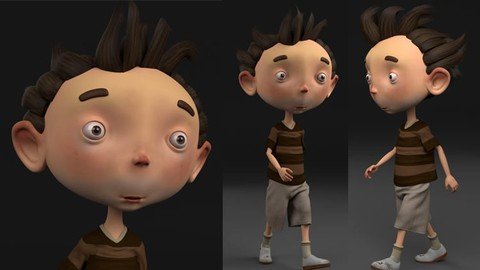
Be able to Model, Texture, Rig, Animate, Simulate Cloth and Hair and Render characters using Maya and Substance Painter.
What you'll learn
Cartoon Character Modeling in Maya
Texturing in Substance Painter
Basic Character Rigging
Walk Cycle Animation
Creating Cloth and Hair Using ncloth
Rendering Animation
Requirements
There is no requirements. This course is for complete beginners.
Description
Students Reviews : Zoltan Palinkas gave 5 Star and Says : This is the Best Tutorial what I have ever follow. Really good. This is a perfect Maya tutorial for beginners. Clear and accurate, easy to follow. The final result is amazing. Really good tutorial,Orlando Ordonez gave 5 Star and Says : Great course, especially if your a beginner and you want to know how do the complete character pipeline. The instructor does a great job of explaining everything in an easy to follow way. Would definitely recommend, and look forward to other course from this instructor.Check reviews section for more great reviews.Are you a beginner and want to learn complete character creation process in Maya for production ? I mean Everything from modeling, texturing, rigging, animation, cloth and hair simulation and rendering.*Instructor : My name is Nalini kanta jena, I am a 3d Instructor. I have been working since 2008. I have worked as game artist in Lakshya Digital and Dhruva Interactive, two Gaming studios based in India. I have also taught at Arena animation, ZICA and Reliance Education as a 3d instructor. I have also taught more than 30,000 students all around the world through my online courses.Course Goal : At the end of this course, you will be able to Model, Texture, Rig, Animate, Simulate Cloth and Hair and Render Cartoon characters using Maya and Substance Painter.Key Topics : In this course, you will be learning:Character Modeling in MayaUV Unwrapping in MayaTexturing in Substance PainterRiggingWalk Cycle AnimationCreating Cloth and Hair Using nclothRendering AnimationI will start the course with Maya basics in case you have never used Maya before. Then I will model the character in Maya. After that I will unwrap UVs in Maya and then I will Switch to Substance painter and texture the character there. Then I will export textures into Maya and setup Lights, material and texture there. Then I will rig the character and then I will animate the character and create a walk cycle. After that I will work on the cloth so I will use ncloth for both the cloth and the hair simulation. at the end we are gonna render the animation sequence using Arnold.This Course is for Whom : I have designed this course for beginner students who wants to create characters for film and short films but struggles to do it because they lack the experience and knowledge of all these topics needed to create a character.Enroll Now : So if you are interested then enroll now and be able to create your own characters for film and short films today.
Overview
Section 1: Introduction
Lecture 1 Introduction
Lecture 2 What are in the Project File folder
Section 2: Maya Basics
Lecture 3 User Interface Overview
Lecture 4 View pot Navigation
Lecture 5 Creating Objects
Lecture 6 Saving and Opening Files
Lecture 7 Selecting Objects and Components
Lecture 8 Using Move, Rotate and Scale Tool
Lecture 9 Using Layers
Lecture 10 Soft Selection and Symmetry
Lecture 11 Hide and Show Objects
Lecture 12 Intro to Outliner
Lecture 13 Using Pivot Point
Lecture 14 Group Objects
Lecture 15 Using Marking Menu
Lecture 16 Using Hotbox & Wrap Up
Section 3: Character Modeling in Maya
Lecture 17 Creating a Project Folder
Lecture 18 Reference Image Setup in Maya
Lecture 19 Block Out the Torso
Lecture 20 Block Out the Arm
Lecture 21 Block Out the Leg
Lecture 22 Block Out the Hand
Lecture 23 Define the Hand
Lecture 24 Block out the Face - Eye Topology
Lecture 25 Block out the Face - Mouth Topology
Lecture 26 Block out the Face - Head Topology
Lecture 27 Modeling the Ear
Lecture 28 Modeling the Nose
Lecture 29 Modeling Mouth Bag
Lecture 30 Adjusting the Head with even Polygons
Lecture 31 Connecting the Head with Body
Lecture 32 Modeling Gum
Lecture 33 Modeling Gum part 02
Lecture 34 Modeling Teeth
Lecture 35 Modeling Tongue
Lecture 36 Blocking the foot
Lecture 37 Defining the lip
Lecture 38 Defining the Nose
Lecture 39 Defining the Eye
Lecture 40 Defining the Head
Lecture 41 Defining the Body
Lecture 42 Correcting the Pose for Rigging
Lecture 43 Mirroring The Character
Lecture 44 Mirroring the Eye
Lecture 45 Modeling the T-Shirt
Lecture 46 Modeling the Pant
Lecture 47 Blocking the Shoe
Lecture 48 Creating Curves for Hair
Lecture 49 Creating Curves for Hair Part 02
Lecture 50 Creating Curves for Hair Part 03
Lecture 51 Generating Geometry from Curves
Lecture 52 Generating Geometry from Curves Part 02
Lecture 53 Adjusting Hair Clumps
Lecture 54 Converting Hair Into Polygons
Lecture 55 Making The Eyebrows
Lecture 56 Creating The Hair Filler
Lecture 57 Final Check
Section 4: UV Unwrapping in Maya
Lecture 58 UV Unwrapping Basics
Lecture 59 Unwrapping Shirt UVs
Lecture 60 Unwrapping Pant UVs
Lecture 61 Unwrapping the Head UVs
Lecture 62 Unwrapping the Torso UVs
Lecture 63 Unwrapping the Hand UVs
Lecture 64 Unwrapping the Leg Uvs
Lecture 65 Unwrapping the Eye Uvs
Lecture 66 Unwrapping the Hair UVs
Lecture 67 Unwrapping Mouth UVs
Lecture 68 Packing UVs for the Cloth Texture
Lecture 69 Packing UVs for the Body Texture
Lecture 70 Packing UVs for the Mouth Texture
Lecture 71 Packing UVs for the Eye Texture
Lecture 72 Packing UVs for the Hair Texture
Lecture 73 Clean up and Exporting the Model
Section 5: Character Texturing in Substance Painter
Lecture 74 Creating a Project
Lecture 75 Interface Overview
Lecture 76 Navigating View port
Lecture 77 Adding Base Skin color
Lecture 78 Adding Base Color
Lecture 79 Adding Skin Tone
Lecture 80 Adding Skin Flaws
Lecture 81 Eye Texturing
Lecture 82 T shirt Texturing
Lecture 83 Pant Texturing
Lecture 84 Socks Texturing
Lecture 85 Shoe Texturing
Lecture 86 Adding Dirt to the Shoes
Lecture 87 Mouth Texturing
Lecture 88 Hair Texture Painting
Lecture 89 Hair Alpha Painting
Lecture 90 Final Touch on Texturing
Lecture 91 Rendering in Substance Painter
Lecture 92 Exporting Textures from Substance Painter
Lecture 93 Import and Assign Textures in Maya
Lecture 94 Rendering Setup using Arnold
Section 6: Character Rigging in Maya
Lecture 95 Organizing the Scene for Rigging
Lecture 96 Creating Leg Joints
Lecture 97 Mirroring Leg Joints
Lecture 98 Creating Spine Joints
Lecture 99 Creating the Head Joints
Lecture 100 Creating Arm Joints
Lecture 101 Binding Skin with the Joints
Lecture 102 Fixing Skin Deformation on Leg
Lecture 103 Fixing Skin Deformation on Hand
Lecture 104 Fixing Skin Deformation on Head
Lecture 105 Creating Global Control
Lecture 106 Creating Torso Controls
Lecture 107 Fixing Torso Skin Deformation
Lecture 108 Creating Head Controls
Lecture 109 Creating Eye Controls
Lecture 110 Creating Clavicle and Wrist Controls
Lecture 111 Elbow and Knee Control
Lecture 112 Creating Foot IK Groups
Lecture 113 Creating the Foot Control with Custom Attributes
Lecture 114 Creating Foot Roll and Toe Roll
Lecture 115 Creating Finger Costume Attributes
Lecture 116 Creating an Eye Close Blend shape
Lecture 117 Creating a Smile Blend shape
Lecture 118 Creating a Surprise Blend shape
Lecture 119 Connecting Control Curves with Blend shapes
Lecture 120 Final Tweak to all the Controllers
Section 7: Character Animation in Maya
Lecture 121 Animation Basics
Lecture 122 Correcting the Rig for Animation
Lecture 123 Creating the Contact Pose
Lecture 124 Creating the Middle Contact Pose
Lecture 125 Creating the Down Pose
Lecture 126 Creating the Passing Pose
Lecture 127 Creating the Peak Point Pose
Lecture 128 Fine Tuning the Animation Using Graph Editor
Lecture 129 Making the Animation Cycle
Section 8: Cloth and Hair Simulation
Lecture 130 Making a High poly Version of the Pant
Lecture 131 Making the Low Poly Pant a Ncloth
Lecture 132 Transferring the Ncloth Simulation to High Poly
Lecture 133 Making a High poly Version of the T Shirt
Lecture 134 Making the Low Poly Shirt a Ncloth
Lecture 135 Transferring Ncloth Simulation to the High Poly
Lecture 136 Simulating Hair with Ncloth Part 01
Lecture 137 Simulating Hair with Ncloth Part 02
Lecture 138 Transferring Hair Simulation to High Poly
Lecture 139 Creating a Clean Scene with Cache Data
Section 9: Rendering
Lecture 140 Setting up a Backdrop and Camera
Lecture 141 Adjusting Render Settings to Get good Quality
Lecture 142 Rendering Sequence Images
Section 10: Conclusion
Lecture 143 Conclusion
Lecture 144 Bonus Lecture - What's Next?
Beginner students who wants to create characters for film and short films but struggles to do it because they lack the experience and knowledge of all these topics needed to create a character.
Homepage
Recommend Download Link Hight Speed | Please Say Thanks Keep Topic Live
Links are Interchangeable - No Password - Single Extraction
