• Regeln für den Software-Bereich:


    Allgemeines:

    - In erster Linie sind unsere Boardregeln zu beachten, zu finden HIER.
    - Software zur Audiobearbeitung sollte ausschließlich im Unterforum "Audio" eingestellt werden.
    - Für Cracks, Keygens oder sonstige Freischaltungssoftware gibt es das Unterforum "Freischaltung".
    - Portable Software bitte im entsprechenden Unterforum "Portable Software" eintragen.
    - Diskussionen zur Installation und anderen Problemen mit der Software, bitte im enstprechenden Unterforum "Talk" führen.
    - Bei Unklarheiten und Fragen zu den Regeln bitte die Moderatoren kontaktieren.


    Angebot erstellen

    - Die Struktur des Threadtitels muss wie folgt umgesetzt werden: Herstellername - Softwarename - Versionsnummer
    - Unnötige Zusätze im Threadtitel wie "HOT", "NEW" oder Punkte zwischen den Wörtern sind nicht erlaubt.
    - Achtet darauf immer nur die Hauptversion und deren Updates in einem Thread zusammenfassen, konkretes Beispiel: SoftwareXY v3.12 gehört in den selben Thread mit SoftwareXY v3.13; SoftwareXY v.4.1 gehört in einen neuen eigenen Thread. Ausgenommen hiervon sind Sammelthreads und Dauerangebote.
    - Bei nicht bekannten Herstellern oder Angebote einer privaten Software, ist die Programmbezeichnung + Versionsnummer ausreichend.
    - Besondere Beachtung gilt für den ersten Beitrag eines Angebots. Dort muss eine kurze Beschreibung der Software in deutscher Sprache angegeben werden. Für offizielle Releases ist es Pflicht die NFO im Beitrag einzustellen(Spoiler, siehe nächster Punkt).
    - Weitere Informationen wie NFOs oder Changelogs, versteckt ihr bitte in einem Spoiler.


    Software Suche

    - Für Suchanfragen haben wir das Unterforum "Suche" erstellt.
    - Auch hier sollte vorher die Suchfunktion benutzt werden, um Doppelthreads vorzubeugen. Sollte es bereits eine Suchanfrage geben, könnt ihr den Thread gerne mit einem "Danke" pushen.


    Trojaner- und Virusalarm

    - Falls Euer Virenscanner bei einem Angebot Alarm schlägt, solltet ihr zunächst Ruhe bewahren. Viele Virenscanner erkennen Cracks/Keygens oft fälschlicherweise als Bedrohung.
    - Prüft die verdächtige Datei zuerst mit http://virustotal.com , sollte es sich hierbei wirklich um eine Bedrohung handeln, meldet den Beitrag und/oder wendet euch mit dem Bericht von VirusTotal.com an einen Moderator.


    Unerwünschte Angebote

    - Keylogger, Spionagetools, alles rund ums Thema Hacking/Cracking ist nicht erwünscht.
  • Bitte registriere dich zunächst um Beiträge zu verfassen und externe Links aufzurufen.


CoffeeCup HTML Editor v17

Murtadoc

MyBoerse.bz Pro Member
CoffeeCup HTML Editor 17.0 Build 836
Requirements: Windows : 10, 8, 7
Overview:
Do you want to create totally stellar websites? If yes, then consider the HTML Editor your new best friend. Feel empowered with handy tag references, intuitive tools like code completion, website components that update instantly across all pages, live previews, and dozens of other extraordinary tools and features.

S5WRsQU.jpg

- Unique: a smooth workflow for adding Structured Data
- Helpful: click preview, highlight corresponding code.
- Time-saver: edit components that update everywhere.
- Trusted: by tens of thousands of web designers, developers and HTML veterans.

Get started in seconds
Getting to work on your website is lightning quick thanks to a wide range of start options. Create new HTML or CSS files from scratch, or get a jumpstart on a pro design with an existing theme or ready to use layout. Already have a site in progress? Open its files from your computer, or open them straight from your web server. With the Open From Web option, you can take any website as a starting point, and it doesn’t have to be yours.

Stay organized
A logical structure keeps things running smoothly and eliminates pesky issues like broken links and images. With that in mind, we designed Website Projects, a comprehensive workflow that gives you complete control over how your website is organized.

The Components Library - a gigantic timesaver.
Every website has elements like a menu, footer, or header that are reused across pages. With the Components Library you can save these types of elements in one place and then embed them into any page you want. Now instead of updating each instance of the element manually, just edit the library item and it will automatically update everywhere.

Code with confidence
A comprehensive Tag Reference section puts the correct tags right at your fingertips. Code Completion automatically suggests tags as you type them and smartly suggests selectors from your referenced CSS files. A built-in Validation Tool allows you to check code of all types for perfectly valid pages.

Using these tools helps to produce valid code making your pages display consistently, and be more accessible to disabled users and search engines. Every single time.

Visual code selector + Live preview
Utilize the split-screen preview to see your webpage displayed right below your code. Or use the external preview to display your page in another window or a second monitor. Want to experiment with some code? The live preview shows you exactly what your design will look like as you work.

Made for authentic code enthusiasts
Perfectionists, masters of organization, and SEO aficionados, this app is built for you. Coding your own sites may be one of the most rewarding things you can do. With the HTML Editor you will be up for that task.

Ready for the semantic web
Adding structured, or semantic, data to label content should be a top priority for any site. Search engines are increasingly relying on this approach to better understand what the content is about, which in turn allows them to improve the overall search experience.

Pages that properly use structured data (especially the schema.org vocabulary) are therefore favored above others and are likely to obtain a better search rank. Get started with the HTML Editor and add meaningful data about your website with ease.

Publish anywhere
The built-in FTP uploader painlessly publishes the website to the place of your choice. Pick any web host (or use your own server), add the corresponding FTP settings and go live with a single click. Easily switch between addresses; For example, from a work-in-progress to a live production site.

Or go ftp-free by syncing with the CoffeeCup hosting platform. Get a custom domain name or use your own. Connecting is easy , simply use your CoffeeCup credentials (email and password). It's not required that you use it, but you will have our eternal love if you do.

Customizable Responsive Themes
With our HTML Editor, it is really easy to get a nice website working in a short amount of time. But it can be even faster if you use one of our templates.

More Info:
Download Instructions:
Platform: Windows
Size: 100.22 MB
Format:".rar/.zip" archive.. ".exe" after extracting
Language: English
Hoster: uploadship / uploaded



 

CoffeeCup HTML Editor v17.0 Build 852


dabdeaf6f83c6006415da0828dd1d7b4.jpg


CoffeeCup HTML Editor v17.0 Build 852 | 107 MB | Language: English


Do you want to create totally stellar websites? If yes, then consider the HTML Editor your new best friend. Feel empowered with handy tag references, intuitive tools like code completion, website components that update instantly across all pages, live previews, and dozens of other extraordinary tools and features.


Tag Highlighting
We implemented end tag highlighting because we got so tired of hunting for that ending div tag . This new feature works for the other tags too, so enjoy!

Template Downloader
We created bunches of free, 100% responsive templates. The new Template Installer imports these designs into the HTML Editor with just two clicks. Want to learn CSS Grid? Download a template and play with the code. This is how CoffeeCup makes web development fun!

New Start Screen
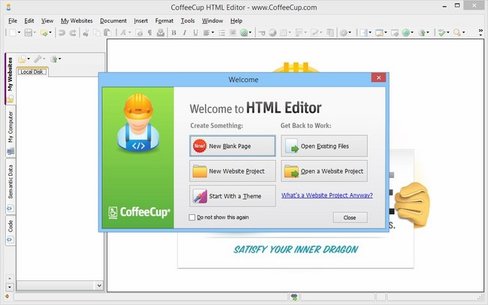
The new welcome screen will give your web development a fast take off. Need to make a quick static page? Then click New HTML Page. Do you want to begin with a snazzy responsive Template, start a complex web project, or simply fiddle with some PHP? The web fun all starts right from this new Start Screen.

Get started in seconds
Getting to work on your website is lightning quick thanks to a wide range of start options. Create new HTML or CSS files from scratch, or get a jumpstart on a pro design with an existing theme or ready to use layout. Already have a site in progress? Open its files from your computer, or open them straight from your web server. With the Open From Web option, you can take any website as a starting point, and it does not have to be yours.

Stay organized
A logical structure keeps things running smoothly and eliminates pesky issues like broken links and images. With that in mind, we designed Website Projects, a comprehensive workflow that gives you complete control over how your website is organized.

Code with confidence
A comprehensive Tag Reference section puts the correct tags right at your fingertips. Code Completion automatically suggests tags as you type them and smartly suggests selectors from your referenced CSS files. A built-in Validation Tool allows you to check code of all types for perfectly valid pages. Using these tools helps to produce valid code making your pages display consistently, and be more accessible to disabled users and search engines. Every single time.

Ready for the semantic web
Adding structured, or semantic, data to label content should be a top priority for any site. Search engines are increasingly relying on this approach to better understand what the content is about, which in turn allows them to improve the overall search experience. Pages that properly use structured data (especially the schema.org vocabulary) are therefore favored above others and are likely to obtain a better search rank. Get started with the HTML Editor and add meaningful data about your website with ease.

Publish anywhere
The built-in FTP uploader painlessly publishes the website to the place of your choice. Pick any web host (or use your own server), add the corresponding FTP settings and go live with a single click. Easily switch between addresses; For example, from a work-in-progress to a live production site.

Release Notes:
- Updated some links and wording within the trial version dialogs.
- Make the default project location setting more visible. This way you are able to save the path for the default location for projects when creating a new project without having to go to preferences to change it.
- Added phone number to link drop down.
- We added the option to remove recent files from welcome screen.
- Select all the tag content from the gutter arrow.
- Added the ability to press the delete key to remove a highlighted link when the combo box is dropped down.
- Added the ability to highlight search terms from the toolbar. This way you can see from a glance where the terms appear.
- Corrected an issue with Validation and Unicode Chars. It was acting as though the document is valid, when using the built-in tool of HTML Editor shows some UTF8 errors should not be there.

Requirements: Windows 10, Windows 8/8.1, and Windows 7

Homepage:


Größe: 107 MB
Sprache: English
Format: .rar / .exe
Plattform: Windows (32 Bit 64 Bit)


HOSTER:

K2s.cc (Keep2Share)

Rapidgator.net

Nitroflare.com

Uploadgig.com


DOWNLOAD


​
 

CoffeeCup HTML Editor v17.0 Build 854


4a952fc859a2c68eccbfc54003bc87cc.jpg


CoffeeCup HTML Editor v17.0 Build 854 | 130 MB | Language: English


Do you want to create totally stellar websites? If yes, then consider the HTML Editor your new best friend. Feel empowered with handy tag references, intuitive tools like code completion, website components that update instantly across all pages, live previews, and dozens of other extraordinary tools and features.


- Unique: a smooth workflow for adding Structured Data
- Helpful: click preview, highlight corresponding code.
- Time-saver: edit components that update everywhere.
- Trusted: by tens of thousands of web designers, developers and HTML veterans.

Get started in seconds
Getting to work on your website is lightning quick thanks to a wide range of start options. Create new HTML or CSS files from scratch, or get a jumpstart on a pro design with an existing theme or ready to use layout. Already have a site in progress? Open its files from your computer, or open them straight from your web server. With the Open From Web option, you can take any website as a starting point, and it does not have to be yours.

Stay organized
A logical structure keeps things running smoothly and eliminates pesky issues like broken links and images. With that in mind, we designed Website Projects, a comprehensive workflow that gives you complete control over how your website is organized.

The Components Library - a gigantic timesaver.
Every website has elements like a menu, footer, or header that are reused across pages. With the Components Library you can save these types of elements in one place and then embed them into any page you want. Now instead of updating each instance of the element manually, just edit the library item and it will automatically update everywhere.

Code with confidence
A comprehensive Tag Reference section puts the correct tags right at your fingertips. Code Completion automatically suggests tags as you type them and smartly suggests selectors from your referenced CSS files. A built-in Validation Tool allows you to check code of all types for perfectly valid pages.

Using these tools helps to produce valid code making your pages display consistently, and be more accessible to disabled users and search engines. Every single time.

Visual code selector + Live preview
Utilize the split-screen preview to see your webpage displayed right below your code. Or use the external preview to display your page in another window or a second monitor. Want to experiment with some code? The live preview shows you exactly what your design will look like as you work.

Made for authentic code enthusiasts
Perfectionists, masters of organization, and SEO aficionados, this app is built for you. Coding your own sites may be one of the most rewarding things you can do. With the HTML Editor you will be up for that task.

Ready for the semantic web
Adding structured, or semantic, data to label content should be a top priority for any site. Search engines are increasingly relying on this approach to better understand what the content is about, which in turn allows them to improve the overall search experience.

Pages that properly use ?structured data (especially the ?schema.org vocabulary) are therefore favored above others and are likely to obtain a better search rank. Get started with the HTML Editor and add meaningful data about your website with ease.

Publish anywhere
The built-in FTP uploader painlessly publishes the website to the place of your choice. Pick any web host (or use your own server), add the corresponding FTP settings and go live with a single click. Easily switch between addresses; For example, from a work-in-progress to a live production site.

Or go ftp-free by syncing with the CoffeeCup hosting platform. Get a custom domain name or use your own. Connecting is easy , simply use your CoffeeCup credentials (email and password). It's not required that you use it, but you will have our eternal love if you do.

Customizable Responsive Themes
With our HTML Editor, it is really easy to get a nice website working in a short amount of time. But it can be even faster if you use one of our templates.

Release Notes:
Homepage:


Größe: 130 MB
Sprache: English
Format: .rar / .exe
Plattform: Windows (32 Bit 64 Bit)


HOSTER:

K2s.cc (Keep2Share)

Rapidgator.net

Nitroflare.com

Uploadgig.com


DOWNLOAD


​
 
CoffeeCup HTML Editor 17.0 Build 854
Requirements: Windows : 10, 8, 7
Overview:
Do you want to create totally stellar websites? If yes, then consider the HTML Editor your new best friend. Feel empowered with handy tag references, intuitive tools like code completion, website components that update instantly across all pages, live previews, and dozens of other extraordinary tools and features.
NthJLyF.png

- Unique: a smooth workflow for adding Structured Data
- Helpful: click preview, highlight corresponding code.
- Time-saver: edit components that update everywhere.
- Trusted: by tens of thousands of web designers, developers and HTML veterans.

Get started in seconds
Getting to work on your website is lightning quick thanks to a wide range of start options. Create new HTML or CSS files from scratch, or get a jumpstart on a pro design with an existing theme or ready to use layout. Already have a site in progress? Open its files from your computer, or open them straight from your web server. With the Open From Web option, you can take any website as a starting point, and it doesn’t have to be yours.

Stay organized
A logical structure keeps things running smoothly and eliminates pesky issues like broken links and images. With that in mind, we designed Website Projects, a comprehensive workflow that gives you complete control over how your website is organized.

The Components Library - a gigantic timesaver.
Every website has elements like a menu, footer, or header that are reused across pages. With the Components Library you can save these types of elements in one place and then embed them into any page you want. Now instead of updating each instance of the element manually, just edit the library item and it will automatically update everywhere.

Code with confidence
A comprehensive Tag Reference section puts the correct tags right at your fingertips. Code Completion automatically suggests tags as you type them and smartly suggests selectors from your referenced CSS files. A built-in Validation Tool allows you to check code of all types for perfectly valid pages.

Using these tools helps to produce valid code making your pages display consistently, and be more accessible to disabled users and search engines. Every single time.

Visual code selector + Live preview
Utilize the split-screen preview to see your webpage displayed right below your code. Or use the external preview to display your page in another window or a second monitor. Want to experiment with some code? The live preview shows you exactly what your design will look like as you work.

Made for authentic code enthusiasts
Perfectionists, masters of organization, and SEO aficionados, this app is built for you. Coding your own sites may be one of the most rewarding things you can do. With the HTML Editor you will be up for that task.

Ready for the semantic web
Adding structured, or semantic, data to label content should be a top priority for any site. Search engines are increasingly relying on this approach to better understand what the content is about, which in turn allows them to improve the overall search experience.

Pages that properly use structured data (especially the schema.org vocabulary) are therefore favored above others and are likely to obtain a better search rank. Get started with the HTML Editor and add meaningful data about your website with ease.

Publish anywhere
The built-in FTP uploader painlessly publishes the website to the place of your choice. Pick any web host (or use your own server), add the corresponding FTP settings and go live with a single click. Easily switch between addresses; For example, from a work-in-progress to a live production site.

Or go ftp-free by syncing with the CoffeeCup hosting platform. Get a custom domain name or use your own. Connecting is easy , simply use your CoffeeCup credentials (email and password). It's not required that you use it, but you will have our eternal love if you do.

Customizable Responsive Themes
With our HTML Editor, it is really easy to get a nice website working in a short amount of time. But it can be even faster if you use one of our templates.
More Info:
Download Instructions:
Platform: Windows
Size: 130 MB
Format:".rar/.zip" archive.. ".exe" after extracting
Language: English
Hoster: uploaded / bayfiles


CoffeeCup HTML Editor v17.0 Build 859


a1c95305b307a586aa23ed7b56a88fe8.png


CoffeeCup HTML Editor v17.0 Build 859 | 107 MB | Language: English


Do you want to create totally stellar websites? If yes, then consider the HTML Editor your new best friend. Feel empowered with handy tag references, intuitive tools like code completion, website components that update instantly across all pages, live previews, and dozens of other extraordinary tools and features.


Tag Highlighting
We implemented end tag highlighting because we got so tired of hunting for that ending div tag
. This new feature works for the other tags too, so enjoy!

Template Downloader
We created bunches of free, 100% responsive templates. The new Template Installer imports these designs into the HTML Editor with just two clicks. Want to learn CSS Grid? Download a template and play with the code. This is how CoffeeCup makes web development fun!

New Start Screen
The new welcome screen will give your web development a fast take off. Need to make a quick static page? Then click New HTML Page. Do you want to begin with a snazzy responsive Template, start a complex web project, or simply fiddle with some PHP? The web fun all starts right from this new Start Screen.

Get started in seconds
Getting to work on your website is lightning quick thanks to a wide range of start options. Create new HTML or CSS files from scratch, or get a jumpstart on a pro design with an existing theme or ready to use layout. Already have a site in progress? Open its files from your computer, or open them straight from your web server. With the Open From Web option, you can take any website as a starting point, and it doesn't have to be yours.

Stay organized
A logical structure keeps things running smoothly and eliminates pesky issues like broken links and images. With that in mind, we designed Website Projects, a comprehensive workflow that gives you complete control over how your website is organized.

Code with confidence
A comprehensive Tag Reference section puts the correct tags right at your fingertips. Code Completion automatically suggests tags as you type them and smartly suggests selectors from your referenced CSS files. A built-in Validation Tool allows you to check code of all types for perfectly valid pages. Using these tools helps to produce valid code making your pages display consistently, and be more accessible to disabled users and search engines. Every single time.

Ready for the semantic web
Adding structured, or semantic, data to label content should be a top priority for any site. Search engines are increasingly relying on this approach to better understand what the content is about, which in turn allows them to improve the overall search experience. Pages that properly use structured data (especially the schema.org vocabulary) are therefore favored above others and are likely to obtain a better search rank. Get started with the HTML Editor and add meaningful data about your website with ease.

Publish anywhere
The built-in FTP uploader painlessly publishes the website to the place of your choice. Pick any web host (or use your own server), add the corresponding FTP settings and go live with a single click. Easily switch between addresses; For example, from a work-in-progress to a live production site.

Release Notes:
- Refreshed style dialogs with new styles.
- Fixed library menu items that didn't change to library tab.
- Allow for logging in automatically to S-Drive after verifying the app.
- Updated with new default templates inside HTML Editor.
- Updated open/close tags when moving with keyboard.
- Added tweaks for Installer Controlled Folder Access setting for smoother installation.

Requirements: Windows 10, Windows 8/8.1, and Windows 7

Homepage:


Größe: 107 MB
Sprache: English
Format: .rar / .exe
Medizin: Crack / Patch
Plattform: Windows (32 Bit 64 Bit)


HOSTER:

K2s.cc (Keep2Share)

Rapidgator.net

Nitroflare.com

Uploadgig.com


DOWNLOAD


​
 
CoffeeCup HTML Editor v17.0 Build 859

Englisch // Crack

hgfgh4ukda.jpeg


Beschreibung:

Möchten Sie absolut herausragende Websites erstellen? Wenn ja, dann betrachten Sie den HTML-Editor als Ihren neuen besten Freund. Fühlen Sie sich mit praktischen Tag-Referenzen, intuitiven Tools wie Code-Vervollständigung, Website-Komponenten, die sofort auf allen Seiten aktualisiert werden, Live-Vorschauen und Dutzenden anderer außergewöhnlicher Tools und Funktionen ausgestattet.
Tag-Hervorhebung
Wir haben das Hervorheben von End-Tags implementiert, weil wir es so satt hatten, nach dem Ende Div-Tag </div> zu suchen. Diese neue Funktion funktioniert auch für die anderen Tags. Viel Spaß!

Template Downloader
Wir haben eine Reihe kostenloser, zu 100% reaktionsfähiger Vorlagen erstellt. Das neue Template Installer importiert diese Designs mit nur zwei Klicks in den HTML-Editor. Möchten Sie CSS Grid lernen? Laden Sie eine Vorlage herunter und spielen Sie mit dem Code. So macht CoffeeCup Webentwicklung Spaß!

Neuer Startbildschirm
Der neue Begrüßungsbildschirm ermöglicht Ihrer Webentwicklung einen schnellen Start. Müssen Sie eine schnelle statische Seite erstellen? Klicken Sie dann auf Neue HTML-Seite. Möchten Sie mit einer pfiffigen, reaktionsschnellen Vorlage beginnen, ein komplexes Webprojekt starten oder einfach mit PHP herumspielen? Der Web-Spaß beginnt direkt ab diesem neuen Startbildschirm.

Beginnen Sie in Sekunden
Dank einer Vielzahl von Startoptionen können Sie blitzschnell mit der Arbeit an Ihrer Website beginnen. Erstellen Sie neue HTML- oder CSS-Dateien von Grund auf neu oder starten Sie ein Pro-Design mit einem vorhandenen Thema oder einem gebrauchsfertigen Layout. Haben Sie bereits eine Website in Bearbeitung? Öffnen Sie die Dateien von Ihrem Computer oder direkt von Ihrem Webserver. Mit der Option "Aus Web öffnen" können Sie jede Website als Ausgangspunkt nehmen, und sie muss nicht Ihre sein.

Bleib organisiert
Eine logische Struktur sorgt für einen reibungslosen Ablauf und beseitigt lästige Probleme wie fehlerhafte Links und Bilder. Vor diesem Hintergrund haben wir Website-Projekte entwickelt, einen umfassenden Workflow, mit dem Sie die vollständige Organisation Ihrer Website steuern können.

Code mit Vertrauen
In einem umfassenden Abschnitt mit Tag-Referenzen haben Sie die richtigen Tags immer zur Hand. Die Code-Vervollständigung schlägt automatisch Tags vor, während Sie sie eingeben, und schlägt auf intelligente Weise Selektoren aus Ihren referenzierten CSS-Dateien vor. Mit einem integrierten Validierungstool können Sie Code aller Art auf perfekt gültige Seiten überprüfen. Mithilfe dieser Tools können Sie gültigen Code erstellen, damit Ihre Seiten konsistent angezeigt werden und behinderten Benutzern und Suchmaschinen besser zugänglich sind. Jedes Mal.

Bereit für das Semantic Web
Das Hinzufügen strukturierter oder semantischer Daten zum Etiketteninhalt sollte für jede Website oberste Priorität haben. Suchmaschinen verlassen sich zunehmend auf diesen Ansatz, um besser zu verstehen, worum es bei den Inhalten geht, was es ihnen wiederum ermöglicht, das gesamte Sucherlebnis zu verbessern. Seiten, die strukturierte Daten richtig verwenden (insbesondere das Vokabular von schema.org), werden daher gegenüber anderen bevorzugt und erhalten wahrscheinlich einen besseren Suchrang. Beginnen Sie mit dem HTML-Editor und fügen Sie mühelos aussagekräftige Daten zu Ihrer Website hinzu.

Überall veröffentlichen
Der integrierte FTP-Uploader veröffentlicht die Website schmerzlos an einem Ort Ihrer Wahl. Wählen Sie einen beliebigen Webhost aus (oder verwenden Sie Ihren eigenen Server), fügen Sie die entsprechenden FTP-Einstellungen hinzu und gehen Sie mit einem einzigen Klick online. Einfach zwischen Adressen wechseln; Zum Beispiel von einem Work-in-Progress zu einem Live-Produktionsstandort.

_________________________________________________

Größe: 133 MB
Sprache: Englisch
Format: RAR/EXE
Plattform: Windows 7/8/8.1/10(32 oder 64-Bit)
Hoster: RapidGator|Alfafile|Ddownload
________________________________________

37504BFC70.png


​
 

CoffeeCup HTML Editor v17.0 Build 865


bc300784c6a8a10f183c9286cf7296d2.png


CoffeeCup HTML Editor v17.0 Build 865 | 133 MB | Language: English


Do you want to create totally stellar websites? If yes, then consider the HTML Editor your new best friend. Feel empowered with handy tag references, intuitive tools like code completion, website components that update instantly across all pages, live previews, and dozens of other extraordinary tools and features.

- Unique: a smooth workflow for adding Structured Data
- Helpful: click preview, highlight corresponding code.
- Time-saver: edit components that update everywhere.
- Trusted: by tens of thousands of web designers, developers and HTML veterans.

Get started in seconds
Getting to work on your website is lightning quick thanks to a wide range of start options. Create new HTML or CSS files from scratch, or get a jumpstart on a pro design with an existing theme or ready to use layout. Already have a site in progress? Open its files from your computer, or open them straight from your web server. With the Open From Web option, you can take any website as a starting point, and it doesn't have to be yours.

Stay organized
A logical structure keeps things running smoothly and eliminates pesky issues like broken links and images. With that in mind, we designed Website Projects, a comprehensive workflow that gives you complete control over how your website is organized.

The Components Library - a gigantic timesaver.
Every website has elements like a menu, footer, or header that are reused across pages. With the Components Library you can save these types of elements in one place and then embed them into any page you want. Now instead of updating each instance of the element manually, just edit the library item and it will automatically update everywhere.

Code with confidence
A comprehensive Tag Reference section puts the correct tags right at your fingertips. Code Completion automatically suggests tags as you type them and smartly suggests selectors from your referenced CSS files. A built-in Validation Tool allows you to check code of all types for perfectly valid pages.

Using these tools helps to produce valid code making your pages display consistently, and be more accessible to disabled users and search engines. Every single time.

Visual code selector + Live preview
Utilize the split-screen preview to see your webpage displayed right below your code. Or use the external preview to display your page in another window or a second monitor. Want to experiment with some code? The live preview shows you exactly what your design will look like as you work.

Made for authentic code enthusiasts
Perfectionists, masters of organization, and SEO aficionados, this app is built for you. Coding your own sites may be one of the most rewarding things you can do. With the HTML Editor you will be up for that task.

Ready for the semantic web
Adding structured, or semantic, data to label content should be a top priority for any site. Search engines are increasingly relying on this approach to better understand what the content is about, which in turn allows them to improve the overall search experience.

Pages that properly use ​structured data (especially the ​schema.org vocabulary) are therefore favored above others and are likely to obtain a better search rank. Get started with the HTML Editor and add meaningful data about your website with ease.

Publish anywhere
The built-in FTP uploader painlessly publishes the website to the place of your choice. Pick any web host (or use your own server), add the corresponding FTP settings and go live with a single click. Easily switch between addresses; For example, from a work-in-progress to a live production site.

Or go ftp-free by syncing with the CoffeeCup hosting platform. Get a custom domain name or use your own. Connecting is easy , simply use your CoffeeCup credentials (email and password). It's not required that you use it, but you will have our eternal love if you do.

Customizable Responsive Themes
With our HTML Editor, it is really easy to get a nice website working in a short amount of time. But it can be even faster if you use one of our templates.


Größe: 133 MB
Sprache: English
Format: .rar / .exe
Medizin: Crack / Patch
Plattform: Windows 10 , Windows 8/8.1 , Windows 7
Bit depth: 32bit 64bit


HOSTER:

K2s.cc (Keep2share)

Rapidgator.net

Nitroflare.com

Uploadgig.com


DOWNLOAD


​


CoffeeCup HTML Editor 17.0 Build 865


414dbc4bfaff555ba558a2f6a1d5f592.jpg


CoffeeCup HTML Editor 17.0 Build 865


Möchten Sie absolut herausragende Websites erstellen? Wenn ja, dann betrachten Sie den HTML-Editor als Ihren neuen besten Freund. Fühlen Sie sich mit praktischen Tag-Referenzen, intuitiven Tools wie Codevervollständigung, Website-Komponenten, die sofort auf allen Seiten aktualisiert werden, Live-Vorschauen und Dutzenden anderer außergewöhnlicher Tools und Funktionen gestärkt.


Sprache: English | Größe: 133 MB | Format: RAR, EXE | Plattform: Windows 7, 8, 8.1, 10 (32 oder 64Bit)


Hoster:
UploadGig.com | RapidGator.net | DDownload.com


DOWNLOAD Links:


​
 
CoffeeCup HTML Editor v17.0 Build 865

Englisch // Crack

hgewlwjsd.png


Beschreibung:

Möchten Sie absolut herausragende Websites erstellen? Wenn ja, dann betrachten Sie den HTML-Editor als Ihren neuen besten Freund. Fühlen Sie sich mit praktischen Tag-Referenzen, intuitiven Tools wie Code-Vervollständigung, Website-Komponenten, die sofort auf allen Seiten aktualisiert werden, Live-Vorschauen und Dutzenden anderer außergewöhnlicher Tools und Funktionen ausgestattet.
Tag-Hervorhebung
Wir haben das Hervorheben von End-Tags implementiert, weil wir es so satt hatten, nach dem Ende Div-Tag </div> zu suchen. Diese neue Funktion funktioniert auch für die anderen Tags. Viel Spaß!

Template Downloader
Wir haben eine Reihe kostenloser, zu 100% reaktionsfähiger Vorlagen erstellt. Das neue Template Installer importiert diese Designs mit nur zwei Klicks in den HTML-Editor. Möchten Sie CSS Grid lernen? Laden Sie eine Vorlage herunter und spielen Sie mit dem Code. So macht CoffeeCup Webentwicklung Spaß!

Neuer Startbildschirm
Der neue Begrüßungsbildschirm ermöglicht Ihrer Webentwicklung einen schnellen Start. Müssen Sie eine schnelle statische Seite erstellen? Klicken Sie dann auf Neue HTML-Seite. Möchten Sie mit einer pfiffigen, reaktionsschnellen Vorlage beginnen, ein komplexes Webprojekt starten oder einfach mit PHP herumspielen? Der Web-Spaß beginnt direkt ab diesem neuen Startbildschirm.

Beginnen Sie in Sekunden
Dank einer Vielzahl von Startoptionen können Sie blitzschnell mit der Arbeit an Ihrer Website beginnen. Erstellen Sie neue HTML- oder CSS-Dateien von Grund auf neu oder starten Sie ein Pro-Design mit einem vorhandenen Thema oder einem gebrauchsfertigen Layout. Haben Sie bereits eine Website in Bearbeitung? Öffnen Sie die Dateien von Ihrem Computer oder direkt von Ihrem Webserver. Mit der Option "Aus Web öffnen" können Sie jede Website als Ausgangspunkt nehmen, und sie muss nicht Ihre sein.

Bleib organisiert
Eine logische Struktur sorgt für einen reibungslosen Ablauf und beseitigt lästige Probleme wie fehlerhafte Links und Bilder. Vor diesem Hintergrund haben wir Website-Projekte entwickelt, einen umfassenden Workflow, mit dem Sie die vollständige Organisation Ihrer Website steuern können.

Code mit Vertrauen
In einem umfassenden Abschnitt mit Tag-Referenzen haben Sie die richtigen Tags immer zur Hand. Die Code-Vervollständigung schlägt automatisch Tags vor, während Sie sie eingeben, und schlägt auf intelligente Weise Selektoren aus Ihren referenzierten CSS-Dateien vor. Mit einem integrierten Validierungstool können Sie Code aller Art auf perfekt gültige Seiten überprüfen. Mithilfe dieser Tools können Sie gültigen Code erstellen, damit Ihre Seiten konsistent angezeigt werden und behinderten Benutzern und Suchmaschinen besser zugänglich sind. Jedes Mal.

Bereit für das Semantic Web
Das Hinzufügen strukturierter oder semantischer Daten zum Etiketteninhalt sollte für jede Website oberste Priorität haben. Suchmaschinen verlassen sich zunehmend auf diesen Ansatz, um besser zu verstehen, worum es bei den Inhalten geht, was es ihnen wiederum ermöglicht, das gesamte Sucherlebnis zu verbessern. Seiten, die strukturierte Daten richtig verwenden (insbesondere das Vokabular von schema.org), werden daher gegenüber anderen bevorzugt und erhalten wahrscheinlich einen besseren Suchrang. Beginnen Sie mit dem HTML-Editor und fügen Sie mühelos aussagekräftige Daten zu Ihrer Website hinzu.

Überall veröffentlichen
Der integrierte FTP-Uploader veröffentlicht die Website schmerzlos an einem Ort Ihrer Wahl. Wählen Sie einen beliebigen Webhost aus (oder verwenden Sie Ihren eigenen Server), fügen Sie die entsprechenden FTP-Einstellungen hinzu und gehen Sie mit einem einzigen Klick online. Einfach zwischen Adressen wechseln; Zum Beispiel von einem Work-in-Progress zu einem Live-Produktionsstandort.

_________________________________________________

Größe: 110 MB
Sprache: Englisch
Format: RAR/EXE
Plattform: Windows 7/8/8.1/10(32 oder 64-Bit)
Hoster: RapidGator|Ddownload
________________________________________

99AE9B79B5.png


​
 
Zurück
Oben Unten