• Regeln für den Software-Bereich:


    Allgemeines:

    - In erster Linie sind unsere Boardregeln zu beachten, zu finden HIER.
    - Software zur Audiobearbeitung sollte ausschließlich im Unterforum "Audio" eingestellt werden.
    - Für Cracks, Keygens oder sonstige Freischaltungssoftware gibt es das Unterforum "Freischaltung".
    - Portable Software bitte im entsprechenden Unterforum "Portable Software" eintragen.
    - Diskussionen zur Installation und anderen Problemen mit der Software, bitte im enstprechenden Unterforum "Talk" führen.
    - Bei Unklarheiten und Fragen zu den Regeln bitte die Moderatoren kontaktieren.


    Angebot erstellen

    - Die Struktur des Threadtitels muss wie folgt umgesetzt werden: Herstellername - Softwarename - Versionsnummer
    - Unnötige Zusätze im Threadtitel wie "HOT", "NEW" oder Punkte zwischen den Wörtern sind nicht erlaubt.
    - Achtet darauf immer nur die Hauptversion und deren Updates in einem Thread zusammenfassen, konkretes Beispiel: SoftwareXY v3.12 gehört in den selben Thread mit SoftwareXY v3.13; SoftwareXY v.4.1 gehört in einen neuen eigenen Thread. Ausgenommen hiervon sind Sammelthreads und Dauerangebote.
    - Bei nicht bekannten Herstellern oder Angebote einer privaten Software, ist die Programmbezeichnung + Versionsnummer ausreichend.
    - Besondere Beachtung gilt für den ersten Beitrag eines Angebots. Dort muss eine kurze Beschreibung der Software in deutscher Sprache angegeben werden. Für offizielle Releases ist es Pflicht die NFO im Beitrag einzustellen(Spoiler, siehe nächster Punkt).
    - Weitere Informationen wie NFOs oder Changelogs, versteckt ihr bitte in einem Spoiler.


    Software Suche

    - Für Suchanfragen haben wir das Unterforum "Suche" erstellt.
    - Auch hier sollte vorher die Suchfunktion benutzt werden, um Doppelthreads vorzubeugen. Sollte es bereits eine Suchanfrage geben, könnt ihr den Thread gerne mit einem "Danke" pushen.


    Trojaner- und Virusalarm

    - Falls Euer Virenscanner bei einem Angebot Alarm schlägt, solltet ihr zunächst Ruhe bewahren. Viele Virenscanner erkennen Cracks/Keygens oft fälschlicherweise als Bedrohung.
    - Prüft die verdächtige Datei zuerst mit http://virustotal.com , sollte es sich hierbei wirklich um eine Bedrohung handeln, meldet den Beitrag und/oder wendet euch mit dem Bericht von VirusTotal.com an einen Moderator.


    Unerwünschte Angebote

    - Keylogger, Spionagetools, alles rund ums Thema Hacking/Cracking ist nicht erwünscht.
  • Bitte registriere dich zunächst um Beiträge zu verfassen und externe Links aufzurufen.


Code Industry Master PDF Editor v5

Master PDF Editor 5.7.20 Multilingual

c87e898be3ffbf369d4ccf8a7dc57f87.png


Größe: 43.11 MB
Sprache: Multi-Deutsch
Format: RAR/EXE
Plattform: Windows


Hoster: RapidGator, UploadGig, NitroFlare


Master PDF Editor 5.7.20 Multilingual
Requirements: Windows XP and later
Overview:
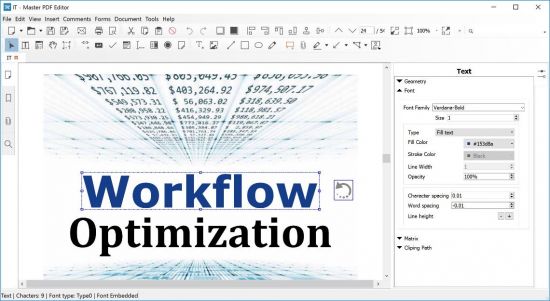
Our robust and rich set of features includes the full support of PDF and XPS files, import/export PDF pages into JPG, TIFF, PNG, or BMP formats, converting XPS into PDF and vice versa, and 128 bit encryption. You can also add various controls such as buttons, text fields, checkboxes and more, as well as implement event handlers for predefined user actions such as pressing, clicking, hovering, and scrolling. Powerful commenting tools like Sticky Note and Stamp, as well as enhanced editing capabilities packed in the StrikeOut, Underline, and Highlight functions will make your work easier than ever.
VcSADv1.png

Master PDF Editor – Features
• Edit PDF text, images and pages with full editing features
• Create new PDF or edit existing ones.
• Add and/or edit bookmarks in PDF files.
• Encrypt and/or protect PDF files using 128 bit encryption.
• Convert XPS files into PDF.
• Add PDF controls (like buttons, checkboxes, lists, etc.) into your PDFs.
• Import/export PDF pages into common graphical formats including BMP, JPG, PNG, and TIFF.
• Split and merge PDF files.
• JavaScript support.
• Dynamic XFA form support.
• Validation Forms and Calculate Values.
• Adding a digital signature and Signing PDF Documents.
• Fast and simple PDF forms fill out.
• Changing font attributes (size, family, color etc).
More Info:
Download Instructions:
Platform: Windows
Size: 44.41 MB
Format:".rar/.zip" archive.. ".exe" after extracting
Language: Multilingual
VirusTotal Result:
Hoster: uploadship / uploaded


Master PDF Editor v5.7.30 Multilingual


ba17ee58f14a3a7a571bccb0a2c1848a.jpg


Master PDF Editor v5.7.30 Multilingual | 43 MB | Language: Multilanguage


Master PDF Editor is straightforward, easy to use application for working with PDF documents equipped with powerful multi-purpose functionality. With Master PDF Editor you can easily view, create and modify PDF documents. The application enables you to merge several files into one, split a source document into multiple documents, and also to comment, sign and encrypt PDF files.


View, create, modify, sign, scan, OCR and print PDF documents
Modify text and objects
With Master PDF Editor you can add text with any formatting to a PDF document or edit existing text. You can also insert images to the document, select and move objects, change the size of objects, save images to a file and copy objects them to the clipboard.

Annotate PDF documents
Powerful annotation tools such as Sticky Note, Measuring tools and Shapes, as well as the enhanced editing capabilities provided by the Strikethrough, Underline, and Highlight functions will make your work easier than ever. Create unique Stamps and use them when reviewing the document or making a note of its status.

Create and fill in PDF forms
With Master PDF Editor it is very simple to edit the various elements of interactive PDF forms such as buttons, text fields, checkboxes and more, as well as implement event handlers for predefined user actions. Automatic calculation and data validation with javascript is supported.

Optical character recognition
Optical character recognition allows the ability to search for text fast and efficiently, as well as to edit scanned documents and documents containing images.

Operations on pages
Master PDF Editor supports both the merging and spiting of PDF files. It enables you to easily move, remove, insert and rotate pages in PDF documents as well as change their size.

Bookmarks
Create, edit and remove bookmarks. Add bookmarks for specified pages or paragraphs to allow fast document navigation and efficiently look up information.

Virtual PDF printer
Master PDF Editor is installed as a virtual PDF printer, allowing you to easily print any documents from different applications supporting printing (e.d. Microsoft Word / Excel, OpenOffice).

Digital signatures
Check digital signatures, create new ones and sign documents with digital certificate. For PDF documents, a digital signature is the equivalent of the handwritten signature on paper documents, so the recipient of the signed document may be confident about its authenticity.
*In order to use this function it is required to have a digital signing certificate.

Create PDF documents
PDFs can be created straight from paper documents using a scanner. Master PDF Editor allows you to create documents from existing files, create empty documents or insert empty pages into an existing document .

Whats New:
Homepage:


Größe: 43 MB
Sprache: Multilingual-Deutsch
Format: .rar / .exe
Medizin: Crack / Patch
Plattform: Windows (32 Bit 64 Bit)


HOSTER:

K2s.cc (Keep2Share)

Rapidgator.net

Nitroflare.com

Uploadgig.com


DOWNLOAD



Master PDF Editor v5.7.40 Multilingual


22bf6a144cc4a70dd12bb075c89bbc48.jpg


Master PDF Editor v5.7.40 Multilingual | 43 MB | Language: Multilanguage


Master PDF Editor is straightforward, easy to use application for working with PDF documents equipped with powerful multi-purpose functionality. With Master PDF Editor you can easily view, create and modify PDF documents. The application enables you to merge several files into one, split a source document into multiple documents, and also to comment, sign and encrypt PDF files.


View, create, modify, sign, scan, OCR and print PDF documents
Modify text and objects
With Master PDF Editor you can add text with any formatting to a PDF document or edit existing text. You can also insert images to the document, select and move objects, change the size of objects, save images to a file and copy objects them to the clipboard.

Annotate PDF documents
Powerful annotation tools such as Sticky Note, Measuring tools and Shapes, as well as the enhanced editing capabilities provided by the Strikethrough, Underline, and Highlight functions will make your work easier than ever. Create unique Stamps and use them when reviewing the document or making a note of its status.

Create and fill in PDF forms
With Master PDF Editor it is very simple to edit the various elements of interactive PDF forms such as buttons, text fields, checkboxes and more, as well as implement event handlers for predefined user actions. Automatic calculation and data validation with javas***** is supported.

Optical character recognition
Optical character recognition allows the ability to search for text fast and efficiently, as well as to edit scanned documents and documents containing images.

Operations on pages
Master PDF Editor supports both the merging and spiting of PDF files. It enables you to easily move, remove, insert and rotate pages in PDF documents as well as change their size.

Bookmarks
Create, edit and remove bookmarks. Add bookmarks for specified pages or paragraphs to allow fast document navigation and efficiently look up information.

Virtual PDF printer
Master PDF Editor is installed as a virtual PDF printer, allowing you to easily print any documents from different applications supporting printing (e.d. Microsoft Word / Excel, OpenOffice).

Digital signatures
Check digital signatures, create new ones and sign documents with digital certificate. For PDF documents, a digital signature is the equivalent of the handwritten signature on paper documents, so the recipient of the signed document may be confident about its authenticity.
*In order to use this function it is required to have a digital signing certificate.

Create PDF documents
PDFs can be created straight from paper documents using a scanner. Master PDF Editor allows you to create documents from existing files, create empty documents or insert empty pages into an existing document .

Whats New:
Homepage:


Größe: 43 MB
Sprache: Multilingual-Deutsch
Format: .rar / .exe
Medizin: Crack / Patch
Plattform: Windows (32 Bit 64 Bit)


HOSTER:

K2s.cc (Keep2Share)

Rapidgator.net

Nitroflare.com

Uploadgig.com


DOWNLOAD



Master PDF Editor v5.7.90 Multilingual


39a1724292e4fd6eb3e971ja9.jpeg


Master PDF Editor v5.7.90 Multilingual | 44 MB | Language: Multilanguage


Master PDF Editor is straightforward, easy to use application for working with PDF documents equipped with powerful multi-purpose functionality. With Master PDF Editor you can easily view, create and modify PDF documents. The application enables you to merge several files into one, split a source document into multiple documents, and also to comment, sign and encrypt PDF files.


Modify text and objects
With Master PDF Editor you can add text with any formatting to a PDF document or edit existing text. You can also insert images to the document, select and move objects, change the size of objects, save images to a file and copy objects them to the clipboard.

Annotate PDF documents
Powerful annotation tools such as Sticky Note, Measuring tools and Shapes, as well as the enhanced editing capabilities provided by the Strikethrough, Underline, and Highlight functions will make your work easier than ever. Create unique Stamps and use them when reviewing the document or making a note of its status.

Create and fill in PDF forms
With Master PDF Editor it is very simple to edit the various elements of interactive PDF forms such as buttons, text fields, checkboxes and more, as well as implement event handlers for predefined user actions. Automatic calculation and data validation with jаvascript is supported.

Optical character recognition
Optical character recognition allows the ability to search for text fast and efficiently, as well as to edit scanned documents and documents containing images.

Operations on pages
Master PDF Editor supports both the merging and spiting of PDF files. It enables you to easily move, remove, insert and rotate pages in PDF documents as well as change their size.

Bookmarks
Create, edit and remove bookmarks. Add bookmarks for specified pages or paragraphs to allow fast document navigation and efficiently look up information.

Virtual PDF printer
Master PDF Editor is installed as a virtual PDF printer, allowing you to easily print any documents from different applications supporting printing (e.d. Microsoft Word / Excel, OpenOffice).

Digital signatures
Check digital signatures, create new ones and sign documents with digital certificate. For PDF documents, a digital signature is the equivalent of the handwritten signature on paper documents, so the recipient of the signed document may be confident about its authenticity.

Create PDF documents
PDFs can be created straight from paper documents using a scanner. Master PDF Editor allows you to create documents from existing files, create empty documents or insert empty pages into an existing document .

Operating System: Windows XP(SP 3), 2003, 2008 , Vista, 7, 8 and Windows 10

Home Page-


Größe: 44 MB
Sprache: Multilingual-Deutsch
Format: .rar / .exe
Medizin: Crack / Patch
Plattform: Windows 10 , Windows 8/8.1 , Windows 7
Bit depth: 32bit 64bit


HOSTER:

K2s.cc (Keep2share)

Rapidgator.net

Nitroflare.com

Uploadgig.com


DOWNLOAD



Master PDF Editor 5.7.90 Multilingual


1426e3dc730f0b306e8dd174020a68bf.png


Master PDF Editor 5.7.90 Multilingual


Master PDF Editor ist eine unkomplizierte, benutzerfreundliche Anwendung zum Arbeiten mit PDF-Dokumenten, die mit leistungsstarken Mehrzweckfunktionen ausgestattet ist. Mit Master PDF Editor können Sie PDF-Dokumente einfach anzeigen, erstellen und ändern. Die Anwendung ermöglicht Ihnen, mehrere Dateien zu einer zusammenzuführen, ein Quelldokument in mehrere Dokumente aufzuteilen sowie PDF-Dateien zu kommentieren, zu signieren und zu verschlüsseln.


Sprache: Deutsch, Multi | Größe: 45 MB | Format: RAR, EXE | Plattform: Windows 7, 8, 8.1, 10 (32 oder 64Bit)


Hoster:
UploadGig.com | RapidGator.net | DDownload.com


DOWNLOAD Links:


Master PDF Editor 5.8.02

Multilingual / inkl. keygen-CRD


1426e3dc730f0b306e8dd174020a68bf.png


Details:

Größe: 44 MB
Sprache: Multilingual-Deutsch
Format: .rar / .exe
Plattform: Windows 10 , Windows 8/8.1 , Windows 7
Bit depth: 32bit 64bit
Hoster: Rapidgator.net, Turbobit.net,Nitroflare.com

Beschreibung :

Master PDF Editor is straightforward, easy to use application for working with PDF documents equipped with powerful multi-purpose functionality. With Master PDF Editor you can easily view, create and modify PDF documents. The application enables you to merge several files into one, split a source document into multiple documents, and also to comment, sign and encrypt PDF files.

Download :

Turbobit


Rapidgator


Nitroflare

 
Zurück
Oben Unten