• Regeln für den Software-Bereich:


    Allgemeines:

    - In erster Linie sind unsere Boardregeln zu beachten, zu finden HIER.
    - Software zur Audiobearbeitung sollte ausschließlich im Unterforum "Audio" eingestellt werden.
    - Für Cracks, Keygens oder sonstige Freischaltungssoftware gibt es das Unterforum "Freischaltung".
    - Portable Software bitte im entsprechenden Unterforum "Portable Software" eintragen.
    - Diskussionen zur Installation und anderen Problemen mit der Software, bitte im enstprechenden Unterforum "Talk" führen.
    - Bei Unklarheiten und Fragen zu den Regeln bitte die Moderatoren kontaktieren.


    Angebot erstellen

    - Die Struktur des Threadtitels muss wie folgt umgesetzt werden: Herstellername - Softwarename - Versionsnummer
    - Unnötige Zusätze im Threadtitel wie "HOT", "NEW" oder Punkte zwischen den Wörtern sind nicht erlaubt.
    - Achtet darauf immer nur die Hauptversion und deren Updates in einem Thread zusammenfassen, konkretes Beispiel: SoftwareXY v3.12 gehört in den selben Thread mit SoftwareXY v3.13; SoftwareXY v.4.1 gehört in einen neuen eigenen Thread. Ausgenommen hiervon sind Sammelthreads und Dauerangebote.
    - Bei nicht bekannten Herstellern oder Angebote einer privaten Software, ist die Programmbezeichnung + Versionsnummer ausreichend.
    - Besondere Beachtung gilt für den ersten Beitrag eines Angebots. Dort muss eine kurze Beschreibung der Software in deutscher Sprache angegeben werden. Für offizielle Releases ist es Pflicht die NFO im Beitrag einzustellen(Spoiler, siehe nächster Punkt).
    - Weitere Informationen wie NFOs oder Changelogs, versteckt ihr bitte in einem Spoiler.


    Software Suche

    - Für Suchanfragen haben wir das Unterforum "Suche" erstellt.
    - Auch hier sollte vorher die Suchfunktion benutzt werden, um Doppelthreads vorzubeugen. Sollte es bereits eine Suchanfrage geben, könnt ihr den Thread gerne mit einem "Danke" pushen.


    Trojaner- und Virusalarm

    - Falls Euer Virenscanner bei einem Angebot Alarm schlägt, solltet ihr zunächst Ruhe bewahren. Viele Virenscanner erkennen Cracks/Keygens oft fälschlicherweise als Bedrohung.
    - Prüft die verdächtige Datei zuerst mit http://virustotal.com , sollte es sich hierbei wirklich um eine Bedrohung handeln, meldet den Beitrag und/oder wendet euch mit dem Bericht von VirusTotal.com an einen Moderator.


    Unerwünschte Angebote

    - Keylogger, Spionagetools, alles rund ums Thema Hacking/Cracking ist nicht erwünscht.
  • Bitte registriere dich zunächst um Beiträge zu verfassen und externe Links aufzurufen.


BurnAware v9

BurnAware Professional v9.5 Final

Multilingual/Deutsch // 32 + 64 Bit // Setup + Portable // Patch // 10.10.2016

Portable: Speichert im Quellverzeichnis, schreibt keine Werte in die Registry (paf-Basis)


Home:


Beschreibung:
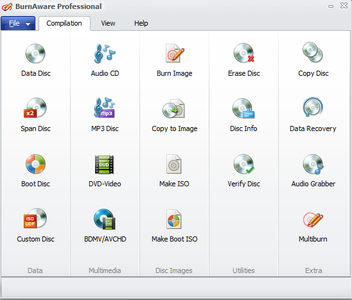
"BurnAware" ist eine echte Allround-Brennsoftware, die auch mit Blu-ray-Rohlingen zurecht kommt und alle Anwendungsfälle zufriedenstellend meistert.

Das Programm erstellt für Sie Audio-CDs, Video-DVDs oder Image-Discs. Dank der übersichtlichen Aufmachung kommen Sie mit wenigen Klicks an Ihr Ziel. Da sich das Programm rein auf das Brennen beschränkt, müssen Sie sich auch nicht durch einen Funktions-Urwald wie etwa bei Nero forsten.


Hoster:
Uploaded
Größe
19 Mb (RAR/EXE)
Sprache
Deutsch/Englisch
Plattform
Microsoft Windows Vista/7/8/8.1/10 (32 oder 64-Bit)
Parts: 1


 
BurnAware Pro | v9.5 | Deutsch | Cracked
BurnAware.v9.5.Pro-F4CG


yodo7yaw.png


_ .: Beschreibung :. _

BurnAware Home ist eine vollfunktionale, einfach zu benutzende Brennsoftware, die euch das Verewigen von etlichen Dateitypen wie z.B.
digitale Bilder, Archive, Dokumente, Musik, Videos auf CDs, DVDs und Blu-rays ermöglicht. Mit BurnAware Home könnt ihr bootfähige bzw.
Multisession-CDs sowie hochqualitative Audio CDs und DVDs erstellen und natürlich Sicherungskopien anfertigen. Darüber hinaus hilft euch
dieses Programm beim Wiederherstellen von Daten auf beschädigten CDs


_ .: NFO :. _
sidvklwb.png


Plattform: Windows
Format: .exe
Sprache(n): Multi inkl. Deutsch
Hoster: Uploaded, Share-Online, Oboom
Größe: 9 MB
Parts: 1

sidvklwb.png

i38tfrud.png

_ .: Download :. _

sidvklwb.png
 
BurnAware Professional 9.6 Multilingual

003b26c4_medium1fuak.png


BurnAware is the ultimate disc burning software. BurnAware Free is one of the most popular free CD, DVD, Blu-ray Disc burning software available for Windows. Using this program you can easily create and burn Audio and MP3 CD, Data and DVD-Video disc, ISO and Cue Image, erase or format rewritable disc, copy your CD or DVD to ISO image.

BurnAware is a full-fledged, easy-to-use burning software which allows users to write all types of files such as digital photos, pictures, archives, documents, music and videos to CDs, DVDs and Blu-ray Discs. With BurnAware, you also be able to create bootable or multisession discs, high-quality Audio CDs and Video DVDs, make and burn ISO images, copy and backup discs, extract audio tracks, erase and verify data, recover data from multisession or unreadable discs.

Key Benefits
One of the most noticeable feature is an user interface – clean, effective, easy-to-use and multilingual. Another great benefits are low CPU usage while burning and very stable burning process. Plus support of latest OS - Windows 10, as well as any version starting from Windows XP, both 32 and 64 bits.

Advanced Options
Besides standard options, BurnAware offers many advanced options such as BOOT settings, UDF partition and versions, ISO levels and restrictions, session selection, CD-Text for track and disc, byte by byte verification, direct copying, disc spanning and many more.

OS: Windows
Lang: Multi
Size: 11,89 MB
Format: .exe
Hoster: Uploaded
PW: boerse


Directload
​
 
BurnAware Professional v9.6 Final

Multilingual/Deutsch // 32 + 64 Bit // Setup + Portable // Patch // 09.11.2016

Portable: Speichert im Quellverzeichnis, schreibt keine Werte in die Registry (paf-Basis)


Home:


Beschreibung:
"BurnAware" ist eine echte Allround-Brennsoftware, die auch mit Blu-ray-Rohlingen zurecht kommt und alle Anwendungsfälle zufriedenstellend meistert.

Das Programm erstellt für Sie Audio-CDs, Video-DVDs oder Image-Discs. Dank der übersichtlichen Aufmachung kommen Sie mit wenigen Klicks an Ihr Ziel. Da sich das Programm rein auf das Brennen beschränkt, müssen Sie sich auch nicht durch einen Funktions-Urwald wie etwa bei Nero forsten.


Hoster:
Uploaded
Größe
19 Mb (RAR/EXE)
Sprache
Deutsch/Englisch
Plattform
Microsoft Windows Vista/7/8/8.1/10 (32 oder 64-Bit)
Parts: 1

 
BurnAware Pro | v9.6 | Deutsch | Cracked
BurnAware.v9.6.Pro-F4CG


yodo7yaw.png


_ .: Beschreibung :. _

BurnAware Home ist eine vollfunktionale, einfach zu benutzende Brennsoftware, die euch das Verewigen von etlichen Dateitypen wie z.B.
digitale Bilder, Archive, Dokumente, Musik, Videos auf CDs, DVDs und Blu-rays ermöglicht. Mit BurnAware Home könnt ihr bootfähige bzw.
Multisession-CDs sowie hochqualitative Audio CDs und DVDs erstellen und natürlich Sicherungskopien anfertigen. Darüber hinaus hilft euch
dieses Programm beim Wiederherstellen von Daten auf beschädigten CDs


_ .: NFO :. _
sidvklwb.png


Plattform: Windows
Format: .exe
Sprache(n): Multi inkl. Deutsch
Hoster: Uploaded, Share-Online, Oboom
Größe: 9 MB
Parts: 1

sidvklwb.png

i38tfrud.png

_ .: Download :. _

sidvklwb.png
 
BurnAware Professional 9.7 Multilingual + Portable

003b26c4_medium1fuak.png


BurnAware is the ultimate disc burning software. BurnAware Free is one of the most popular free CD, DVD, Blu-ray Disc burning software available for Windows. Using this program you can easily create and burn Audio and MP3 CD, Data and DVD-Video disc, ISO and Cue Image, erase or format rewritable disc, copy your CD or DVD to ISO image.

BurnAware is a full-fledged, easy-to-use burning software which allows users to write all types of files such as digital photos, pictures, archives, documents, music and videos to CDs, DVDs and Blu-ray Discs. With BurnAware, you also be able to create bootable or multisession discs, high-quality Audio CDs and Video DVDs, make and burn ISO images, copy and backup discs, extract audio tracks, erase and verify data, recover data from multisession or unreadable discs.

Key Benefits
One of the most noticeable feature is an user interface – clean, effective, easy-to-use and multilingual. Another great benefits are low CPU usage while burning and very stable burning process. Plus support of latest OS - Windows 10, as well as any version starting from Windows XP, both 32 and 64 bits.

Advanced Options
Besides standard options, BurnAware offers many advanced options such as BOOT settings, UDF partition and versions, ISO levels and restrictions, session selection, CD-Text for track and disc, byte by byte verification, direct copying, disc spanning and many more.

OS: Windows
Lang: Multi
Size: 11,85 MB
Format: .exe
Hoster: Uploaded
PW: boerse


Portable


Directload
​
 
BurnAware Professional v9.7
Multilingual/Deutsch / Crack (DLL) & Patch / Setup & Portable

burnawarer9un8.png


"BurnAware" ist eine echte Allround-Brennsoftware, die auch mit Blu-ray-Rohlingen zurecht kommt und alle Anwendungsfälle zufriedenstellend meistert.

Das Programm erstellt für Sie Audio-CDs, Video-DVDs oder Image-Discs. Dank der übersichtlichen Aufmachung kommen Sie mit wenigen Klicks an Ihr Ziel. Da sich das Programm rein auf das Brennen beschränkt, müssen Sie sich auch nicht durch einen Funktions-Urwald wie etwa bei Nero forsten.

Größe: 41,00 MB
Sprache: Multi/Deutsch
Format: Exe
Plattform: Windows 32 + 64 Bits
Hoster: Uploaded, Share-Online, Oboom
Passwort: Keins

pid0hyo3ab2o.png


BurnAware Premium 9.7 Multilingual

003b26c4_medium1fuak.png


BurnAware is a family of full-featured and free burning software to create CD, DVD and Blu-ray discs of all types. Home users can easily burn bootable discs, multisession discs, high-quality audio CDs and video DVDs, make, copy and burn disc images. Power users will benefit from BurnAware's advanced options, including control of boot settings, UDF partition and versions, ISO levels and restrictions, session selection, CD text for tracks and discs, data recovering, disc spanning and direct copying.

Burn CDs and DVDs to multiple drives simultaneously
Record one or more titles to separate drives simultaneously, even while creating a new title.

Keep original discs scratch free
Duplicate CDs and DVDs or store them as ISO image files on your hard disk. You can always burn them later to create and backup copy of the original movie/game/software.

Create data backups
Burn your photos, spread sheets, home work results etc. to CD/DVD/Blu-Ray Disc. A hard disk crash would no longer be fatal to your work or family archives.

Update existing discs
You can use the same media for sequential recording daily. New data would perfectly co-exist with previously recorded data. The only limitation is the physical media capacity.

Supports:
• All media types (CD/DVD/Blu-ray Disc) including Double Layer
• All current hardware interfaces (IDE/SCSI/USB/1394/SATA) including AHCI
• UDF/ISO9660/Joliet file systems (any combination)
• On-the-fly writing (no staging to hard drive first)
• Verification of written files
• Multisession DVD-RW/DVD+RW
• Unicode CD-Text (tracks and disc)

OS: Windows
Lang: Multi
Size: 9,32 MB
Format: .exe
Hoster: Uploaded
PW: boerse


Directload
​
 
Zurück
Oben Unten