• Regeln für den Software-Bereich:


    Allgemeines:

    - In erster Linie sind unsere Boardregeln zu beachten, zu finden HIER.
    - Software zur Audiobearbeitung sollte ausschließlich im Unterforum "Audio" eingestellt werden.
    - Für Cracks, Keygens oder sonstige Freischaltungssoftware gibt es das Unterforum "Freischaltung".
    - Portable Software bitte im entsprechenden Unterforum "Portable Software" eintragen.
    - Diskussionen zur Installation und anderen Problemen mit der Software, bitte im enstprechenden Unterforum "Talk" führen.
    - Bei Unklarheiten und Fragen zu den Regeln bitte die Moderatoren kontaktieren.


    Angebot erstellen

    - Die Struktur des Threadtitels muss wie folgt umgesetzt werden: Herstellername - Softwarename - Versionsnummer
    - Unnötige Zusätze im Threadtitel wie "HOT", "NEW" oder Punkte zwischen den Wörtern sind nicht erlaubt.
    - Achtet darauf immer nur die Hauptversion und deren Updates in einem Thread zusammenfassen, konkretes Beispiel: SoftwareXY v3.12 gehört in den selben Thread mit SoftwareXY v3.13; SoftwareXY v.4.1 gehört in einen neuen eigenen Thread. Ausgenommen hiervon sind Sammelthreads und Dauerangebote.
    - Bei nicht bekannten Herstellern oder Angebote einer privaten Software, ist die Programmbezeichnung + Versionsnummer ausreichend.
    - Besondere Beachtung gilt für den ersten Beitrag eines Angebots. Dort muss eine kurze Beschreibung der Software in deutscher Sprache angegeben werden. Für offizielle Releases ist es Pflicht die NFO im Beitrag einzustellen(Spoiler, siehe nächster Punkt).
    - Weitere Informationen wie NFOs oder Changelogs, versteckt ihr bitte in einem Spoiler.


    Software Suche

    - Für Suchanfragen haben wir das Unterforum "Suche" erstellt.
    - Auch hier sollte vorher die Suchfunktion benutzt werden, um Doppelthreads vorzubeugen. Sollte es bereits eine Suchanfrage geben, könnt ihr den Thread gerne mit einem "Danke" pushen.


    Trojaner- und Virusalarm

    - Falls Euer Virenscanner bei einem Angebot Alarm schlägt, solltet ihr zunächst Ruhe bewahren. Viele Virenscanner erkennen Cracks/Keygens oft fälschlicherweise als Bedrohung.
    - Prüft die verdächtige Datei zuerst mit http://virustotal.com , sollte es sich hierbei wirklich um eine Bedrohung handeln, meldet den Beitrag und/oder wendet euch mit dem Bericht von VirusTotal.com an einen Moderator.


    Unerwünschte Angebote

    - Keylogger, Spionagetools, alles rund ums Thema Hacking/Cracking ist nicht erwünscht.
  • Bitte registriere dich zunächst um Beiträge zu verfassen und externe Links aufzurufen.


BrowseEmAll v9

mikemike

MyBoerse.bz Pro Member
BrowseEmAll 9.1.0 Enterprise/Server/Studio
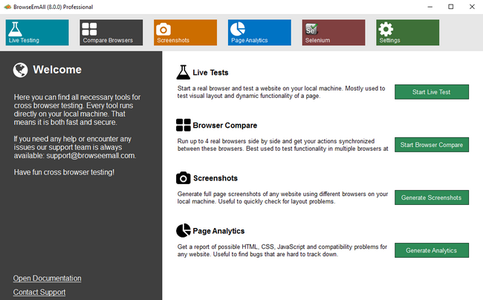
browsewmudf5aupi.png


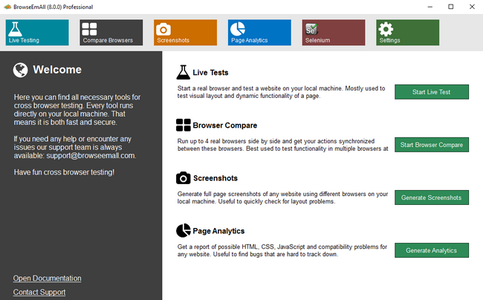
On-Premises, Fast & Secure Cross Browser Testing – Live Testing, Screenshots and Code Analytics On Your Local Machine. Test without worrying about firewalls and data security. With BrowseEmAll everything runs on your machine. This makes testing normal websites, staging environments and localhost possible out of the box. And your data stays secure and never leaves your network.

Browser testing as swift as running a native browser
We run all browsers on your local machine so you get the same browsing experience as your users do. Of course all browsers come with their native developer tools for easy debugging.
Make your browser testing more efficient and less frustrating
BrowseEmAll provides all features you would expect from a modern cross browser testing solution. Speed up testing with Live-Testing, Screenshots, Side-By-Side Comparison, Code-Analytics and Selenium Testing.
Native Life-Testing Experience
Run 70+ browsers directly on your local machine.
Side-By-Side Browser Comparison
Get your input synchronized on up to 4 different browsers.
Full-Page Screenshots
Spot layout issues with full-page screenshots.
Page Analytics
Find potential errors and compatibility problems in the code.
Selenium Grid
Start a fully featured Selenium Grid with a single click.On-Premises, Fast & Secure Cross Browser Testing – Live Testing, Screenshots and Code Analytics On Your Local Machine. Test without worrying about firewalls and data security. With BrowseEmAll everything runs on your machine. This makes testing normal websites, staging environments and localhost possible out of the box. And your data stays secure and never leaves your network.
Browser testing as swift as running a native browser
We run all browsers on your local machine so you get the same browsing experience as your users do. Of course all browsers come with their native developer tools for easy debugging.
Make your browser testing more efficient and less frustrating
BrowseEmAll provides all features you would expect from a modern cross browser testing solution. Speed up testing with Live-Testing, Screenshots, Side-By-Side Comparison, Code-Analytics and Selenium Testing.
Native Life-Testing Experience
Run 70+ browsers directly on your local machine.
Side-By-Side Browser Comparison
Get your input synchronized on up to 4 different browsers.
Full-Page Screenshots
Spot layout issues with full-page screenshots.
Page Analytics
Find potential errors and compatibility problems in the code.
Selenium Grid
Start a fully featured Selenium Grid with a single click.

OS: Windows
Lang: Englisch
Size: 237,45 MB
Format: .exe
Hoster: Uploaded
PW: boerse


Directload

 
BrowseEmAll 9.1.0 Enterprise/Server/Studio/Manual Edition

Englisch / Crack

browsewmudf.png


Beschreibung:

On-Premises, Fast & Secure Cross Browser Testing – Live Testing, Screenshots and Code Analytics On Your Local Machine. Test without worrying about firewalls and data security. With BrowseEmAll everything runs on your machine. This makes testing normal websites, staging environments and localhost possible out of the box. And your data stays secure and never leaves your network.

Browser testing as swift as running a native browser
We run all browsers on your local machine so you get the same browsing experience as your users do. Of course all browsers come with their native developer tools for easy debugging.
Make your browser testing more efficient and less frustrating
BrowseEmAll provides all features you would expect from a modern cross browser testing solution. Speed up testing with Live-Testing, Screenshots, Side-By-Side Comparison, Code-Analytics and Selenium Testing.
Native Life-Testing Experience
Run 70+ browsers directly on your local machine.
Side-By-Side Browser Comparison
Get your input synchronized on up to 4 different browsers.
Full-Page Screenshots
Spot layout issues with full-page screenshots.
Page Analytics
Find potential errors and compatibility problems in the code.
Selenium Grid
Start a fully featured Selenium Grid with a single click.On-Premises, Fast & Secure Cross Browser Testing – Live Testing, Screenshots and Code Analytics On Your Local Machine. Test without worrying about firewalls and data security. With BrowseEmAll everything runs on your machine. This makes testing normal websites, staging environments and localhost possible out of the box. And your data stays secure and never leaves your network.
Browser testing as swift as running a native browser
We run all browsers on your local machine so you get the same browsing experience as your users do. Of course all browsers come with their native developer tools for easy debugging.
Make your browser testing more efficient and less frustrating
BrowseEmAll provides all features you would expect from a modern cross browser testing solution. Speed up testing with Live-Testing, Screenshots, Side-By-Side Comparison, Code-Analytics and Selenium Testing.
Native Life-Testing Experience
Run 70+ browsers directly on your local machine.
Side-By-Side Browser Comparison
Get your input synchronized on up to 4 different browsers.
Full-Page Screenshots
Spot layout issues with full-page screenshots.
Page Analytics
Find potential errors and compatibility problems in the code.
Selenium Grid
Start a fully featured Selenium Grid with a single click.
_________________________________________________

Größe: 274,84 MB
Sprache: Englisch
Format: Exe
Plattform: Windows 32 + 64 Bits
Hoster: Uploaded, Share-Online
________________________________________

12.fwo5aih.png


DOWNLOAD:

 
BrowseEmAll v9.2.4

Enterprise, Manual, Server, Studio Edition

Englisch / incl. Crack (Dll)

browseemall68jcg.jpg


Beschreibung:

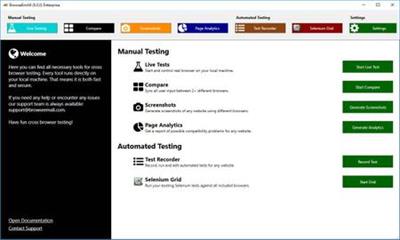
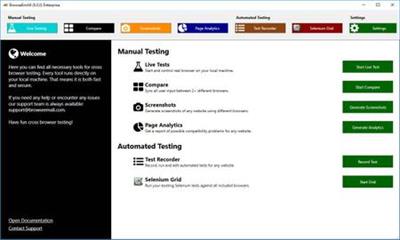
Automated Browser Testing
Jump start your test automation with our Record & Play technology or run your existing test suite using the configuration less Selenium integration.

Quickly record and play automates tests against all major desktop and mobile browser or point your existing Selenium test suite against the integrated Selenium Grid. Everything runs on premise for easy testing of internal pages or staging environments.
_________________________________________________

Größe: 272,00 MB
Sprache: Englisch
Format: Exe
Plattform: Microsoft Windows 7/8/8.1/10 (32 oder 64-Bit)
Hoster: Uploaded, Share-Online, RapidGator
________________________________________

bwb7w8aifdsdk.png


DOWNLOAD:


BrowseEmAll 9.2.0 Enterprise, Manual, Server, Studio Edition

browsewmudf5aupi.png


On-Premises, Fast & Secure Cross Browser Testing – Live Testing, Screenshots and Code Analytics On Your Local Machine. Test without worrying about firewalls and data security. With BrowseEmAll everything runs on your machine. This makes testing normal websites, staging environments and localhost possible out of the box. And your data stays secure and never leaves your network.

Browser testing as swift as running a native browser
We run all browsers on your local machine so you get the same browsing experience as your users do. Of course all browsers come with their native developer tools for easy debugging.
Make your browser testing more efficient and less frustrating
BrowseEmAll provides all features you would expect from a modern cross browser testing solution. Speed up testing with Live-Testing, Screenshots, Side-By-Side Comparison, Code-Analytics and Selenium Testing.
Native Life-Testing Experience
Run 70+ browsers directly on your local machine.
Side-By-Side Browser Comparison
Get your input synchronized on up to 4 different browsers.
Full-Page Screenshots
Spot layout issues with full-page screenshots.
Page Analytics
Find potential errors and compatibility problems in the code.
Selenium Grid
Start a fully featured Selenium Grid with a single click.On-Premises, Fast & Secure Cross Browser Testing – Live Testing, Screenshots and Code Analytics On Your Local Machine. Test without worrying about firewalls and data security. With BrowseEmAll everything runs on your machine. This makes testing normal websites, staging environments and localhost possible out of the box. And your data stays secure and never leaves your network.
Browser testing as swift as running a native browser
We run all browsers on your local machine so you get the same browsing experience as your users do. Of course all browsers come with their native developer tools for easy debugging.
Make your browser testing more efficient and less frustrating
BrowseEmAll provides all features you would expect from a modern cross browser testing solution. Speed up testing with Live-Testing, Screenshots, Side-By-Side Comparison, Code-Analytics and Selenium Testing.
Native Life-Testing Experience
Run 70+ browsers directly on your local machine.
Side-By-Side Browser Comparison
Get your input synchronized on up to 4 different browsers.
Full-Page Screenshots
Spot layout issues with full-page screenshots.
Page Analytics
Find potential errors and compatibility problems in the code.
Selenium Grid
Start a fully featured Selenium Grid with a single click.

OS: Windows
Lang: Englisch
Size: 237,45 MB
Format: .exe
Hoster: Uploaded
PW: boerse


Directload
 
BrowseEmAll 9.6.1 Enterprise / Runtime / Studio / Manual Edition


ce3f6f2f00430f8d35446629bb482a70.jpg


BrowseEmAll 9.6.1 Enterprise / Runtime / Studio / Manual Edition | 247 MB


On-Premises, Fast & Secure Cross Browser Testing - Live Testing, and Code Analytics On Your Local Machine. Test without worrying about firewalls and data security. With BrowseEmAll everything runs on your machine. This makes testing normal websites, staging environments and localhost possible out of the box. And your data stays secure and never leaves your network.


Browser testing as swift as running a native browser
We run all browsers on your local machine so you get the same browsing experience as your users do. Of course all browsers come with their native developer tools for easy debugging.

Make your browser testing more efficient and less frustrating
BrowseEmAll provides all features you would expect from a modern cross browser testing solution. Speed up testing with Live-Testing, , Side-By-Side Comparison, Code-Analytics and Selenium Testing.

Native Life-Testing Experience
Run 70+ browsers directly on your local machine.

Side-By-Side Browser Comparison
Get your input synchronized on up to 4 different browsers.

Full-Page
Spot layout issues with full-page.

Page Analytics
Find potential errors and compatibility problems in the code.

Selenium Grid
Start a fully featured Selenium Grid with a single click.

Operating System: Windows 7, 8/8.1, 10

Home Page -


DOWNLOAD LINKS:


BrowseEmAll 9.6.2 Enterprise / Runtime / Studio / Manual Edition


9980e9ecfa1ebca6248fff361ce4efdc.jpeg


BrowseEmAll 9.6.2 Enterprise / Runtime / Studio / Manual Edition | 240 MB | Language: English


On-Premises, Fast & Secure Cross Browser Testing - Live Testing, and Code Analytics On Your Local Machine. Test without worrying about firewalls and data security. With BrowseEmAll everything runs on your machine. This makes testing normal websites, staging environments and localhost possible out of the box. And your data stays secure and never leaves your network.


Browser testing as swift as running a native browser
We run all browsers on your local machine so you get the same browsing experience as your users do. Of course all browsers come with their native developer tools for easy debugging.

Make your browser testing more efficient and less frustrating
BrowseEmAll provides all features you would expect from a modern cross browser testing solution. Speed up testing with Live-Testing, , Side-By-Side Comparison, Code-Analytics and Selenium Testing.

Native Life-Testing Experience
Run 70+ browsers directly on your local machine.
Side-By-Side Browser Comparison
Get your input synchronized on up to 4 different browsers.
Full-Page
Spot layout issues with full-page .
Page Analytics
Find potential errors and compatibility problems in the code.
Selenium Grid
Start a fully featured Selenium Grid with a single click.

Operating System: Windows 7, 8/8.1, 10

Home Page -


DOWNLOAD LINKS:


BrowseEmAll v9.6.2

Englisch / inkl. Crack (Dll)

browsellsakgc.jpg


Beschreibung:

Schnelle und sichere Cross-Browser-Tests vor Ort - Live-Tests, Screenshots und Code-Analysen auf Ihrem lokalen Computer. Testen Sie, ohne sich um Firewalls und Datensicherheit sorgen zu müssen. Mit BrowseEmAll läuft alles auf Ihrem Computer. Dies ermöglicht das sofortige Testen normaler Websites, Staging-Umgebungen und lokaler Hosts. Und Ihre Daten bleiben sicher und verlassen Ihr Netzwerk nie.

Browsertests so schnell wie das Ausführen eines nativen Browsers
Wir führen alle Browser auf Ihrem lokalen Computer aus, damit Sie die gleiche Browser-Erfahrung wie Ihre Benutzer erhalten. Natürlich werden alle Browser mit ihren nativen Entwicklertools zum einfachen Debuggen geliefert.

Machen Sie das Testen Ihres Browsers effizienter und weniger frustrierend
BrowseEmAll bietet alle Funktionen, die Sie von einer modernen browserübergreifenden Testlösung erwarten. Beschleunigen Sie das Testen mit Live-Tests, Screenshots, Side-by-Side-Vergleichen, Code-Analytics und Selentests.

Native Life-Testing-Erfahrung
Führen Sie mehr als 70 Browser direkt auf Ihrem lokalen Computer aus.

Side-by-Side-Browser-Vergleich
Synchronisieren Sie Ihre Eingabe in bis zu 4 verschiedenen Browsern.

Ganzseitige Screenshots
Spot-Layout-Probleme mit ganzseitigen Screenshots.

Seitenanalyse
Finden Sie mögliche Fehler und Kompatibilitätsprobleme im Code.

Selengitter
Starten Sie ein voll ausgestattetes Selenium-Gitter mit einem einzigen Klick.

_________________________________________________

Größe: 240 MB
Sprache: Englisch
Format: Exe
Plattform: Windows (32 oder 64-Bit)
Hoster: RapidGator.net, Alfafile.net, Ddownload.com
________________________________________

C574A613A0.png


BrowseEmAll v9.6.3


bdf21ba411b685ca0906e2bbef2718bc.jpeg


BrowseEmAll v9.6.3 | Enterprise / Runtime / Studio / Manual Edition | 58 MB | Language: English


Homepage:


Größe: 58 MB
Sprache: English
Format: .rar / .exe
Medizin: Present
Plattform: Windows 10 , Windows 8/8.1 , Windows 7
Bit depth: 32bit 64bit


HOSTER:

K2s.cc (Keep2share)

Rapidgator.net

Nitroflare.com

Uploadgig.com


DOWNLOAD


BrowseEmAll Studio 9.7.1


0db1a93004bc8b099b839565294b6dcd.jpg


BrowseEmAll Studio 9.7.1


Schnelles und sicheres Cross-Browser-Testing vor Ort – Live-Tests, Screenshots und Code-Analyse auf Ihrem lokalen Rechner. Testen Sie, ohne sich um Firewalls und Datensicherheit sorgen zu müssen. Mit BrowseEmAll läuft alles auf Ihrem Rechner. So können Sie normale Websites, Staging-Umgebungen und lokale Hosts sofort testen. Ihre Daten bleiben sicher und verlassen Ihr Netzwerk nie.


Sprache: English | Größe: 138 MB | Format: RAR, EXE | Plattform: Windows 7, 8/8.1, 10, 11 (32/64Bit)


Hoster:
RapidGator.net | NitroFlare.com | DDownload.com


DOWNLOAD Links:


Zurück
Oben Unten