




MP4 | Video: h264, 1280x720 | Audio: AAC, 44.1 KHz, 2 Ch
Language: English | Duration: 56m | Size: 1.3 GB
Play with Highlights and Shadows to Add Interest
What you'll learn
Learn step-by-step methods for creating the layered art.
Get tips for creating compositions that are easily editable.
Learn a workflow for use of layers for adding texture.
Learn methods for adjusting highlights and shadows.
• Learn methods for adding accents like the sun, birds and clouds.
Requirements
No prerequisite required
Description
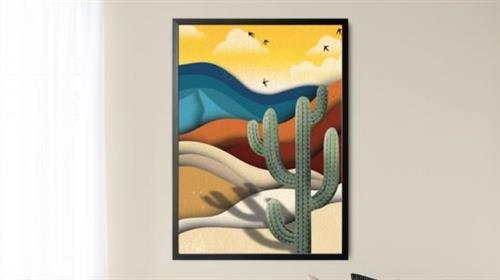
Creating a dimensional desert scene will not be too difficult using Procreate. There are some quick concepts that I will teach you that will make this so much easier. It's all about the shading and highlights and we will be using a number of techniques to achieve these.
As always this class, Bold and Dusty Desert Dunes and Cactus Scene in Procreate, will demonstrate the entire process from start to finish. In the class, I take you through all the steps in creating this complete desert scene. I keep this project as simple as possible, but I show you plenty of inspiring art. You can go in so many different directions with this piece, and my "scenic" Pinterest board will be a great place to find inspiration. And, I have techniques to save the art in such a way that making alterations and adding texture is super easy. I show you how to add texture to individual pieces of the design and to add an over-all texture. I even provide you with useful brushes to do that with. I use these methods to be sure the art that we'll be creating is completely editable.
In this class I'll walk you through
my step-by-step method for creating the layered art
tips for creating compositions that are easily editable
my workflow for use of layers for adding texture
adjusting highlights and shadows
adding accents like the sun, birds and clouds
If you are looking for novel approaches to doing scenes like this, you've come to the right place. I try to keep all the concepts easy to re-create.
The key concepts I will include
layering and shadows to create depth
simple techniques to add interest
transferring of skills and knowledge to create a scene unique to you
I really hope you will try more than one scene using these approaches. It would be fun to try different color schemes or even to create the whole scene within a circle or some other shape. Another suggestion would be to try this as a nighttime scene, rather than a daytime version. Take the time to create something you can later use for greeting cards or other POD items.
Intro to Bold and Dusty Desert Dunes and Cactus Scene in Procreate
This short intro will give you an overview of the class.
Lesson 1: Overview, Inspiration and Examples
In this lesson, I will give an overview of the document set-up, showing you how a couple of my documents looked with all the layers and clipping masks. I take you into a Pinterest board I have created for this class as well so you will have plenty of inspiration.
Lesson 2: Blocking in the Sand Dunes and Basic Shapes
In this lesson, I will break down the complete process of drawing the sand dunes. Once each layer is drawn, I duplicate it and show you how to re-colour them in a contrasting darker shade to create the shadows. We use Gaussian blur to soften and spread these to make them look more realistic.
Lesson 3: Adding Dimension and Additional Motifs
In this lesson, I will explain how I created the fading sky and sun. I show you tricks with the Gaussian Blur as well as using the airbrush as an eraser. The last step is for us to draw the cactus in readiness for the next lesson. I show you how I adjusted the Posca Paint marker that I always use (this is the same as the monoline brush in the default set that comes with Procreate).
Lesson 4: Working on the Cactus Details
This is the lesson in which I show you how to add details to the cactus. We start with creating the shadows using the Gaussian Blur. I erase part of the lines to create a hard line. The last step is to add a highlighted line. These three steps add so much interest and dimension to the cactus.
Lesson 5: Adding the Spikes on the Cactus
Adding spikes to the cactus in this lesson is what will truly finish the cactus and give it some stylized "real"-ness. I love the addition of all the details because I feel like it really comes together.
Lesson 6: Adding Clouds and Bird Details
This is the stage where we pull our layout together, and I will add the small details that make it work. I show you how to create clouds using a couple of different techniques: the first uses a feathered selection. The second method is by using an airbrush. I then show you how to draw a few quick birds.
Lesson 7: Adding Finishing Touches and Textures
Adding all the finishing touches is the focus of this lesson. I will be adding all the background textures into the piece and then further enhancing all the foreground items with a combination of the color mop brushes as well as textures such as spatters.
Lesson 8: Closing Thoughts, Mock Ups and Wrap Up
We will conclude everything in this lesson. I show you a couple of quick mock-ups with the pattern and we end with a chat about next steps.
Concepts covered
Concepts covered include but are not limited to Procreate landscape design, filling, layering, Gaussian Blur, Procreate canvas settings, brush settings, eraser settings (with airbrush), how to create fade-outs, Procreate snapping and guides, sketching, sizing of document, adding texture, clipping masks, procreate brushes for adding other interesting details, workflow best practices, painting best practice, Procreate composites, techniques with paints and blending, and much more.
You will get.
58 minutes of direction from an instructor who has been in graphic design business and education for over 40 years
knowledge of multiple ways to solve each design challenge
a selection of brushes and an over-all paper texture
Project Description
Challenge yourself today and download and install the Procreate brushes provided to get started on this desert scene. If you are really inspired, try more than one scene using these approaches. Try different color schemes or even to create the whole scene within a circle or some other shape. Another suggestion would be to try this as a nighttime scene, rather than a daytime version. Take the time to create something you can later use for greeting cards or other POD items. Work through each of the lessons, applying the concepts as I teach them.
Who this course is for
Procreate users looking new ideas for illustration.
Homepage
Recommend Download Link Hight Speed | Please Say Thanks Keep Topic Live
Links are Interchangeable - No Password - Single Extraction
