



• Regeln für den Video-Bereich:

    In den Börsenbereich gehören nur Angebote die bereits den Allgemeinen Regeln entsprechen.

    Einteilung

    - Folgende Formate gehören in die angegeben Bereiche:
    - Filme: Encodierte Filme von BluRay, DVD, R5, TV, Screener sowie Telesyncs im Format DivX, XviD und x264.
    - DVD: Filme im Format DVD5, DVD9 und HD2DVD.
    - HD: Encodierte Filme mit der Auflösung 720p oder darüber von BluRay, DVD, R5, TV, Screener sowie Telesyncs im Format x264.
    - 3D: Encodierte Filme von BluRay, die in einem 3D Format vorliegen. Dies gilt auch für Dokus, Animation usw.
    - Serien: Cartoon/Zeichentrick, Anime, Tutorials, Dokumentationen, Konzerte/Musik, Sonstiges sind demnach in die entsprechenden Bereiche einzuordnen, auch wenn sie beispielsweise im High Definition-Format oder als DVD5/DVD9/HD2DVD vorliegen. Ausnahme 3D.
    - Bereich Englisch: Englische Releases gehören immer in diesen Bereich.
    - Bereich Talk: Der Bereich, in dem über die Releases diskutiert werden kann, darf, soll und erwünscht ist.


    Angebot/Beitrag erstellen

    - Ein Beitrag darf erst dann erstellt werden, wenn der Upload bei mindestens einem OCH komplett ist. Platzhalter sind untersagt.
    - Bei einem Scenerelease hat der Threadtitel ausschließlich aus dem originalen, unveränderten Releasenamen zu bestehen. Es dürfen keine Veränderungen wie z.B. Sterne, kleine Buchstaben o.ä. vorgenommen werden. Ausnahme Serienbörse:
    - Bei einem Sammelthread für eine Staffel entfällt aus dem Releasename natürlich der Name der Folge. Beispiel: Die Simpsons S21 German DVDRip XviD - ITG
    - Dementsprechend sind also u.a. verboten: Erweiterungen wie "Tipp", "empfehlenswert", "only", "reup", usw. / jegliche andere Zusatzinformation oder Ergänzung, welche nicht in obiger Beschreibung zu finden ist.

    Aufbau des Angebots und Threadtitel

    Der Titel nach folgendem Muster erstellt zu werden. <Name> [3D] [Staffel] [German] <Jahr> <Tonspur> [DL] [Auflösung] <Quelle> <Codec> - <Group>
    Beispiel: The Dark Knight German 2008 AC3 DVDRip XviD - iND
    Beispiel: The Dark Knight 2008 DTS DL BDRip x264 - iND
    Beispiel: The Dark Knight 2008 AC3 DL BDRip XviD - iND
    Beispiel: The Dark Knight German 2008 AC3 720p BluRay x264 iND
    Beispiel: The Dark Knight 2008 DTS DL 1080p BluRay x264 iND
    Beispiel: Die Simpsons S01 German AC3 DVDRip XviD iND
    Beispiel: Die Simpsons S20 German AC3 720p BluRay x264 iND
    Beispiel: Sword Art Online II Ger Sub 2014 AAC 1080p WEBRip x264 - peppermint
    Entsprechend sind also u.a. verboten: Sonderzeichen wie Klammern, Sterne, Ausrufezeichen, Unterstriche, Anführungszeichen / Erweiterungen wie "Tipp", "empfehlenswert", "only", "reup", usw. / jegliche andere Zusatzinformation oder Ergänzung, welche nicht in obiger Beschreibung zu finden ist
    Ausnahmen hiervon können in den Bereichen geregelt sein.

    Die Beiträge sollen wie folgt aufgebaut werden:
    Überschrift entspricht dem Threadtitel
    Cover
    kurze Inhaltsbeschreibung
    Format, Größe, Dauer sind gut lesbar für Downloader außerhalb des Spoilers zu vermerken
    Nfo sind immer Anzugeben und selbige immer im Spoiler in Textform.
    Sind keine Nfo vorhanden z.B. Eigenpublikationen, sind im Spoiler folgende Dateiinformationen zusätzlich anzugeben :
    Quelle
    Video (Auflösung und Bitrate)
    Ton (Sprache, Format und Bitrate der einzelnen Spuren)
    Untertitel (sofern vorhanden)
    Hosterangabe in Textform außerhalb eines Spoiler mit allen enthaltenen Hostern.
    Bei SD kann auf diese zusätzlichen Dateiinformationen verzichtet werden.

    Alle benötigten Passwörter sind, sofern vorhanden, in Textform im Angebot anzugeben.
    Spoiler im Spoiler mit Kommentaren :"Schon Bedankt?" sind unerwünscht.


    Releases

    - Sind Retail-Release verfügbar, sind alle anderen Variationen untersagt. Ausnahmen: Alle deutschen Retail-Release sind CUT, in diesem Fall sind dubbed UNCUT-Release zulässig.
    - Im Serien-Bereich gilt speziell: Wenn ein Retail vor Abschluss einer laufenden Staffel erscheint, darf diese Staffel noch zu Ende gebracht werden.62
    - Gleiche Releases sind unbedingt zusammenzufassen. Das bedeutet, es ist zwingend erforderlich, vor dem Erstellen eines Themas per Suchfunktion zu überprüfen, ob bereits ein Beitrag mit demselben Release besteht. Ist dies der Fall, ist der bereits vorhandene Beitrag zu verwenden.
    - P2P und Scene Releases dürfen nicht verändert oder gar unter einem iND Tag eingestellt werden.


    Support, Diskussionen und Suche

    - Supportanfragen sind entweder per PN oder im Bereich Talk zu stellen.
    - Diskussionen und Bewertungen sind im Talk Bereich zu führen. Fragen an die Uploader haben ausschließlich via PN zu erfolgen, und sind in den Angeboten untersagt.
    - Anfragen zu Upload-Wünschen sind nur im Bereich Suche Video erlaubt. Antworten dürfen nur auf Angebote von MyBoerse.bz verlinkt werden.


    Verbote

    - Untersagt sind mehrere Formate in einem einzigen Angebotsthread, wie beispielsweise das gleichzeitige Anbieten von DivX/XviD, 720p und 1080p in einem Thread. Pro Format, Release und Auflösung ist ein eigener Thread zu eröffnen.
    - Grundsätzlich ebenso verboten sind Dupes. Uploader haben sich an geeigneter Stelle darüber zu informieren, ob es sich bei einem Release um ein Dupe handelt.
    - Gefakte, nur teilweise lauffähige oder unvollständige Angebote sind untersagt. Dies gilt auch für eigene Publikationen, die augenscheinlich nicht selbst von z.B. einer DVD gerippt wurden. Laufende Serien, bei denen noch nicht alle Folgen verfügbar sind, dürfen erstellt und regelmäßig geupdatet werden.
    - Untersagt sind Angebote, welche nur und ausschließlich in einer anderen Sprache als deutsch oder englisch vorliegen. Ausnahmen sind VORHER mit den Moderatoren zu klären.


    Verstoß gegen die Regeln

    - Angebote oder Beiträge, die gegen die Forenregeln verstoßen, sind über den "Melden"-Button im Beitrag zu melden.
  • Bitte registriere dich zunächst um Beiträge zu verfassen und externe Links aufzurufen.

*** Bestes IPTV *** bester Preis *** gratis Test ***


Blender 2.9 Design & Render a Stylized Water Scene

0nelove

MyBoerse.bz Pro Member

x53IFDZlcdSePD4OTQknnwLl3pWm8LjI.jpg

Genre: eLearning | MP4 | Video: h264, 1280x720 | Audio: aac, 48000 Hz
Language: English | SRT | Size: 12.3 GB | Duration: 13h 41m
What you'll learn​


Using Blender 2.9 (the newest software version) and understanding its interface and shortcuts
Creating a stunning unique 3D stylized tropical environment including an underwater scene as a diorama
Learn an industry-standard 3D modelling professional workflow within Blender 2.9
Effective problem-solving in Blender 2.9
Following through a complete guide on creating a 3D stylised water scene
Maintaining and optimising stylized scene aesthetics for a stylized tropical water scene
Marking Seams, Sharps, and fixing Normals
Smoothing and preparing meshes for texturing
Adding materials using Blender 2.9's node system
Mesh deforming and using Booleans
Learning how to make loop cuts in Blender 2.9
Fixing Ngons within Blender 2.9
Complete guide on marking seams & texture resolutions
Complete UV Mapping Guide: UV mapping and UV unwrapping your model
Creating Coral, Stone, and Gold Coin Materials
Creating Collections of Objects and Meshes using a Hierarchy System
Using Armatures to Pose a 3D model within Blender 2.9
Creating Underwater God Rays using Lightpath Node Set up that Utilises Sunlight and a Water Shader
Achieving a Fully Realistic Water Refraction Effect
Creating a Fully Lit Sky fit for the Tropics
Learning how to use rendering to improve the quality of presentation for your 3D environment
Rendering a stylized tropical water scene to a high level
Requirements
To have downloaded Blender any version 2.8 - 2.9 (available for free)
A thirst to learn and excitement about 3D modelling
To download all course resources including 23 references, 5 glass texture maps, and a course handbook
To own a computer (Mircrosoft, Linux or Mac)
Description
Course Description

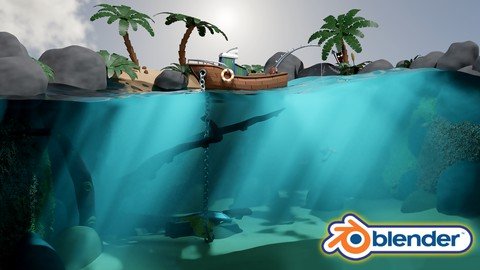
Hi and welcome to my newest Blender 2.9 stylized 3D art course. 'Blender 2.9 Design & Render a Stylized Water Scene' is a complete guide to creating a 3D diorama of a tropical water scene filled with a variety of assets, each uniquely designed and textured.

'Blender 2.9 Design & Render a Stylized Water Scene' will be one of the few 3D modelling courses that will show you how to create trees, plants, and foliage. As with all other course assets, this course's flora will be perfectly suited for any tropical environment.

One of the most sought-after learning experiences of this course is learning how to create underwater god rays. Exciting course content includes 3D modelling a fishing boat, a fishing line and post, palm trees, foliage, coral, a treasure chest, tentacles, and a variety of scenic rocks - all perfectly suited for the tropics.

'Blender 2.9 Design & Render a Stylized Water Scene' brings with it everything I have learned about what makes a 3D modelling course amazing. Taking all the great tools and screen tooltips from 3D Tudor's huge library of courses, this new course will give you the most comprehensive learning process out there.

You will have access to a full course handbook as part of this course, allowing you to identify which parts of the course you would like to jump ahead to if you are a non-linear 3D modeller. The 'Blender 2.9 Design & Render a Stylized Water Scene' course handbook features 24-course sections, each focusing on an asset or set of assets. As such, the course handbook will transform the learning experience for 3D modelers who love to organise their learning process and take the steering wheel into their own hands.

Following the success of my latest course, we will be modelling, texturing, and finalising every individual asset before moving onto the next. Students have said that this has helped them in staying excited throughout the creation process, being able to see how their scene comes closer to the course preview step-by-step.

This course is suited for beginners and intermediate Blender users, taking you through a professional workflow, and by the time you reach the course finish line after over 13 hours of content, you will have a stylized 3D water scene portfolio piece to be proud of.

A large part of 'Blender 2.9 Design & Render a Stylized Water Scene' late development stages will involve technical know-how about Blender Cycles rendering. In addition to learning a super-fast industry-standard workflow, you will learn how to continuously assess the quality of your scene, and how to tweak smaller sub-components you want to make better through render reviews.

Despite being a stylized art course, 'Blender 2.9 Design & Render a Stylized Water Scene', focuses on ensuring that what you create within your water scene is fully workable in real-life and a realism element is maintained. Within that, we will be modelling an intricate fishing spool that is fully functional and helps you reel in the fishing line that will be featured on the boat's stern. You will also learn how to use human references to correctly scale your models to average human proportions with the help of a free reference included in the course resource pack.

'Blender 2.9 Design & Render a Stylized Water Scene' freebies will include numerous glass textures, an HDRI map, and 23 reference files for every one of the individual scene assets we will be creating.

Because of how versatile every 'Blender 2.9 Design & Render a Stylized Water Scene' 3D asset is, this course will show introduce you to interesting functionalities, including new and creative ways of using various Blender 2.9 modifiers and add-ons, including but not limited to:

- Marking Seams, Sharps, and fixing Normals;

- Smoothing and preparing Meshes for Texturing;

- Adding Materials using Blender 2.9's Node System;

- Mesh deforming and using Booleans;

- Loop cuts;

- Joining Meshes and finishing Seams;

- Fixing Ngons;

- Creating Glass, Sand, Coral, and Rock Materials;

- Creating Collections of Objects and Meshes using a Hierarchy System;

- Creating a simple Armature to move our Tentacles;

- Creating Underwater God Rays using Lightpath Node Set up that Utilises Sunlight and a Water Shader;

- Achieving a Fully Realistic Water Refraction Effect;

- Creating a Fully Lit Sky fit for the Tropics;

- Rendering a Stylized Water Scene.

Modeling

'Blender 2.9 Design & Render a Stylized Water Scene' will give you access to one of the most versatile modelling experiences out there. You will be creating a vast number of 3D assets, helping you practice different skills and Blender 2.9 addons, modifiers, and tools.

This course will teach you how to 3D model stylised assets from the ground up, using Blender 2.9. Whether you are a 3D modelling beginner, intermediate, or advanced user, on-screen tooltips and animations will be popping up when you need them to explain what each Blender 2.9 modifier, addon, or functionality do. Learning outcomes from joining this course will also include adding new key commands to your 3D modeller toolkit with key casting allowing you to keep track of every key I press during the course.

Because of the 'Blender 2.9 Design & Render a Stylized Water Scene' course design, the course handbook will enable you to take a personalised approach to the modelling tasks you chose to focus on next, enabling you to skip ahead to model those assets you cannot wait to get your hands on. By the end of the course, the knowledge you will have learned can be used independent of the direction you take in 3D modeling - following the amateur or the professional path.

Texturing

'Blender 2.9 Design & Render a Stylized Water Scene' will teach you how to make complex stylized materials from scratch using Blender 2.9's node system. We will be taking an in-depth look at all texture maps, like metallic and roughness, for example. As part of this course, you will also be creating procedural sand and rope materials.

Through enrolling in this course, you will also learn how to lay and apply multiple materials to meshes.

Animation

Through modelling every sea voyager's nightmare - a set of tentacles reaching for you - you will learn basic animation skills. You will learn how to create a basic armature and how to use it to position your red tentacles within our scene to create a sense of fear in our storytelling.

Rendering

'Blender 2.9 Design & Render a Stylized Water Scene' will show you how to use Blender 2.9 cycles rendering as part of your quality assurance process. Through rendering our stylised water scene regularly, we will be tweaking its presentation to reach the course finish line in such a way that our scene fully resembles what we aimed for.

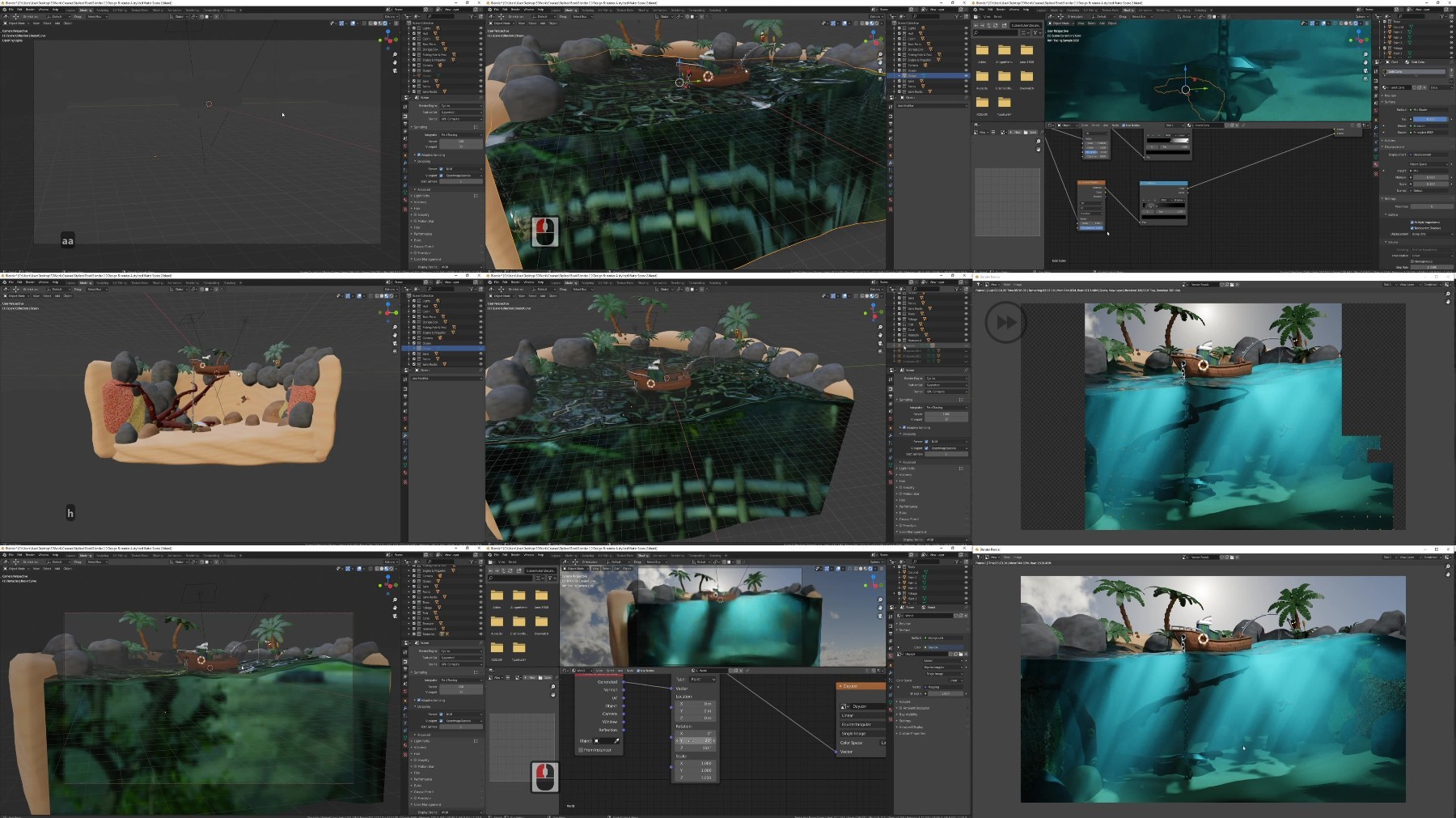
Rendering will allow us to present our model professionally and make it stand out in any portfolio. Lighting is one of the key components that tend to be the most overlooked. 'Blender 2.9 Design & Render a Stylized Water Scene' will take you a step further, giving you more than a basic introduction to lighting and helping you achieve one of the most desirable lighting conditions - underwater god rays.

The god rays we will have created in the underwater section of our stylized scene will add the wow-factor to the overall design, with every individual asset individually contributing to the scene's professional 3D modelling quality.

You will come away with renders which you will be proud to show off on your social media. By the time we have finished rendering in Blender 2.9, you will have the knowledge and confidence to create stylised assets that look like they fell out straight out of a game.

Download Pack

Download packs always excite me when I get my hands on a new course. 'Blender 2.9 Design & Render a Stylized Water Scene' will include a free download pack with 23 stylized references for all the individual underwater scene assets we will be creating. You will also get access to five glass texture maps free for you to use. The best course navigation tool for 'Blender 2.9 Design & Render a Stylized Water Scene' will also be included.

The course handbook will give the control back to you and you will be able to fully streamline your learning process to your needs and wants seamlessly.

So, with all that said, I hope I have whetted your appetite to start your journey into stylised 3D game asset creation. Check out the free introduction and I am sure you won't be able to put this course down.

Who wouldn't like mentally transporting themselves into the tropics?

By enrolling in 'Blender 2.9 Design & Render a Stylized Water Scene', you will get the full tropical environment experience in which you will be immersed further after every lesson.

'Blender 2.9 Design & Render a Stylized Water Scene' is one of the first story-telling Blender 2.9 courses out there, with every asset giving you a piece of the puzzle for a fully tropical sea experience.

I was fully inspired to make this scene something special and I am sure you will too.

Happy modelling everyone!

Neil, 3D Tudor

Who this course is for:
Beginner 3D modellers eager to learn how to build a 3D stylised water scene diorama
Enthusiasts of Blender who want to fast-track their understanding of its new and exciting changes
Mid-Level 3D modellers who want to take their modelling to the new level and improve their workflow with tips and tricks

 

9227ba1d628f486b624dba7ad9c18174.jpg

Blender 2.9 Design & Render a Stylized Water Scene
Duration: 13h 38m | .MP4 1280x720, 25fps(r) | AAC, 48000 Hz, 2ch | 9.71 GB
Genre: eLearning | Language: English​

Hi and welcome to my newest Blender 2.9 stylized 3D art course. 'Blender 2.9 Design & Render a Stylized Water Scene' is a complete guide into creating a 3D diorama of a tropical water scene filled with a variety of assets, each uniquely designed and textured.

'Blender 2.9 Design & Render a Stylized Water Scene' will be one of the few 3D modelling courses that will show you how to create trees, plants, and foliage. As with all other course assets, this course's flora will be perfectly suited for any tropical environment.

One of the most sought-after learning experiences of this course is learning how to create underwater god rays. Exciting course content includes 3D modelling a fishing boat, a fishing line and post, palm trees, foliage, coral, a treasure chest, tentacles, and a variety of scenic rocks - all perfectly suited for the tropics.

'Blender 2.9 Design & Render a Stylized Water Scene' brings with it everything I have learned about what makes a 3D modelling course amazing. Using great tools and on-screen tooltips, this new course will give you the most comprehensive learning process out there.

You will have access to a full course handbook as part of this course, allowing you to identify which parts of the course you would like to jump ahead to if you are a non-linear 3D modeller. The 'Blender 2.9 Design & Render a Stylized Water Scene' course handbook features 24 course sections, each focusing on an asset or set of assets. As such, the course handbook will transform the learning experience for 3D modelers who love to organise their learning process and take the steering wheel into their own hands.

Following the success of my latest course, we will be modelling, texturing, and finalising every individual asset before moving onto the next. Students have said that this has helped them in staying excited throughout the creation process, being able to see how their scene comes closer to the course preview step-by-step.

This course is suited for beginners and intermediate Blender users, taking you through a professional workflow and by the time you reach the course finish line after over 13 hours of content, you will have a stylized 3D water scene portfolio piece to be proud of.

A large part of 'Blender 2.9 Design & Render a Stylized Water Scene' late development stages will involve technical know-how about Blender Cycles rendering. In addition to learning a super-fast industry-standard workflow, you will learn how to continuously assess the quality of your scene, and how to tweak smaller sub-components you want to make better through render reviews.

Despite being a stylized art course, 'Blender 2.9 Design & Render a Stylized Water Scene', focuses on ensuring that what you create within your water scene is fully workable in real-life and a realism element is maintained. Within that, we will be modelling an intricate fishing spool that is fully functional and helps you reel in the fishing line that will be featured on the boat's stern. You will also learn how to use human references to correctly scale your models to average human proportions with the help of a free reference included in the course resource pack.

'Blender 2.9 Design & Render a Stylized Water Scene' freebies will include numerous glass textures, an HDRI map, and 23 reference files for every one of the individual scene assets we will be creating.

Because of how versatile every 'Blender 2.9 Design & Render a Stylized Water Scene' 3D asset is, this course will show introduce you to interesting functionalities, including new and creative ways of using various Blender 2.9 modifiers and add-ons, including but not limited to:

- Marking Seams, Sharps, and fixing Normals;
- Smoothing and preparing Meshes for Texturing;
- Adding Materials using Blender 2.9's Node System;
- Mesh deforming and using Booleans;
- Loop cuts;
- Joining Meshes and finishing Seams;
- Fixing Ngons;
- Creating Glass, Sand, Coral, and Rock Materials;
- Creating Collections of Objects and Meshes using a Hierarchy System;
- Creating a simple Armature to move our Tentacles;
- Creating Underwater God Rays using Lightpath Node Set up that Utilises Sunlight and a Water Shader;
- Achieving a Fully Realistic Water Refraction Effect;
- Creating a Fully Lit Sky fit for the Tropics;
- Rendering a Stylized Water Scene.


rF8TP9KL_o.jpg


709155499_yxusj-tmj47hu3995r.jpg

Blender 2.9 Design & Render a Stylized Water Scene
Duration: 13h 38m | .MP4 1280x720, 25fps(r) | AAC, 48000 Hz, 2ch | 9.71 GB
Genre: eLearning | Language: English​

Hi and welcome to my newest Blender 2.9 stylized 3D art course. 'Blender 2.9 Design & Render a Stylized Water Scene' is a complete guide into creating a 3D diorama of a tropical water scene filled with a variety of assets, each uniquely designed and textured.

'Blender 2.9 Design & Render a Stylized Water Scene' will be one of the few 3D modelling courses that will show you how to create trees, plants, and foliage. As with all other course assets, this course's flora will be perfectly suited for any tropical environment.

One of the most sought-after learning experiences of this course is learning how to create underwater god rays. Exciting course content includes 3D modelling a fishing boat, a fishing line and post, palm trees, foliage, coral, a treasure chest, tentacles, and a variety of scenic rocks - all perfectly suited for the tropics.

'Blender 2.9 Design & Render a Stylized Water Scene' brings with it everything I have learned about what makes a 3D modelling course amazing. Using great tools and on-screen tooltips, this new course will give you the most comprehensive learning process out there.

You will have access to a full course handbook as part of this course, allowing you to identify which parts of the course you would like to jump ahead to if you are a non-linear 3D modeller. The 'Blender 2.9 Design & Render a Stylized Water Scene' course handbook features 24 course sections, each focusing on an asset or set of assets. As such, the course handbook will transform the learning experience for 3D modelers who love to organise their learning process and take the steering wheel into their own hands.

Following the success of my latest course, we will be modelling, texturing, and finalising every individual asset before moving onto the next. Students have said that this has helped them in staying excited throughout the creation process, being able to see how their scene comes closer to the course preview step-by-step.

This course is suited for beginners and intermediate Blender users, taking you through a professional workflow and by the time you reach the course finish line after over 13 hours of content, you will have a stylized 3D water scene portfolio piece to be proud of.

A large part of 'Blender 2.9 Design & Render a Stylized Water Scene' late development stages will involve technical know-how about Blender Cycles rendering. In addition to learning a super-fast industry-standard workflow, you will learn how to continuously assess the quality of your scene, and how to tweak smaller sub-components you want to make better through render reviews.

Despite being a stylized art course, 'Blender 2.9 Design & Render a Stylized Water Scene', focuses on ensuring that what you create within your water scene is fully workable in real-life and a realism element is maintained. Within that, we will be modelling an intricate fishing spool that is fully functional and helps you reel in the fishing line that will be featured on the boat's stern. You will also learn how to use human references to correctly scale your models to average human proportions with the help of a free reference included in the course resource pack.

'Blender 2.9 Design & Render a Stylized Water Scene' freebies will include numerous glass textures, an HDRI map, and 23 reference files for every one of the individual scene assets we will be creating.

Because of how versatile every 'Blender 2.9 Design & Render a Stylized Water Scene' 3D asset is, this course will show introduce you to interesting functionalities, including new and creative ways of using various Blender 2.9 modifiers and add-ons, including but not limited to:

- Marking Seams, Sharps, and fixing Normals;
- Smoothing and preparing Meshes for Texturing;
- Adding Materials using Blender 2.9's Node System;
- Mesh deforming and using Booleans;
- Loop cuts;
- Joining Meshes and finishing Seams;
- Fixing Ngons;
- Creating Glass, Sand, Coral, and Rock Materials;
- Creating Collections of Objects and Meshes using a Hierarchy System;
- Creating a simple Armature to move our Tentacles;
- Creating Underwater God Rays using Lightpath Node Set up that Utilises Sunlight and a Water Shader;
- Achieving a Fully Realistic Water Refraction Effect;
- Creating a Fully Lit Sky fit for the Tropics;
- Rendering a Stylized Water Scene.


709155513_yxusj-y8o1av8z07u1.jpg

a4BW7E4f_o.jpg

 
Zurück
Oben Unten