• Regeln für den Software-Bereich:


    Allgemeines:

    - In erster Linie sind unsere Boardregeln zu beachten, zu finden HIER.
    - Software zur Audiobearbeitung sollte ausschließlich im Unterforum "Audio" eingestellt werden.
    - Für Cracks, Keygens oder sonstige Freischaltungssoftware gibt es das Unterforum "Freischaltung".
    - Portable Software bitte im entsprechenden Unterforum "Portable Software" eintragen.
    - Diskussionen zur Installation und anderen Problemen mit der Software, bitte im enstprechenden Unterforum "Talk" führen.
    - Bei Unklarheiten und Fragen zu den Regeln bitte die Moderatoren kontaktieren.


    Angebot erstellen

    - Die Struktur des Threadtitels muss wie folgt umgesetzt werden: Herstellername - Softwarename - Versionsnummer
    - Unnötige Zusätze im Threadtitel wie "HOT", "NEW" oder Punkte zwischen den Wörtern sind nicht erlaubt.
    - Achtet darauf immer nur die Hauptversion und deren Updates in einem Thread zusammenfassen, konkretes Beispiel: SoftwareXY v3.12 gehört in den selben Thread mit SoftwareXY v3.13; SoftwareXY v.4.1 gehört in einen neuen eigenen Thread. Ausgenommen hiervon sind Sammelthreads und Dauerangebote.
    - Bei nicht bekannten Herstellern oder Angebote einer privaten Software, ist die Programmbezeichnung + Versionsnummer ausreichend.
    - Besondere Beachtung gilt für den ersten Beitrag eines Angebots. Dort muss eine kurze Beschreibung der Software in deutscher Sprache angegeben werden. Für offizielle Releases ist es Pflicht die NFO im Beitrag einzustellen(Spoiler, siehe nächster Punkt).
    - Weitere Informationen wie NFOs oder Changelogs, versteckt ihr bitte in einem Spoiler.


    Software Suche

    - Für Suchanfragen haben wir das Unterforum "Suche" erstellt.
    - Auch hier sollte vorher die Suchfunktion benutzt werden, um Doppelthreads vorzubeugen. Sollte es bereits eine Suchanfrage geben, könnt ihr den Thread gerne mit einem "Danke" pushen.


    Trojaner- und Virusalarm

    - Falls Euer Virenscanner bei einem Angebot Alarm schlägt, solltet ihr zunächst Ruhe bewahren. Viele Virenscanner erkennen Cracks/Keygens oft fälschlicherweise als Bedrohung.
    - Prüft die verdächtige Datei zuerst mit http://virustotal.com , sollte es sich hierbei wirklich um eine Bedrohung handeln, meldet den Beitrag und/oder wendet euch mit dem Bericht von VirusTotal.com an einen Moderator.


    Unerwünschte Angebote

    - Keylogger, Spionagetools, alles rund ums Thema Hacking/Cracking ist nicht erwünscht.
  • Bitte registriere dich zunächst um Beiträge zu verfassen und externe Links aufzurufen.

*** Bestes IPTV *** bester Preis *** gratis Test ***


Auslogics File Recovery Professional v9

berndherbert

MyBoerse.bz Pro Member
die aktuelle Version (-Juli 2019-)


njaat2a4.jpg


Auslogics File Recovery Professional 9.0.0


download: 14,4 MB


language: engl


Beschreibung
o4edevbm.jpg


Mit Auslogics File Recovery stellen Sie verlorengegangene Daten und Dokumente wieder her. Dateien wie Bilder, Texte, Musik oder Excel-Tabellen werden vom Suchlauf gefunden. Zusätzlich rettet das Tool auch Files, die von Viren oder Spyware zerstört wurden.

Homepage:
e5jiputi.jpg


-https://www.auslogics.com/en/software/file-recovery/

c94yv6ge.gif
c94yv6ge.gif


Hoster
mooiibs7.png


Format:
RAR-EXE-ISO


Ein Danke wäre sehr nett


j63quhjt.gif


jzb79onz.gif

dankesagen

...............................................................................

Ich habe den AV-Scanner "Baidu"
dltj5x9i.jpg


und die
"Windows Firewall Control"
8rmag2vb.jpg


an Board
 
Auslogics File Recovery Professional 9.0.0.1

die aktuelle Version (-Juli 2019-)


njaat2a4.jpg


Auslogics File Recovery Professional 9.0.0.1


download: 14,4 MB


language: engl


Beschreibung
o4edevbm.jpg


Mit Auslogics File Recovery stellen Sie verlorengegangene Daten und Dokumente wieder her. Dateien wie Bilder, Texte, Musik oder Excel-Tabellen werden vom Suchlauf gefunden. Zusätzlich rettet das Tool auch Files, die von Viren oder Spyware zerstört wurden.

Homepage:
e5jiputi.jpg


-https://www.auslogics.com/en/software/file-recovery/

c94yv6ge.gif
c94yv6ge.gif


Hoster
mooiibs7.png


Format:
RAR-EXE-ISO


Ein Danke wäre sehr nett


j63quhjt.gif


jzb79onz.gif

dankesagen

...............................................................................

Ich habe den AV-Scanner "Baidu"
dltj5x9i.jpg


und die
"Windows Firewall Control"
8rmag2vb.jpg


an Board
 
Auslogics File Recovery Professional v9.5.0.2 Multilingual


f69467af097f3532aef5195bf04094eb.jpeg


Auslogics File Recovery Professional v9.5.0.2 Multilingual | 14 MB | Language: Multilanguage


Auslogics File Recovery - an effective and easy to use program that will recover accidentally deleted files and files deleted by virus attacks and software faults.


Recover Any File
Often we delete a file, then clear the Recycle Bin and the file is lost. Software programs sometimes crash during a transaction with a file and this can accidentally delete the file. Viruses are another common cause of data loss. This is where File Recovery comes to rescue. With this program you can recover deleted documents, music, digital photos, applications and all other files from your hard drive, USB memory sticks or digital camera memory cards.

Flexible Search System
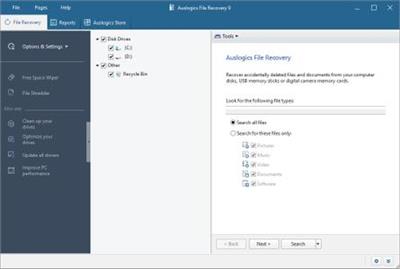
You can take advantage of the flexible search options to minimize file recovery time. The program allows you to select the drives you want to scan for deleted files and specify the types of files you are searching for. If you remember when the deleted files were last modified, you can specify a date range. In addition to that, you can search deleted files by name
Restore Data from Lost Partitions
File Recovery can locate the information about deleted portions of the disk, so that you will be able to recover files from a lost partition. This even applies to deleted portions of the disk that got reallocated for other partitions. File Recovery also detects files that were on the disk before it got formatted. And if it was just a quick format of a partition, the program will be able to recover these files.

Securely Erase Files
File Shredder is a valuable feature that should be used by anyone who wishes to ensure immediate and complete deletion of a confidential file from the current disk drive. Few users realize that files deleted in a usual way can be restored by powerful recovery programs such as Auslogics File Recovery even when the Recycle Bin is emptied. Files deleted with File Shredder cannot be restored by any file recovery software.

Support for Any Types of Drives And Devices
Auslogics File Recovery guarantees professional recovery of all file types from all kinds of media. With the program you can recover files deleted from your PC, external hard drives and USB sticks in a quick and easy way. The program also supports all types of digital cameras' and camcorders' memory cards, so any recently deleted picture or movie from your digital camera can be restored as well.

Create an Image of Your Disk
Take advantage of the program's useful feature that allows you to create a complete disk image. The disk image file is the exact image of the logical drive along with all the information contained on the disk, including deleted files. This option allows you to recover files from the disk image later on while continuing working with the logical drive. Having an image of your drive is also an excellent way to back up all your data.

Preview Files Before Recovering
Another major benefit of Auslogics File Recovery is its advanced preview options. The program allows you to preview photos, videos, documents and PDF files right from the program, while browsing through the list of files found during the scan. This option will help you to quickly find files you are searching for and decide which of them need to be recovered.

Wipe Free Disk Space
Similar to File Shredder, Disk Wiper securely deletes files from your disk drive. The difference is that this wizard will wipe the free space on your drive, so that any traces of deleted files are gone for good. You don't have to select specific files to delete - the tool only affects files that have already been deleted. Use this feature to be sure that none of your previously deleted files can ever be restored.

Operating System: Windows 7, 8/8.1, 10

Home Page -


DOWNLOAD LINKS:



Zurück
Oben Unten