• Regeln für den Software-Bereich:


    Allgemeines:

    - In erster Linie sind unsere Boardregeln zu beachten, zu finden HIER.
    - Software zur Audiobearbeitung sollte ausschließlich im Unterforum "Audio" eingestellt werden.
    - Für Cracks, Keygens oder sonstige Freischaltungssoftware gibt es das Unterforum "Freischaltung".
    - Portable Software bitte im entsprechenden Unterforum "Portable Software" eintragen.
    - Diskussionen zur Installation und anderen Problemen mit der Software, bitte im enstprechenden Unterforum "Talk" führen.
    - Bei Unklarheiten und Fragen zu den Regeln bitte die Moderatoren kontaktieren.


    Angebot erstellen

    - Die Struktur des Threadtitels muss wie folgt umgesetzt werden: Herstellername - Softwarename - Versionsnummer
    - Unnötige Zusätze im Threadtitel wie "HOT", "NEW" oder Punkte zwischen den Wörtern sind nicht erlaubt.
    - Achtet darauf immer nur die Hauptversion und deren Updates in einem Thread zusammenfassen, konkretes Beispiel: SoftwareXY v3.12 gehört in den selben Thread mit SoftwareXY v3.13; SoftwareXY v.4.1 gehört in einen neuen eigenen Thread. Ausgenommen hiervon sind Sammelthreads und Dauerangebote.
    - Bei nicht bekannten Herstellern oder Angebote einer privaten Software, ist die Programmbezeichnung + Versionsnummer ausreichend.
    - Besondere Beachtung gilt für den ersten Beitrag eines Angebots. Dort muss eine kurze Beschreibung der Software in deutscher Sprache angegeben werden. Für offizielle Releases ist es Pflicht die NFO im Beitrag einzustellen(Spoiler, siehe nächster Punkt).
    - Weitere Informationen wie NFOs oder Changelogs, versteckt ihr bitte in einem Spoiler.


    Software Suche

    - Für Suchanfragen haben wir das Unterforum "Suche" erstellt.
    - Auch hier sollte vorher die Suchfunktion benutzt werden, um Doppelthreads vorzubeugen. Sollte es bereits eine Suchanfrage geben, könnt ihr den Thread gerne mit einem "Danke" pushen.


    Trojaner- und Virusalarm

    - Falls Euer Virenscanner bei einem Angebot Alarm schlägt, solltet ihr zunächst Ruhe bewahren. Viele Virenscanner erkennen Cracks/Keygens oft fälschlicherweise als Bedrohung.
    - Prüft die verdächtige Datei zuerst mit http://virustotal.com , sollte es sich hierbei wirklich um eine Bedrohung handeln, meldet den Beitrag und/oder wendet euch mit dem Bericht von VirusTotal.com an einen Moderator.


    Unerwünschte Angebote

    - Keylogger, Spionagetools, alles rund ums Thema Hacking/Cracking ist nicht erwünscht.
  • Bitte registriere dich zunächst um Beiträge zu verfassen und externe Links aufzurufen.


Apowersoft Screen Recorder Pro v2

_Pink

MyBoerse.bz Pro Member
Apowersoft Screen Recorder Pro v2.0.4
rar / exe / crack / Multilanguage inkl. German

screen_recordery5xf2.png


Mit dem Screen Recorder zeichnen Sie schnell und bequem Desktop-Videos, Tutorials und Gaming-Videos auf.

Der Screen Recorder zeichnet für Sie sämtliche Bildschirminhalte Ihres PCs samt System- oder Mikrofonton auf und hält Sie im WMV-Format fest. Dadurch eignet sich das Tool hervorragend zum Erstellen von Desktop-Videos, Tutorials oder Gaming-Videos.


Hoster - Uploaded.net
Größe - 15 MB


Download
 
Apowersoft Screen Recorder Pro v2 0 5


Apowersoft Screen Recorder Pro v2.0.5

l1bjzlr2.jpg


Titel: Apowersoft Screen Recorder Pro v2.0.5
Genre: Multimedia & Video
Sprache/n: - keine Info verfügbar -
Hoster: Uploaded / Share-Online
Groesse: 15,555 MB
Passwort: - !!!KEIN PASSWORT!!! -

INFO: EXE

defy4vw8.jpg


Beschreibung:


Das Programm Bildschirmrecorder Pro ist eine vielseitige
Anwendung zum Aufnehmen von Bildschirmaktivitäten.

Mit nur einigen wenigen Schritten kann man alles auf dem
Bildschirm in hoher Qualität aufzeichnen. Man kann auch
Tonspuren des Mikrofons und Videos der Webcam aufzeichnen.

Der eingebaute Video-Konverter Videos nach Anforderungen in
viele Formate wie AVI, MP4, WMV, 3GP usw. zu konvertieren.
Während der Aufnahme kann man auch Wörter hinzufügen,
Zeichnungen anfertigen oder Graffiti erstellen.

Features:
- Bildschirmaktivität mit Ton aufnehmen
- Webcam-Videos in hoher Qualität aufzeichnen
- Video aus externen Geräten aufnehmen
- Videospiele vom Bildschirm aufnehmen
- Demo Videos erstellen
- Video-Anleitungen erstellen

xqjtnb9f.png


Uploaded / Share-Online
 
Apowersoft Screen Recorder Pro 2.1.0 - Multilingual


0034b2de_mediumvnsei.jpeg


Apowersoft Screen Recorder is an easy-to-use and professional desktop tool for recording screen and audio activity at the same time. It also allows you to save your videos as standard WMV files. By using its built-in converter, you can convert those WMVs into AVI, MP4, FLV, and SWF, and many other formats with no quality loss.

- Record your PC screen activity with audio
- Capture webcam videos with high quality
- Record video from external devices
- Capture video games on PC screen
- Record live streaming video from any web browser
- Make video demos as needed

OS: Windows
Lang: Multi
Size: 16,07 MB
Format: .exe
Hoster: Uploaded


Directload
​
 
Apowersoft Screen Recorder Pro 2.1.1 - Multilingual


0034b2de_mediumvnsei.jpeg


Apowersoft Screen Recorder is an easy-to-use and professional desktop tool for recording screen and audio activity at the same time. It also allows you to save your videos as standard WMV files. By using its built-in converter, you can convert those WMVs into AVI, MP4, FLV, and SWF, and many other formats with no quality loss.

- Record your PC screen activity with audio
- Capture webcam videos with high quality
- Record video from external devices
- Capture video games on PC screen
- Record live streaming video from any web browser
- Make video demos as needed

OS: Windows
Lang: Multi
Size: 16,07 MB
Format: .exe
Hoster: Uploaded


Directload
​
 
Apowersoft Screen Recorder Pro 2.1.2 - Multilingual


0034b2de_mediumvnsei.jpeg


Apowersoft Screen Recorder is an easy-to-use and professional desktop tool for recording screen and audio activity at the same time. It also allows you to save your videos as standard WMV files. By using its built-in converter, you can convert those WMVs into AVI, MP4, FLV, and SWF, and many other formats with no quality loss.

- Record your PC screen activity with audio
- Capture webcam videos with high quality
- Record video from external devices
- Capture video games on PC screen
- Record live streaming video from any web browser
- Make video demos as needed

OS: Windows
Lang: Multi
Size: 16,07 MB
Format: .exe
Hoster: Uploaded


Directload
​
 
Apowersoft Screen Recorder Pro 2.1.3 - Multilingual


0034b2de_mediumvnsei.jpeg


Apowersoft Screen Recorder is an easy-to-use and professional desktop tool for recording screen and audio activity at the same time. It also allows you to save your videos as standard WMV files. By using its built-in converter, you can convert those WMVs into AVI, MP4, FLV, and SWF, and many other formats with no quality loss.

- Record your PC screen activity with audio
- Capture webcam videos with high quality
- Record video from external devices
- Capture video games on PC screen
- Record live streaming video from any web browser
- Make video demos as needed

OS: Windows
Lang: Multi
Size: 16,07 MB
Format: .exe
Hoster: Uploaded


Directload
​
 
Apowersoft Screen Recorder Pro 2.1.4 (Build 08/06/2016) Multilingual


0034b2de_mediumvnsei.jpeg


Apowersoft Screen Recorder is an easy-to-use and professional desktop tool for recording screen and audio activity at the same time. It also allows you to save your videos as standard WMV files. By using its built-in converter, you can convert those WMVs into AVI, MP4, FLV, and SWF, and many other formats with no quality loss.

- Record your PC screen activity with audio
- Capture webcam videos with high quality
- Record video from external devices
- Capture video games on PC screen
- Record live streaming video from any web browser
- Make video demos as needed

OS: Windows
Lang: Multi
Size: 16,07 MB
Format: .exe
Hoster: Uploaded


Directload
​
 
Apowersoft Screen Recorder Pro 2.1.5 (Build 09/23/2016) Multilingual


0034b2de_mediumvnsei.jpeg


Apowersoft Screen Recorder is an easy-to-use and professional desktop tool for recording screen and audio activity at the same time. It also allows you to save your videos as standard WMV files. By using its built-in converter, you can convert those WMVs into AVI, MP4, FLV, and SWF, and many other formats with no quality loss.

- Record your PC screen activity with audio
- Capture webcam videos with high quality
- Record video from external devices
- Capture video games on PC screen
- Record live streaming video from any web browser
- Make video demos as needed

OS: Windows
Lang: Multi
Size: 16,63 MB
Format: .exe
Hoster: Uploaded


Directload
​
 
Apowersoft Screen Recorder Pro 2.1.5 (Build 10/12/2016) Multilingual


0034b2de_mediumvnsei.jpeg


Apowersoft Screen Recorder is an easy-to-use and professional desktop tool for recording screen and audio activity at the same time. It also allows you to save your videos as standard WMV files. By using its built-in converter, you can convert those WMVs into AVI, MP4, FLV, and SWF, and many other formats with no quality loss.

- Record your PC screen activity with audio
- Capture webcam videos with high quality
- Record video from external devices
- Capture video games on PC screen
- Record live streaming video from any web browser
- Make video demos as needed

OS: Windows
Lang: Multi
Size: 17,41 MB
Format: .exe
Hoster: Uploaded


Directload
​
 
Apowersoft Screen Recorder Pro 2.1.7 (Build 12/25/2016) Multilingual


0034b2de_mediumvnsei.jpeg


Apowersoft Screen Recorder is an easy-to-use and professional desktop tool for recording screen and audio activity at the same time. It also allows you to save your videos as standard WMV files. By using its built-in converter, you can convert those WMVs into AVI, MP4, FLV, and SWF, and many other formats with no quality loss.

- Record your PC screen activity with audio
- Capture webcam videos with high quality
- Record video from external devices
- Capture video games on PC screen
- Record live streaming video from any web browser
- Make video demos as needed

OS: Windows
Lang: Multi
Size: 16,89 MB
Format: .exe
Hoster: Uploaded


Directload
​
 
Apowersoft Screen Recorder Pro 2.4.1.9
Requirements: Windows 7 and later
Overview:
Apowersoft Screen Recorder is an easy-to-use and professional desktop tool for recording screen and audio activity at the same time. It also allows you to save your videos as standard WMV files. By using its built-in converter, you can convert those WMVs into AVI, MP4, FLV, and SWF, and many other formats with no quality loss.
tGbc0S1.png

- Record your PC screen activity with audio
- Capture webcam videos with high quality
- Record video from external devices
- Capture video games on PC screen
- Record live streaming video from any web browser
- Make video demos as needed

Record All Desktop Activities
Apowersoft Screen Recorder, which is a professional screen video recorder for Windows, allows you to capture the whole screen and audio activities with decent quality. So, you can record screen video with ease and make a tutorial for teaching or displaying at will.

Record Screen with Audio Simultaneously
It's really a brilliant feature that the application can record screen and video with audio from systems, Microphones, or both. More strikingly, it supports recording screen and audio activity synchronously, which eliminates the game players' doubt whether there exists a software capable of keeping the games and their voice in sync.

Record Video from Webcam
If you want to record screen video through a webcam, this screen recorder, which is available for Skype, MSN, and GTalk, as well as many others, can indeed do what you need. It saves the recording to standard WMV format file by default, so you can share it with others directly.

Record Live Streaming Video
Catering to different users, the Screen Video Recorder, which can apply to any website, is an excellent assistant to record any live streaming video from Twitch TV, BBC, CNN, and Livestream, as well as many other live video websites. It's the best choice to use for collecting video clips.

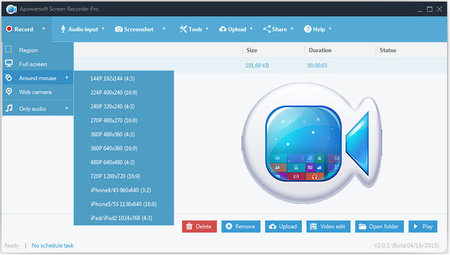
Multiple Recording Modes
Full Screen: records what happens on the entire computer screen.
Custom Area: enables you to select any portion of the screen to record.
Around Mouse: tracks your mouse to record.
Select Window: selects the window you launch on screen to record.
Obviously, these thoughtful modes win users' favor and users tend to choose this as their screen recording tool.

Create Scheduled Task
What makes it remarkable is that the program has a considerate design. That is, it enables you to create a scheduled task by presetting the start time and the customized duration. Thus, you can record screen video without staying in front of the computer.

Capture Screenshots
Someone wants to save the pictures displayed on videos or other places where it can't be saved directly, and this software can really satisfy you. It can capture whatever pictures you saw on your computer screen and save the captured pictures to a standard image format, such as JPG, PNG, BMG, GIF and TIFF.

Perfect Video Converter
After your recording, the built-in video converter can help you to convert the video better and faster. You can choose one of the formats that Screen Recorder Pro provides to convert, such as AVI, MP4, FLV, SWF, 3GP, MKV, and MPEG, or popular design formats for Apple, Android and Sony devices.
More Info:
Download Instructions:
Platform: Windows
Size: 23 MB
Format:".rar/.zip" archive.. ".exe" after extracting
Language: English
Hoster: uploaded

 
Zurück
Oben Unten