KAMAL
MyBoerse.bz Pro Member
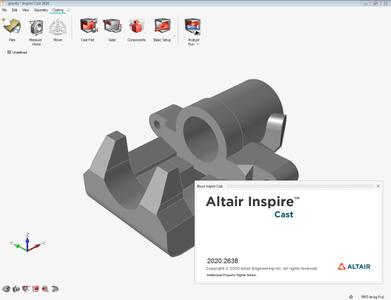
Altair Inspire Cast 2020.0 x64
Altair Inspire Cast 2020.0 x64 | 2.17 GB | Language: English
Altair announces most significant software update release in company history. Altair Cast 2020.0 - a casting process simulation software that allows the user to enhance and optimize their manufactured components.
All of Altair's software products have been updated with advancements in user experience and countless new features, including intuitive workflows that empower users to streamline product development, allowing customers to get to market faster.
The software update release expands on the number of solutions available for designers, engineers, data analysts, IT and HPC professionals, facility managers, and more to drive better decisions and accelerate the pace of innovation. It broadens the scope of the new user experience, enables access to more physics, data analytics, and machine learning, and makes the Altair software delivery method more flexible and accessible.
Altair Inspire Cast 2020 Release Notes - New Features
Altair Inspire Cast 2020 includes the following new features and enhancements.
User Interface Enhancements
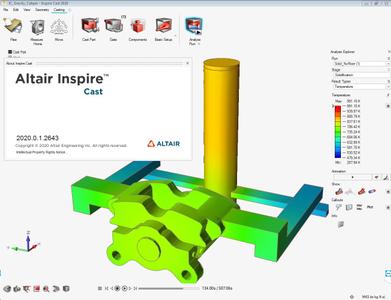
The Inspire Cast user interface has been updated for 2020 and features several new themes, as well as changes to selection and pre-highlighting colors. If you prefer the old background theme, just select Blue Twilight in the Preferences under Workspace > Theme.
Analysis Explorer Enhancements
The Analysis Explorer allows you to filter the results so that areas on the model with results greater than a specified value are masked. In addition, a Scale Factor option has been added to the animation settings window.
Simulation Parameters Information
Users can now quickly access all of the simulation settings used in a run in the Analysis Explorer. This includes information about the components, process parameters, stages, mesh, and model.
Mold Roughness
Users now have the option to select from three surface finishes to simulate friction between the liquid and the mold.
Altair Inspire Cast software is a fast, easy, accurate and affordable casting simulation environment focused on creating high quality components with increased profitability through a highly intuitive user experience. It is the only tool that caters to beginners and experts alike, from product designers to foundry engineers. Right from early design phase, users can visualize typical casting defects such as air entrapment, shrinkage porosity, cold shuts, mold degradation and rectify them avoiding costly downstream corrections. Guided process templates offer 5 easy steps to simulate Gravity Die, Gravity Sand, Investment, High Pressure, Low Pressure Die Casting and Tilt Pouring. Altair Inspire Cast's innovative experience enables users to increase product quality and design better products with a few hours of training.
A complete casting simulation in 5 easy steps through a highly intuitive user experience, catering to beginners and experts alike.
Altair is a global technology company that provides software and cloud solutions in the areas of product development, high performance computing (HPC) and data analytics. Altair enables organizations across broad industry segments to compete more effectively in a connected world while creating a more sustainable future.
Product: Altair Inspire Cast
Version: 2020.0 Build 2638 *
Supported Architectures: x64
Website Home Page :
Language: english
System Requirements: PC **
Size: 2.17 Gb
Operating Systems:
- Windows 7, Windows 8.1, Windows 10
- 64 bit only
Hardware:
- OpenGL graphics card with at least 256 MB of onboard memory
- Integrated Intel graphics hardware is currently not supported/li>
Memory:
- 4 GB of RAM (8 GB recommended)
- 10 GB or more of free hard disk space
DOWNLOAD LINKS:
Altair Inspire Cast 2020.0 x64 | 2.17 GB | Language: English
Altair announces most significant software update release in company history. Altair Cast 2020.0 - a casting process simulation software that allows the user to enhance and optimize their manufactured components.
All of Altair's software products have been updated with advancements in user experience and countless new features, including intuitive workflows that empower users to streamline product development, allowing customers to get to market faster.
The software update release expands on the number of solutions available for designers, engineers, data analysts, IT and HPC professionals, facility managers, and more to drive better decisions and accelerate the pace of innovation. It broadens the scope of the new user experience, enables access to more physics, data analytics, and machine learning, and makes the Altair software delivery method more flexible and accessible.
Altair Inspire Cast 2020 Release Notes - New Features
Altair Inspire Cast 2020 includes the following new features and enhancements.
User Interface Enhancements
The Inspire Cast user interface has been updated for 2020 and features several new themes, as well as changes to selection and pre-highlighting colors. If you prefer the old background theme, just select Blue Twilight in the Preferences under Workspace > Theme.
Analysis Explorer Enhancements
The Analysis Explorer allows you to filter the results so that areas on the model with results greater than a specified value are masked. In addition, a Scale Factor option has been added to the animation settings window.
Simulation Parameters Information
Users can now quickly access all of the simulation settings used in a run in the Analysis Explorer. This includes information about the components, process parameters, stages, mesh, and model.
Mold Roughness
Users now have the option to select from three surface finishes to simulate friction between the liquid and the mold.
Altair Inspire Cast software is a fast, easy, accurate and affordable casting simulation environment focused on creating high quality components with increased profitability through a highly intuitive user experience. It is the only tool that caters to beginners and experts alike, from product designers to foundry engineers. Right from early design phase, users can visualize typical casting defects such as air entrapment, shrinkage porosity, cold shuts, mold degradation and rectify them avoiding costly downstream corrections. Guided process templates offer 5 easy steps to simulate Gravity Die, Gravity Sand, Investment, High Pressure, Low Pressure Die Casting and Tilt Pouring. Altair Inspire Cast's innovative experience enables users to increase product quality and design better products with a few hours of training.
A complete casting simulation in 5 easy steps through a highly intuitive user experience, catering to beginners and experts alike.
Altair is a global technology company that provides software and cloud solutions in the areas of product development, high performance computing (HPC) and data analytics. Altair enables organizations across broad industry segments to compete more effectively in a connected world while creating a more sustainable future.
Product: Altair Inspire Cast
Version: 2020.0 Build 2638 *
Supported Architectures: x64
Website Home Page :
Language: english
System Requirements: PC **
Size: 2.17 Gb
Operating Systems:
- Windows 7, Windows 8.1, Windows 10
- 64 bit only
Hardware:
- OpenGL graphics card with at least 256 MB of onboard memory
- Integrated Intel graphics hardware is currently not supported/li>
Memory:
- 4 GB of RAM (8 GB recommended)
- 10 GB or more of free hard disk space
DOWNLOAD LINKS: