



• Regeln für den Software-Bereich:


    Allgemeines:

    - In erster Linie sind unsere Boardregeln zu beachten, zu finden HIER.
    - Software zur Audiobearbeitung sollte ausschließlich im Unterforum "Audio" eingestellt werden.
    - Für Cracks, Keygens oder sonstige Freischaltungssoftware gibt es das Unterforum "Freischaltung".
    - Portable Software bitte im entsprechenden Unterforum "Portable Software" eintragen.
    - Diskussionen zur Installation und anderen Problemen mit der Software, bitte im enstprechenden Unterforum "Talk" führen.
    - Bei Unklarheiten und Fragen zu den Regeln bitte die Moderatoren kontaktieren.


    Angebot erstellen

    - Die Struktur des Threadtitels muss wie folgt umgesetzt werden: Herstellername - Softwarename - Versionsnummer
    - Unnötige Zusätze im Threadtitel wie "HOT", "NEW" oder Punkte zwischen den Wörtern sind nicht erlaubt.
    - Achtet darauf immer nur die Hauptversion und deren Updates in einem Thread zusammenfassen, konkretes Beispiel: SoftwareXY v3.12 gehört in den selben Thread mit SoftwareXY v3.13; SoftwareXY v.4.1 gehört in einen neuen eigenen Thread. Ausgenommen hiervon sind Sammelthreads und Dauerangebote.
    - Bei nicht bekannten Herstellern oder Angebote einer privaten Software, ist die Programmbezeichnung + Versionsnummer ausreichend.
    - Besondere Beachtung gilt für den ersten Beitrag eines Angebots. Dort muss eine kurze Beschreibung der Software in deutscher Sprache angegeben werden. Für offizielle Releases ist es Pflicht die NFO im Beitrag einzustellen(Spoiler, siehe nächster Punkt).
    - Weitere Informationen wie NFOs oder Changelogs, versteckt ihr bitte in einem Spoiler.


    Software Suche

    - Für Suchanfragen haben wir das Unterforum "Suche" erstellt.
    - Auch hier sollte vorher die Suchfunktion benutzt werden, um Doppelthreads vorzubeugen. Sollte es bereits eine Suchanfrage geben, könnt ihr den Thread gerne mit einem "Danke" pushen.


    Trojaner- und Virusalarm

    - Falls Euer Virenscanner bei einem Angebot Alarm schlägt, solltet ihr zunächst Ruhe bewahren. Viele Virenscanner erkennen Cracks/Keygens oft fälschlicherweise als Bedrohung.
    - Prüft die verdächtige Datei zuerst mit http://virustotal.com , sollte es sich hierbei wirklich um eine Bedrohung handeln, meldet den Beitrag und/oder wendet euch mit dem Bericht von VirusTotal.com an einen Moderator.


    Unerwünschte Angebote

    - Keylogger, Spionagetools, alles rund ums Thema Hacking/Cracking ist nicht erwünscht.
  • Bitte registriere dich zunächst um Beiträge zu verfassen und externe Links aufzurufen.


Aiseesoft PDF to Excel Converter v3

mikemike

MyBoerse.bz Pro Member
Aiseesoft PDF to Excel Converter 3.2.18 Multilingual


0039dbd4_mediumchot5.jpeg


With Aiseesoft PDF to Excel Converter, it is very easy to quickly convert your PDF file to an editable Microsoft Excel file that you can save in XLSX or XLS format and preserve table formatting so your data is easy to work with. With optical character recognition (OCR) technology, this PDF to Excel conversion tool features accuracy and unmatched ability to convert scanned PDF documents to editable Excel files maintaining the original layout and formatting. Also selecting the output language as consistent as possible with the original file can improve the accuracy of the converted file.

Convert PDF document to an editable Excel file
Turn scanned text into editable data with OCR technology
Export only the PDF data you want into Excel spreadsheets for easy analysis and reporting
Support multi-language PDF files to be converted

OS: Windows
Lang: Multi
Size: 120,64 MB
Format: .exe
Hoster: Uploaded


Directload

 
Aiseesoft PDF to Excel Converter 3.2.20 Multilingual + Portable


0039dbd4_mediumchot5.jpeg


With Aiseesoft PDF to Excel Converter, it is very easy to quickly convert your PDF file to an editable Microsoft Excel file that you can save in XLSX or XLS format and preserve table formatting so your data is easy to work with. With optical character recognition (OCR) technology, this PDF to Excel conversion tool features accuracy and unmatched ability to convert scanned PDF documents to editable Excel files maintaining the original layout and formatting. Also selecting the output language as consistent as possible with the original file can improve the accuracy of the converted file.

Convert PDF document to an editable Excel file
Turn scanned text into editable data with OCR technology
Export only the PDF data you want into Excel spreadsheets for easy analysis and reporting
Support multi-language PDF files to be converted

OS: Windows
Lang: Multi
Size: 120,64 MB
Format: .exe
Hoster: Uploaded


Directload

 
Aiseesoft PDF to Excel Converter 3.3.8 Multilingual


0039dbd4_mediumchot5.jpeg


With Aiseesoft PDF to Excel Converter, it is very easy to quickly convert your PDF file to an editable Microsoft Excel file that you can save in XLSX or XLS format and preserve table formatting so your data is easy to work with. With optical character recognition (OCR) technology, this PDF to Excel conversion tool features accuracy and unmatched ability to convert scanned PDF documents to editable Excel files maintaining the original layout and formatting. Also selecting the output language as consistent as possible with the original file can improve the accuracy of the converted file.

Convert PDF document to an editable Excel file
Turn scanned text into editable data with OCR technology
Export only the PDF data you want into Excel spreadsheets for easy analysis and reporting
Support multi-language PDF files to be converted

OS: Windows
Lang: Multi
Size: 120,64 MB
Format: .exe
Hoster: Uploaded


Directload
 
Zuletzt bearbeitet:
Aiseesoft PDF to Excel Converter 3.3.10 Multilingual


0039dbd4_mediumchot5.jpeg


With Aiseesoft PDF to Excel Converter, it is very easy to quickly convert your PDF file to an editable Microsoft Excel file that you can save in XLSX or XLS format and preserve table formatting so your data is easy to work with. With optical character recognition (OCR) technology, this PDF to Excel conversion tool features accuracy and unmatched ability to convert scanned PDF documents to editable Excel files maintaining the original layout and formatting. Also selecting the output language as consistent as possible with the original file can improve the accuracy of the converted file.

Convert PDF document to an editable Excel file
Turn scanned text into editable data with OCR technology
Export only the PDF data you want into Excel spreadsheets for easy analysis and reporting
Support multi-language PDF files to be converted

OS: Windows
Lang: Multi
Size: 120,64 MB
Format: .exe
Hoster: Uploaded


Directload
 
Aiseesoft PDF to Excel Converter 3.3.12 Multilingual


0039dbd4_mediumchot5.jpeg


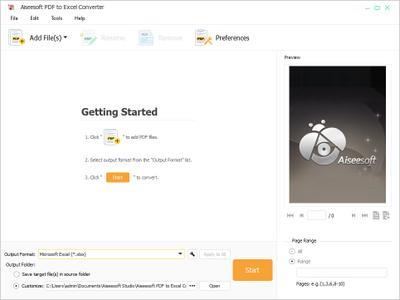
With Aiseesoft PDF to Excel Converter, it is very easy to quickly convert your PDF file to an editable Microsoft Excel file that you can save in XLSX or XLS format and preserve table formatting so your data is easy to work with. With optical character recognition (OCR) technology, this PDF to Excel conversion tool features accuracy and unmatched ability to convert scanned PDF documents to editable Excel files maintaining the original layout and formatting. Also selecting the output language as consistent as possible with the original file can improve the accuracy of the converted file.

Convert PDF document to an editable Excel file
Turn scanned text into editable data with OCR technology
Export only the PDF data you want into Excel spreadsheets for easy analysis and reporting
Support multi-language PDF files to be converted

OS: Windows
Lang: Multi
Size: 120,64 MB
Format: .exe
Hoster: Uploaded


Directload
 
Aiseesoft PDF to Excel Converter 3.3.18 Multilingual


0039dbd4_mediumchot5.jpeg


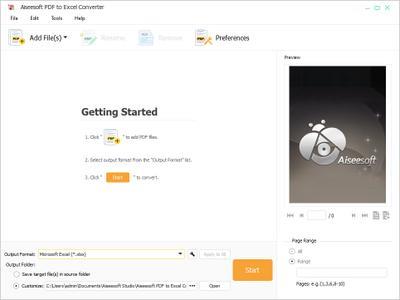
With Aiseesoft PDF to Excel Converter, it is very easy to quickly convert your PDF file to an editable Microsoft Excel file that you can save in XLSX or XLS format and preserve table formatting so your data is easy to work with. With optical character recognition (OCR) technology, this PDF to Excel conversion tool features accuracy and unmatched ability to convert scanned PDF documents to editable Excel files maintaining the original layout and formatting. Also selecting the output language as consistent as possible with the original file can improve the accuracy of the converted file.

Convert PDF document to an editable Excel file
Turn scanned text into editable data with OCR technology
Export only the PDF data you want into Excel spreadsheets for easy analysis and reporting
Support multi-language PDF files to be converted

OS: Windows
Lang: Multi
Size: 121,90 MB
Format: .exe
Hoster: Uploaded


Directload
 
Aiseesoft PDF to Excel Converter v3.3.30 Multilingual


129e0e930f0f3eee034becf2344d35b3.jpeg


Aiseesoft PDF to Excel Converter v3.3.30 Multilingual | 121 MB | Language: Multilanguage


PDF to Excel Converter allows you to quickly convert PDF file to an editable Microsoft Excel file that you can save in XLSX or XLS format and preserve table formatting.


Convert PDF to Excel file
Support converting PDF documents quickly back into XLSX or XLS, making the information and data trapped in the PDF document editable.

Equipped with the powerful OCR technology
Optical Character Recognition technology supports you to turn scanned text into editable data and accurately recognizes numbers and data.

Exact Spreadsheet Recognition and Conversion
All tables in PDF will be extracted accurately and the rows and columns structure will be the same as in the original file, but fully editable.

Convert PDF files to XLS or XLSX with best quality
Aiseesoft PDF to Excel Converter lets you convert PDF documents quickly and accurately back into editable Microsoft Excel files you can use right away. You can save PDF tables as Microsoft Excel 97-2003 (*.xls) or Microsoft Excel 2007 (*.xlsx). In the latter case, you can also check "page-per-sheet" option.

Support optical character recognition technology
To make a scanned PDF document editable, you can convert the image of the document into "real" text that can be edited and analyzed in Excel through OCR (Optical Character Recognition), and even pick language to improve conversion accuracy.

Convert selected PDF pages and batch PDF files
This PDF converting software can not only turn your entire PDF file into an Excel document, but also export just the data you need to Excel spreadsheets. If you want to edit only some of the information in PDF files, just enter the page numbers or page range you want. Then the pieces you have specified will be exported. Besides, importing multiple PDF files into the amazing software and converting them to Excel spreadsheets can help you save time.

Easier, faster, better
Intuitive and user-friendly interface makes it easier than ever to convert PDF files to Excel documents. With excellent encoding and decoding technology, this PDF Excel converter provides you with super fast conversion speed and perfect output quality.

Operating System: Windows 7, 8/8.1, 10

Home Page -


DOWNLOAD LINKS:


Aiseesoft PDF to Excel Converter v3.3.32 Multilingual


1a4fc0d1f9c19bb9243990b07f1a20ec.jpeg


Aiseesoft PDF to Excel Converter v3.3.32 Multilingual | 121 MB | Language: Multilanguage


PDF to Excel Converter allows you to quickly convert PDF file to an editable Microsoft Excel file that you can save in XLSX or XLS format and preserve table formatting.


Convert PDF to Excel file
Support converting PDF documents quickly back into XLSX or XLS, making the information and data trapped in the PDF document editable.

Equipped with the powerful OCR technology
Optical Character Recognition technology supports you to turn scanned text into editable data and accurately recognizes numbers and data.

Exact Spreadsheet Recognition and Conversion
All tables in PDF will be extracted accurately and the rows and columns structure will be the same as in the original file, but fully editable.

Convert PDF files to XLS or XLSX with best quality
Aiseesoft PDF to Excel Converter lets you convert PDF documents quickly and accurately back into editable Microsoft Excel files you can use right away. You can save PDF tables as Microsoft Excel 97-2003 (*.xls) or Microsoft Excel 2007 (*.xlsx). In the latter case, you can also check "page-per-sheet" option.

Support optical character recognition technology
To make a scanned PDF document editable, you can convert the image of the document into "real" text that can be edited and analyzed in Excel through OCR (Optical Character Recognition), and even pick language to improve conversion accuracy.

Convert selected PDF pages and batch PDF files
This PDF converting software can not only turn your entire PDF file into an Excel document, but also export just the data you need to Excel spreadsheets. If you want to edit only some of the information in PDF files, just enter the page numbers or page range you want. Then the pieces you have specified will be exported. Besides, importing multiple PDF files into the amazing software and converting them to Excel spreadsheets can help you save time.

Easier, faster, better
Intuitive and user-friendly interface makes it easier than ever to convert PDF files to Excel documents. With excellent encoding and decoding technology, this PDF Excel converter provides you with super fast conversion speed and perfect output quality.

Operating System: Windows 7, 8/8.1, 10

Home Page -


Größe: 121 MB
Sprache: Multilingual-Deutsch
Format: .rar / .exe
Plattform: Windows (32 Bit 64 Bit)


HOSTER:

K2s.cc (Keep2Share)

Rapidgator.net

Nitroflare.com

Uploadgig.com


DOWNLOAD


0DWf5L2.png


Aiseesoft PDF to Excel Converter 3.3.32 Multilingual


File size: 122 MB

With Aiseesoft PDF to Excel Converter, it is very easy to quickly convert your PDF file to an editable Microsoft Excel file that you can save in XLSX or XLS format and preserve table formatting so your data is easy to work with.​

With optical character recognition (OCR) technology, this PDF to Excel conversion tool features accuracy and unmatched ability to convert scanned PDF documents to editable Excel files maintaining the original layout and formatting. Also selecting the output language as consistent as possible with the original file can improve the accuracy of the converted file.
Convert PDF document to an editable Excel file

Turn scanned text into editable data with OCR technology

Export only the PDF data you want into Excel spreadsheets for easy analysis and reporting

Support multi-language PDF files to be converted

Convert PDF to Excel file

Turn your entire PDF file into an Excel document

Aiseesoft PDF to Excel Converter lets you convert PDF documents quickly and accurately back into editable Microsoft Excel files you can use right away. You can save PDF stables as Microsoft Excel 97-2003 (*.xls) or Microsoft Excel 2007 (*.xlsx). In the latter case, you can also check "page-per-sheet" option.

Export just the data you need to Excel spreadsheets

If you want to edit only some of the information in PDF files, just enter the page numbers or page range you want. Then the pieces you have specified will be exported.

Save with batch processing

Importing multiple PDF files into the amazing software and converting them to Excel spreadsheets can help you save . It's just that convenient.

Support multi-language PDF files

Our PDF to Excel conversion software supports multi-language PDF files, including English, German, French, Japanese, Latin, Korean, Turkish, Thai, Greek, Cyrillic, Arabic, and Chinese, etc.

Support OCR Technology

Support optical character recognition technology

To make a scanned PDF document editable, you can convert the image of the document into "real" text that can be edited and analyzed in Excel through OCR(Optical Character Recognition), and even pick language to improve conversion accuracy.

Easier, faster and better

Easy to use

Intuitive and user-friendly interface makes it easier than ever to convert PDF files to Excel documents.

Super fast conversion

With excellent encoding and decoding technology, this PDF Excel converter provides you with super fast conversion speed and perfect output quality.

Updates: official site does not provide any info about changes in this version.


0DWf5L2.png


Aiseesoft PDF to Excel Converter 3.3.32 Multilingual


File size: 122 MB

With Aiseesoft PDF to Excel Converter, it is very easy to quickly convert your PDF file to an editable Microsoft Excel file that you can save in XLSX or XLS format and preserve table formatting so your data is easy to work with.​

With optical character recognition (OCR) technology, this PDF to Excel conversion tool features accuracy and unmatched ability to convert scanned PDF documents to editable Excel files maintaining the original layout and formatting. Also selecting the output language as consistent as possible with the original file can improve the accuracy of the converted file.
Convert PDF document to an editable Excel file

Turn scanned text into editable data with OCR technology

Export only the PDF data you want into Excel spreadsheets for easy analysis and reporting

Support multi-language PDF files to be converted

Convert PDF to Excel file

Turn your entire PDF file into an Excel document

Aiseesoft PDF to Excel Converter lets you convert PDF documents quickly and accurately back into editable Microsoft Excel files you can use right away. You can save PDF stables as Microsoft Excel 97-2003 (*.xls) or Microsoft Excel 2007 (*.xlsx). In the latter case, you can also check "page-per-sheet" option.

Export just the data you need to Excel spreadsheets

If you want to edit only some of the information in PDF files, just enter the page numbers or page range you want. Then the pieces you have specified will be exported.

Save with batch processing

Importing multiple PDF files into the amazing software and converting them to Excel spreadsheets can help you save . It's just that convenient.

Support multi-language PDF files

Our PDF to Excel conversion software supports multi-language PDF files, including English, German, French, Japanese, Latin, Korean, Turkish, Thai, Greek, Cyrillic, Arabic, and Chinese, etc.

Support OCR Technology

Support optical character recognition technology

To make a scanned PDF document editable, you can convert the image of the document into "real" text that can be edited and analyzed in Excel through OCR(Optical Character Recognition), and even pick language to improve conversion accuracy.

Easier, faster and better

Easy to use

Intuitive and user-friendly interface makes it easier than ever to convert PDF files to Excel documents.

Super fast conversion

With excellent encoding and decoding technology, this PDF Excel converter provides you with super fast conversion speed and perfect output quality.

Updates: official site does not provide any info about changes in this version.


Aiseesoft PDF to Excel Converter 3.3.36 Multilingual


e84a108488d18719a151d7b60983d33e.png


Aiseesoft PDF to Excel Converter 3.3.36 Multilingual


Mit Aiseesoft PDF to Excel Converter ist es sehr einfach, Ihre PDF-Datei schnell in eine bearbeitbare Microsoft Excel-Datei zu konvertieren, die Sie im XLSX- oder XLS-Format speichern und die Tabellenformatierung beibehalten können, damit Ihre Daten einfach zu bearbeiten sind.


Sprache: Deutsch, Multi | Größe: 118 MB | Format: RAR, EXE | Plattform: Windows 7, 8/8.1, 10, 11 (32/64Bit)


Hoster:
UploadGig.com | RapidGator.net | DDownload.com | NitroFlare.com


DOWNLOAD Links:


iqux1y6imjyrynillvdzxedfar.png


Aiseesoft PDF to Excel Converter 3.3.36 (32 oder 64-Bit) Multilingual


Plattform: windows 10 , 8 , 8.1 , 7 , 11 (32 oder 64-Bit)
Größe: 118.14 MB
Sprache(n) -> multi / deutsch / englisch
Format: rar / exe
Hoster: rapidgator / ddownload / nitroflare


Mit Aiseesoft PDF to Excel Converter ist es sehr einfach, Ihre PDF-Datei schnell in eine bearbeitbare Microsoft Excel-Datei zu konvertieren, die Sie im XLSX- oder XLS-Format speichern und die Tabellenformatierung beibehalten können, damit Ihre Daten einfach zu bearbeiten sind. Mit optischer Zeichenerkennungstechnologie (OCR) bietet dieses PDF-zu-Excel-Konvertierungstool Genauigkeit und unübertroffene Fähigkeit, gescannte PDF-Dokumente in bearbeitbare Excel-Dateien zu konvertieren, wobei das ursprüngliche Layout und die ursprüngliche Formatierung beibehalten werden. Auch die Auswahl der Ausgabesprache so konsistent wie möglich mit der Originaldatei kann die Genauigkeit der konvertierten Datei verbessern. Konvertieren Sie ein PDF-Dokument in eine bearbeitbare Excel-Datei. Verwandeln Sie gescannten Text in bearbeitbare Daten mit OCR-Technologie. Exportieren Sie nur die gewünschten PDF-Daten in Excel-Tabellen einfache Analyse und Berichterstattung Unterstützung mehrsprachiger zu konvertierender PDF-Dateien PDF in Excel-Datei konvertieren Wandeln Sie Ihre gesamte PDF-Datei in ein Excel-Dokument um Mit Aiseesoft PDF to Excel Converter können Sie PDF-Dokumente schnell und genau wieder in bearbeitbare Microsoft Excel-Dateien konvertieren, die Sie direkt verwenden können ein Weg. Sie können PDF-Ställe als Microsoft Excel 97-2003 (*.xls) oder Microsoft Excel 2007 (*.xlsx) speichern. Im letzteren Fall können Sie auch die Option „Seite pro Blatt“ aktivieren. Exportieren Sie nur die benötigten Daten in Excel-Tabellen. Wenn Sie nur einige der Informationen in PDF-Dateien bearbeiten möchten, geben Sie einfach die Seitenzahlen oder den Seitenbereich ein wollen. Dann werden die von Ihnen angegebenen Teile exportiert. Sparen Sie Zeit mit der Stapelverarbeitung Durch das Importieren mehrerer PDF-Dateien in die erstaunliche Software und das Konvertieren in Excel-Tabellen können Sie Zeit sparen. Es ist einfach so bequem.

Download:
3n4lcsdgx9kme.gif


Zurück
Oben Unten