• Regeln für den Video-Bereich:

    In den Börsenbereich gehören nur Angebote die bereits den Allgemeinen Regeln entsprechen.

    Einteilung

    - Folgende Formate gehören in die angegeben Bereiche:
    - Filme: Encodierte Filme von BluRay, DVD, R5, TV, Screener sowie Telesyncs im Format DivX, XviD und x264.
    - DVD: Filme im Format DVD5, DVD9 und HD2DVD.
    - HD: Encodierte Filme mit der Auflösung 720p oder darüber von BluRay, DVD, R5, TV, Screener sowie Telesyncs im Format x264.
    - 3D: Encodierte Filme von BluRay, die in einem 3D Format vorliegen. Dies gilt auch für Dokus, Animation usw.
    - Serien: Cartoon/Zeichentrick, Anime, Tutorials, Dokumentationen, Konzerte/Musik, Sonstiges sind demnach in die entsprechenden Bereiche einzuordnen, auch wenn sie beispielsweise im High Definition-Format oder als DVD5/DVD9/HD2DVD vorliegen. Ausnahme 3D.
    - Bereich Englisch: Englische Releases gehören immer in diesen Bereich.
    - Bereich Talk: Der Bereich, in dem über die Releases diskutiert werden kann, darf, soll und erwünscht ist.


    Angebot/Beitrag erstellen

    - Ein Beitrag darf erst dann erstellt werden, wenn der Upload bei mindestens einem OCH komplett ist. Platzhalter sind untersagt.
    - Bei einem Scenerelease hat der Threadtitel ausschließlich aus dem originalen, unveränderten Releasenamen zu bestehen. Es dürfen keine Veränderungen wie z.B. Sterne, kleine Buchstaben o.ä. vorgenommen werden. Ausnahme Serienbörse:
    - Bei einem Sammelthread für eine Staffel entfällt aus dem Releasename natürlich der Name der Folge. Beispiel: Die Simpsons S21 German DVDRip XviD - ITG
    - Dementsprechend sind also u.a. verboten: Erweiterungen wie "Tipp", "empfehlenswert", "only", "reup", usw. / jegliche andere Zusatzinformation oder Ergänzung, welche nicht in obiger Beschreibung zu finden ist.

    Aufbau des Angebots und Threadtitel

    Der Titel nach folgendem Muster erstellt zu werden. <Name> [3D] [Staffel] [German] <Jahr> <Tonspur> [DL] [Auflösung] <Quelle> <Codec> - <Group>
    Beispiel: The Dark Knight German 2008 AC3 DVDRip XviD - iND
    Beispiel: The Dark Knight 2008 DTS DL BDRip x264 - iND
    Beispiel: The Dark Knight 2008 AC3 DL BDRip XviD - iND
    Beispiel: The Dark Knight German 2008 AC3 720p BluRay x264 iND
    Beispiel: The Dark Knight 2008 DTS DL 1080p BluRay x264 iND
    Beispiel: Die Simpsons S01 German AC3 DVDRip XviD iND
    Beispiel: Die Simpsons S20 German AC3 720p BluRay x264 iND
    Beispiel: Sword Art Online II Ger Sub 2014 AAC 1080p WEBRip x264 - peppermint
    Entsprechend sind also u.a. verboten: Sonderzeichen wie Klammern, Sterne, Ausrufezeichen, Unterstriche, Anführungszeichen / Erweiterungen wie "Tipp", "empfehlenswert", "only", "reup", usw. / jegliche andere Zusatzinformation oder Ergänzung, welche nicht in obiger Beschreibung zu finden ist
    Ausnahmen hiervon können in den Bereichen geregelt sein.

    Die Beiträge sollen wie folgt aufgebaut werden:
    Überschrift entspricht dem Threadtitel
    Cover
    kurze Inhaltsbeschreibung
    Format, Größe, Dauer sind gut lesbar für Downloader außerhalb des Spoilers zu vermerken
    Nfo sind immer Anzugeben und selbige immer im Spoiler in Textform.
    Sind keine Nfo vorhanden z.B. Eigenpublikationen, sind im Spoiler folgende Dateiinformationen zusätzlich anzugeben :
    Quelle
    Video (Auflösung und Bitrate)
    Ton (Sprache, Format und Bitrate der einzelnen Spuren)
    Untertitel (sofern vorhanden)
    Hosterangabe in Textform außerhalb eines Spoiler mit allen enthaltenen Hostern.
    Bei SD kann auf diese zusätzlichen Dateiinformationen verzichtet werden.

    Alle benötigten Passwörter sind, sofern vorhanden, in Textform im Angebot anzugeben.
    Spoiler im Spoiler mit Kommentaren :"Schon Bedankt?" sind unerwünscht.


    Releases

    - Sind Retail-Release verfügbar, sind alle anderen Variationen untersagt. Ausnahmen: Alle deutschen Retail-Release sind CUT, in diesem Fall sind dubbed UNCUT-Release zulässig.
    - Im Serien-Bereich gilt speziell: Wenn ein Retail vor Abschluss einer laufenden Staffel erscheint, darf diese Staffel noch zu Ende gebracht werden.62
    - Gleiche Releases sind unbedingt zusammenzufassen. Das bedeutet, es ist zwingend erforderlich, vor dem Erstellen eines Themas per Suchfunktion zu überprüfen, ob bereits ein Beitrag mit demselben Release besteht. Ist dies der Fall, ist der bereits vorhandene Beitrag zu verwenden.
    - P2P und Scene Releases dürfen nicht verändert oder gar unter einem iND Tag eingestellt werden.


    Support, Diskussionen und Suche

    - Supportanfragen sind entweder per PN oder im Bereich Talk zu stellen.
    - Diskussionen und Bewertungen sind im Talk Bereich zu führen. Fragen an die Uploader haben ausschließlich via PN zu erfolgen, und sind in den Angeboten untersagt.
    - Anfragen zu Upload-Wünschen sind nur im Bereich Suche Video erlaubt. Antworten dürfen nur auf Angebote von MyBoerse.bz verlinkt werden.


    Verbote

    - Untersagt sind mehrere Formate in einem einzigen Angebotsthread, wie beispielsweise das gleichzeitige Anbieten von DivX/XviD, 720p und 1080p in einem Thread. Pro Format, Release und Auflösung ist ein eigener Thread zu eröffnen.
    - Grundsätzlich ebenso verboten sind Dupes. Uploader haben sich an geeigneter Stelle darüber zu informieren, ob es sich bei einem Release um ein Dupe handelt.
    - Gefakte, nur teilweise lauffähige oder unvollständige Angebote sind untersagt. Dies gilt auch für eigene Publikationen, die augenscheinlich nicht selbst von z.B. einer DVD gerippt wurden. Laufende Serien, bei denen noch nicht alle Folgen verfügbar sind, dürfen erstellt und regelmäßig geupdatet werden.
    - Untersagt sind Angebote, welche nur und ausschließlich in einer anderen Sprache als deutsch oder englisch vorliegen. Ausnahmen sind VORHER mit den Moderatoren zu klären.


    Verstoß gegen die Regeln

    - Angebote oder Beiträge, die gegen die Forenregeln verstoßen, sind über den "Melden"-Button im Beitrag zu melden.
  • Bitte registriere dich zunächst um Beiträge zu verfassen und externe Links aufzurufen.

++ Premium IPTV ++ 7000 Live Sender ++ UHD Qualität ++ Mediathek mit 18.000 Inhalten ++


VenneTV


AI For Developers With GitHub Copilot, Cursor AI & ChatGPT

babymore87

MyBoerse.bz Pro Member

0552f8bc715676c76d21efb273a268b3.jpeg

Free Download AI For Developers With GitHub Copilot, Cursor AI & ChatGPT
Published 10/2024
Created by Academind by Maximilian Schwarzmüller,Maximilian Schwarzmüller
MP4 | Video: h264, 1280x720 | Audio: AAC, 44.1 KHz, 2 Ch
Genre: eLearning | Language: English + subtitle | Duration: 73 Lectures ( 4h 45m ) | Size: 2.44 GB

Leverage AI to boost your productivity as a developer: Use GitHub Copilot, Cursor AI and ChatGPT for efficient coding
What you'll learn
Use GitHub Copilot to write, test and improve code with AI suggestions
Configure and fine-tune GitHub Copilot chat for your requirements as a developer
Generate and enhance code with Cursor AI
Use Cursor AI smart suggestions, completions, Composer and chat
Plan projects and create assets with ChatGPT or other external AI services
Understand prompt engineering essentials to get the most accurate AI outputs
Build a complete demo project (REST API) leveraging GitHub Copilot, Cursor AI and ChatGPT
Requirements
Basic understanding of programming concepts is required
Familiarity with GitHub is recommended but not required
No prior AI experience necessary to succeed in this course
Description
AI is not a threat-it's an incredibly powerful tool that can help you become an even more efficient and productive developer. While AI can generate code snippets and assist with routine tasks, it still needs your developer expertise to create safe, reliable and complex applications. This course is all about teaching you how to combine your developer skills with AI tools to supercharge your coding process.In today's fast-paced world of development, AI can be your secret weapon. By learning how to use AI tools like GitHub Copilot and Cursor AI efficiently, you can make routine coding tasks faster and easier, leaving you more time to focus on the most important and creative aspects of development. This course shows you exactly how to do that.You'll discover how to integrate AI seamlessly into your workflow, ensuring that it complements your knowledge without replacing the essential role you play as a developer. AI is here to enhance, not replace, your skills.Through hands-on lessons with GitHub Copilot, Cursor AI and external services like ChatGPT, you'll learn how to leverage AI to improve your coding speed, enhance productivity, and tackle complex challenges more efficiently. Whether you're just starting out or already have experience, this course will teach you how to use these tools to your advantage.What's in this course?Introduction to GitHub Copilot: Learn what GitHub Copilot is. Explore its core features like code suggestions, contextual code assistance and even debugging your code.Advanced GitHub Copilot Usage: Dive into more advanced features such as generating unit tests, configuring chat settings and understanding how to prompt the AI for more complex tasks.Mastering Cursor IDE: Discover how Cursor helps with code completion, chat, Cursor Composer and smart suggestions to make coding faster and more intuitive.External AI Tools: Learn how to integrate external services like ChatGPT into your workflow to streamline tasks like project planning, researching and even asset generation.Real-World Practice Project: I'll walk you through creating a REST API from scratch using AI tools. From planning and structuring the app to generating code, implementing features and debugging, you'll see how AI tools can assist every step of the way.Prompt Engineering Essentials: Learn how to fine-tune your prompts to get the best outputs from AI, helping you avoid common pitfalls and optimize efficiency.Debugging and Troubleshooting with AI: See how AI tools can assist with error detection, fixing bugs and improving your code's overall quality.Connect your dev knowledge with AI tools...This course doesn't just give you theory-you'll get practical examples and demos. You'll see firsthand how AI can enhance your coding experience, from writing cleaner code to automating repetitive tasks.If you're a developer who wants to stay ahead of the curve, this is the course for you! The future of development is here, and AI will be a key part of it.Check out the full curriculum, watch the free preview videos, and enroll today to start your AI-powered coding journey.
Who this course is for
Developers looking to boost productivity with GitHub Copilot, Cursor and other AI tools
Anyone curious about AI-driven development and seeking hands-on experience with real projects
Homepage
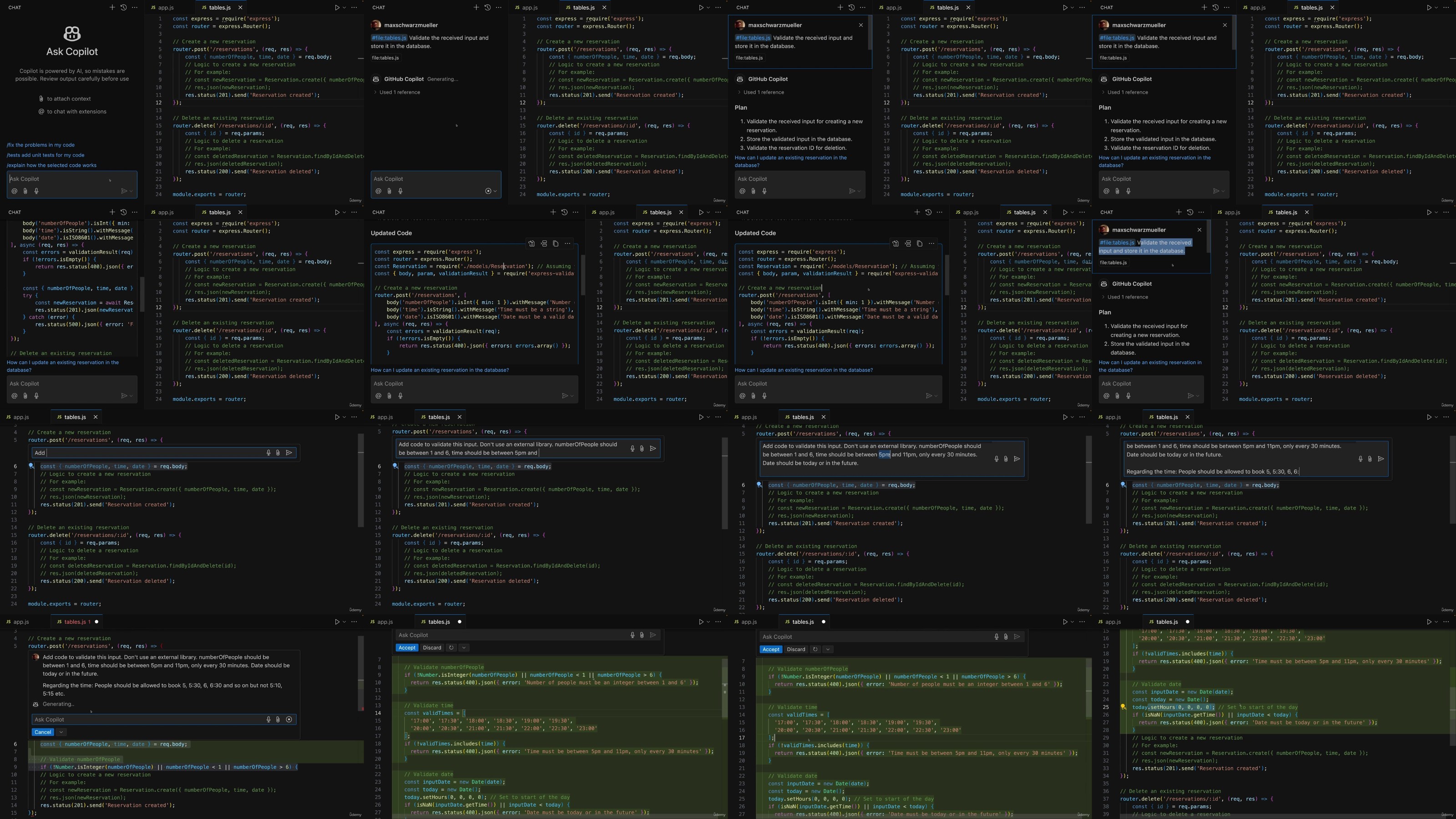
Screenshot


Recommend Download Link Hight Speed | Please Say Thanks Keep Topic Live
No Password - Links are Interchangeable

 

4b7f6e9e62c345ca08623c3d51984e22.jpg

Ai For Developers With Github Copilot, Cursor Ai & Chatgpt
Last updated 11/2024
MP4 | Video: h264, 1280x720 | Audio: AAC, 44.1 KHz
Language: English (US) | Size: 1.61 GB | Duration: 4h 58m​

Leverage AI to boost your productivity as a developer: Use GitHub Copilot, Cursor AI and ChatGPT for efficient coding

What you'll learn
Use GitHub Copilot to write, test and improve code with AI suggestions
Configure and fine-tune GitHub Copilot chat for your requirements as a developer
Generate and enhance code with Cursor AI
Use Cursor AI smart suggestions, completions, Composer and chat
Plan projects and create assets with ChatGPT or other external AI services
Understand prompt engineering essentials to get the most accurate AI outputs
Build a complete demo project (REST API) leveraging GitHub Copilot, Cursor AI and ChatGPT

Requirements
Basic understanding of programming concepts is required
Familiarity with GitHub is recommended but not required
No prior AI experience necessary to succeed in this course

Description
This is THE course developers should take to leverage AI efficiently!AI is not a threat-it's an incredibly powerful tool that can help you become an even more efficient and productive developer. While AI can generate code snippets and assist with routine tasks, it still needs your developer knowledge to create safe, reliable and complex applications. This course is all about teaching you how to combine your developer skills with AI tools to boost your developer productivity.By learning how to use AI tools like GitHub Copilot and Cursor AI efficiently, you can make routine coding tasks faster and easier, leaving you more time to focus on the most important and creative aspects of development. This course shows you exactly how to do that.You'll discover how to integrate AI seamlessly into your workflow, ensuring that it complements your knowledge without replacing the essential role you play as a developer. AI is here to enhance, not replace, your skills.Through practical demos with GitHub Copilot, Cursor AI and external services like ChatGPT, you'll learn how to leverage AI to improve your coding speed, enhance productivity, and solve complex challenges more efficiently. Whether you're just starting out or already have experience, this course will teach you how to use these tools to your advantage.What's in this course?Introduction to GitHub Copilot: Learn what GitHub Copilot is. Explore its core features like code suggestions, chat and contextual code assistance.Advanced GitHub Copilot Usage: Dive into more advanced features such as generating unit tests, configuring chat settings and understanding how to prompt the AI for more complex tasks.Mastering Cursor AI: Discover how Cursor helps with code completion, chat, Cursor Composer and smart suggestions to make coding faster and more intuitive.External AI Tools: Learn how to integrate external services like ChatGPT into your workflow to streamline tasks like project planning, researching and even asset generation.Real-World Practice Project: I'll walk you through creating a REST API from scratch using AI tools. From planning and structuring the app to generating code, implementing features and fixing errors, you'll see how AI tools can assist every step of the way.Prompt Engineering Essentials: Learn how to fine-tune your prompts to get the best outputs from AI, helping you avoid common pitfalls and optimize efficiency.Debugging and Troubleshooting with AI: See how AI tools can assist with error detection, fixing bugs and improving your code's overall quality.This course is short, practical, and straight to the point, designed to equip you with everything you need to start boosting your productivity right away.I think the future of development is about collaboration between AI and developers-and this course teaches you the tools you need to do so.Check out the full curriculum, watch the free preview videos and enrol now to take your coding efficiency to the next level with AI!

Who this course is for:
Developers looking to boost productivity with GitHub Copilot, Cursor and other AI tools,Anyone curious about AI-driven development and seeking hands-on experience with real projects

For More Courses Visit & Bookmark Your Preferred Language Blog
From Here: - - - - - - - -


kZDMpYie_o.jpg


3b8b8a92f3303ecdc8d56af2bc02b02a.jpg

Ai For Developers With Github Copilot, Cursor Ai & Chatgpt
Published 10/2024
MP4 | Video: h264, 1920x1080 | Audio: AAC, 44.1 KHz
Language: English | Size: 2.82 GB | Duration: 4h 46m​

Leverage AI to boost your productivity as a developer: Use GitHub Copilot, Cursor AI and ChatGPT for efficient coding

What you'll learn

Use GitHub Copilot to write, test and improve code with AI suggestions

Configure and fine-tune GitHub Copilot chat for your requirements as a developer

Generate and enhance code with Cursor AI

Use Cursor AI smart suggestions, completions, Composer and chat

Plan projects and create assets with ChatGPT or other external AI services

Understand prompt engineering essentials to get the most accurate AI outputs

Build a complete demo project (REST API) leveraging GitHub Copilot, Cursor AI and ChatGPT

Requirements

Basic understanding of programming concepts is required

Familiarity with GitHub is recommended but not required

No prior AI experience necessary to succeed in this course

Description

AI is not a threat-it's an incredibly powerful tool that can help you become an even more efficient and productive developer. While AI can generate code snippets and assist with routine tasks, it still needs your developer expertise to create safe, reliable and complex applications. This course is all about teaching you how to combine your developer skills with AI tools to supercharge your coding process.In today's fast-paced world of development, AI can be your secret weapon. By learning how to use AI tools like GitHub Copilot and Cursor AI efficiently, you can make routine coding tasks faster and easier, leaving you more time to focus on the most important and creative aspects of development. This course shows you exactly how to do that.You'll discover how to integrate AI seamlessly into your workflow, ensuring that it complements your knowledge without replacing the essential role you play as a developer. AI is here to enhance, not replace, your skills.Through hands-on lessons with GitHub Copilot, Cursor AI and external services like ChatGPT, you'll learn how to leverage AI to improve your coding speed, enhance productivity, and tackle complex challenges more efficiently. Whether you're just starting out or already have experience, this course will teach you how to use these tools to your advantage.What's in this course?Introduction to GitHub Copilot: Learn what GitHub Copilot is. Explore its core features like code suggestions, contextual code assistance and even debugging your code.Advanced GitHub Copilot Usage: Dive into more advanced features such as generating unit tests, configuring chat settings and understanding how to prompt the AI for more complex tasks.Mastering Cursor IDE: Discover how Cursor helps with code completion, chat, Cursor Composer and smart suggestions to make coding faster and more intuitive.External AI Tools: Learn how to integrate external services like ChatGPT into your workflow to streamline tasks like project planning, researching and even asset generation.Real-World Practice Project: I'll walk you through creating a REST API from scratch using AI tools. From planning and structuring the app to generating code, implementing features and debugging, you'll see how AI tools can assist every step of the way.Prompt Engineering Essentials: Learn how to fine-tune your prompts to get the best outputs from AI, helping you avoid common pitfalls and optimize efficiency.Debugging and Troubleshooting with AI: See how AI tools can assist with error detection, fixing bugs and improving your code's overall quality.Connect your dev knowledge with AI tools.This course doesn't just give you theory-you'll get practical examples and demos. You'll see firsthand how AI can enhance your coding experience, from writing cleaner code to automating repetitive tasks.If you're a developer who wants to stay ahead of the curve, this is the course for you! The future of development is here, and AI will be a key part of it.Check out the full curriculum, watch the free preview videos, and enroll today to start your AI-powered coding journey.

Overview

Section 1: Getting Started

Lecture 1 Welcome To The Course!

Lecture 2 Course Overview: What You'll Learn & Achieve

Lecture 3 Course Focus: AI Programming Tools & Beyond

Lecture 4 Understanding AI: Limitations, Costs & Unpredictability

Section 2: Leverage GitHub Copilot Suggestions & Chat

Lecture 5 Introducing GitHub Copilot

Lecture 6 GitHub Copilot: AI Code Completion For Developers

Lecture 7 Installing & Setting Up GitHub Copilot

Lecture 8 Using AI Powered Code Suggestions To Write Code

Lecture 9 Mastering Prompts: Using Comments To Guide Github Copilot's AI

Lecture 10 Writing A Full Python Script With Suggestions

Lecture 11 Using The Inline Chat Feature To Add Error Handling

Lecture 12 Configuring the Chat: Tips For Efficient Use

Lecture 13 Exploring The Sidebar Chat For More Complex Tasks

Lecture 14 Adding Context: Using References & Shortcuts For Smarter Code Creation

Lecture 15 Adding Additional Participants For Enhanced Sidebar Chat Context

Lecture 16 Running Terminal Commands Efficiently With AI

Lecture 17 Mastering GitHub Copilot Slash Commands: Explain, Fix & More

Lecture 18 Automating Unit Test Generation For Selected Code Sections

Lecture 19 Creating New Projects With The /new Command

Lecture 20 Prompt Engineering Essentials: Guidelines & Best Practices

Lecture 21 How Being Specific & Adding Context Improves AI Code Generation Efficiency

Lecture 22 Validating Input With GitHub Copilot Sidebar Chat

Lecture 23 Effective Iteration: Balancing AI & Manual Coding

Section 3: Introducing Cursor AI: Smart Suggestions, Chat and Composer

Lecture 24 Introducing Cursor AI

Lecture 25 What Is Cursor AI & How It Enhances Developer Productivity

Lecture 26 Prerequisites For Using Cursor: What You Need To Know

Lecture 27 Getting Started With Cursor's Auto-Suggestions

Lecture 28 Smart & Predictive Code Completion With Cursor: Writing Code Faster With Tab

Lecture 29 Fixing Code On The Fly With Cursor's AI-Powered Suggestions

Lecture 30 Using Comments As Prompts To Guide Cursor's Code Generation

Lecture 31 Debugging Errors In The Terminal

Lecture 32 Understanding Cursor's Inline Chat Feature

Lecture 33 Leveraging The Docs Integration For Better Code Generation

Lecture 34 Generating Terminal Commands With The Inline-Chat

Lecture 35 Explaining Selected Code Snippets With The Quick Question Mode

Lecture 36 Enhancing The Workflow With The External Sidebar Chat Window

Lecture 37 Editing Multiple Files & Performing More Complex Edits With Cursor Composer Mode

Lecture 38 Cursor AI Features Round-Up: Tests, Code Fixes & More

Section 4: ChatGPT Or Other External AI Services: Use-Cases During Development

Lecture 39 Introduction To External AI Services

Lecture 40 How To NOT Use ChatGPT As A Developer

Lecture 41 Planning Applications With ChatGPT

Lecture 42 Researching Development Solutions With External AI Services

Lecture 43 Using AI For Asset Generation

Lecture 44 Prompt Engineering: Key Techniques

Lecture 45 Section Round Up: When To Use External AI Services In Development

Section 5: Practice Project: Creating a REST API with AI

Lecture 46 A Full Demo Project: Overview

Lecture 47 The REST API: Application Requirements Overview

Lecture 48 Planning the Application Structure with ChatGPT

Lecture 49 Setting Up the Project in Cursor AI

Lecture 50 Writing User Registration & Login Code with Cursor Composer

Lecture 51 Providing Follow-Up Feedback To Cursor Composer

Lecture 52 Connecting to A SQLite Database with Cursor's Sidebar Chat

Lecture 53 Tweaking AI-Generated Code

Lecture 54 Using Inline Chat For Editing Validation Code

Lecture 55 Testing the REST API With Postman

Lecture 56 Encrypting User Passwords With bcryptjs

Lecture 57 Debugging the App With The AI Chat

Lecture 58 Adding Authentication with JSON Web Tokens

Lecture 59 Adding Event Specific Routes With GitHub Copilot Inline Chat

Lecture 60 Creating, Editing & Deleting Events With Copilot's Sidebar Chat

Lecture 61 Creating & Exporting Reusable Model Functions For Event Management

Lecture 62 Testing & Debugging The App

Lecture 63 Implementing & Testing Validation With The Inline Chat

Lecture 64 Protecting Event Routes With User Authentication

Lecture 65 Testing Authentication

Lecture 66 Adding Role Based Authorization To The Update & Delete Routes

Lecture 67 Testing Authorization

Lecture 68 Adding POST Routes with Suggestions For Registering & Unregistering Events

Lecture 69 Testing & Fixing Event Registration & Unregistration

Lecture 70 Integrating Image Upload Functionality With The Multer Package

Lecture 71 Finishing & Testing The Image Upload Feature

Lecture 72 Adding Frontend Applications To The REST API with the CORS Package

Lecture 73 Conclusion & Next Steps

Developers looking to boost productivity with GitHub Copilot, Cursor and other AI tools,Anyone curious about AI-driven development and seeking hands-on experience with real projects

aIIqgdrE_o.jpg


6a34e7ed99a2df204e1a8d0402d4a37f.jpg

Ai For Developers With Github Copilot, Cursor Ai & Chatgpt
Last updated 11/2024
MP4 | Video: h264, 1280x720 | Audio: AAC, 44.1 KHz
Language: English (US) | Size: 1.61 GB | Duration: 4h 58m​

Leverage AI to boost your productivity as a developer: Use GitHub Copilot, Cursor AI and ChatGPT for efficient coding

What you'll learn
Use GitHub Copilot to write, test and improve code with AI suggestions
Configure and fine-tune GitHub Copilot chat for your requirements as a developer
Generate and enhance code with Cursor AI
Use Cursor AI smart suggestions, completions, Composer and chat
Plan projects and create assets with ChatGPT or other external AI services
Understand prompt engineering essentials to get the most accurate AI outputs
Build a complete demo project (REST API) leveraging GitHub Copilot, Cursor AI and ChatGPT

Requirements
Basic understanding of programming concepts is required
Familiarity with GitHub is recommended but not required
No prior AI experience necessary to succeed in this course

Description
This is THE course developers should take to leverage AI efficiently!AI is not a threat-it's an incredibly powerful tool that can help you become an even more efficient and productive developer. While AI can generate code snippets and assist with routine tasks, it still needs your developer knowledge to create safe, reliable and complex applications. This course is all about teaching you how to combine your developer skills with AI tools to boost your developer productivity.By learning how to use AI tools like GitHub Copilot and Cursor AI efficiently, you can make routine coding tasks faster and easier, leaving you more time to focus on the most important and creative aspects of development. This course shows you exactly how to do that.You'll discover how to integrate AI seamlessly into your workflow, ensuring that it complements your knowledge without replacing the essential role you play as a developer. AI is here to enhance, not replace, your skills.Through practical demos with GitHub Copilot, Cursor AI and external services like ChatGPT, you'll learn how to leverage AI to improve your coding speed, enhance productivity, and solve complex challenges more efficiently. Whether you're just starting out or already have experience, this course will teach you how to use these tools to your advantage.What's in this course?Introduction to GitHub Copilot: Learn what GitHub Copilot is. Explore its core features like code suggestions, chat and contextual code assistance.Advanced GitHub Copilot Usage: Dive into more advanced features such as generating unit tests, configuring chat settings and understanding how to prompt the AI for more complex tasks.Mastering Cursor AI: Discover how Cursor helps with code completion, chat, Cursor Composer and smart suggestions to make coding faster and more intuitive.External AI Tools: Learn how to integrate external services like ChatGPT into your workflow to streamline tasks like project planning, researching and even asset generation.Real-World Practice Project: I'll walk you through creating a REST API from scratch using AI tools. From planning and structuring the app to generating code, implementing features and fixing errors, you'll see how AI tools can assist every step of the way.Prompt Engineering Essentials: Learn how to fine-tune your prompts to get the best outputs from AI, helping you avoid common pitfalls and optimize efficiency.Debugging and Troubleshooting with AI: See how AI tools can assist with error detection, fixing bugs and improving your code's overall quality.This course is short, practical, and straight to the point, designed to equip you with everything you need to start boosting your productivity right away.I think the future of development is about collaboration between AI and developers-and this course teaches you the tools you need to do so.Check out the full curriculum, watch the free preview videos and enrol now to take your coding efficiency to the next level with AI!

Who this course is for:
Developers looking to boost productivity with GitHub Copilot, Cursor and other AI tools,Anyone curious about AI-driven development and seeking hands-on experience with real projects

For More Courses Visit & Bookmark Your Preferred Language Blog
From Here: - - - - - - - -


bv2seDqk_o.jpg

 
Zurück
Oben Unten