




• Regeln für den Video-Bereich:

    In den Börsenbereich gehören nur Angebote die bereits den Allgemeinen Regeln entsprechen.

    Einteilung

    - Folgende Formate gehören in die angegeben Bereiche:
    - Filme: Encodierte Filme von BluRay, DVD, R5, TV, Screener sowie Telesyncs im Format DivX, XviD und x264.
    - DVD: Filme im Format DVD5, DVD9 und HD2DVD.
    - HD: Encodierte Filme mit der Auflösung 720p oder darüber von BluRay, DVD, R5, TV, Screener sowie Telesyncs im Format x264.
    - 3D: Encodierte Filme von BluRay, die in einem 3D Format vorliegen. Dies gilt auch für Dokus, Animation usw.
    - Serien: Cartoon/Zeichentrick, Anime, Tutorials, Dokumentationen, Konzerte/Musik, Sonstiges sind demnach in die entsprechenden Bereiche einzuordnen, auch wenn sie beispielsweise im High Definition-Format oder als DVD5/DVD9/HD2DVD vorliegen. Ausnahme 3D.
    - Bereich Englisch: Englische Releases gehören immer in diesen Bereich.
    - Bereich Talk: Der Bereich, in dem über die Releases diskutiert werden kann, darf, soll und erwünscht ist.


    Angebot/Beitrag erstellen

    - Ein Beitrag darf erst dann erstellt werden, wenn der Upload bei mindestens einem OCH komplett ist. Platzhalter sind untersagt.
    - Bei einem Scenerelease hat der Threadtitel ausschließlich aus dem originalen, unveränderten Releasenamen zu bestehen. Es dürfen keine Veränderungen wie z.B. Sterne, kleine Buchstaben o.ä. vorgenommen werden. Ausnahme Serienbörse:
    - Bei einem Sammelthread für eine Staffel entfällt aus dem Releasename natürlich der Name der Folge. Beispiel: Die Simpsons S21 German DVDRip XviD - ITG
    - Dementsprechend sind also u.a. verboten: Erweiterungen wie "Tipp", "empfehlenswert", "only", "reup", usw. / jegliche andere Zusatzinformation oder Ergänzung, welche nicht in obiger Beschreibung zu finden ist.

    Aufbau des Angebots und Threadtitel

    Der Titel nach folgendem Muster erstellt zu werden. <Name> [3D] [Staffel] [German] <Jahr> <Tonspur> [DL] [Auflösung] <Quelle> <Codec> - <Group>
    Beispiel: The Dark Knight German 2008 AC3 DVDRip XviD - iND
    Beispiel: The Dark Knight 2008 DTS DL BDRip x264 - iND
    Beispiel: The Dark Knight 2008 AC3 DL BDRip XviD - iND
    Beispiel: The Dark Knight German 2008 AC3 720p BluRay x264 iND
    Beispiel: The Dark Knight 2008 DTS DL 1080p BluRay x264 iND
    Beispiel: Die Simpsons S01 German AC3 DVDRip XviD iND
    Beispiel: Die Simpsons S20 German AC3 720p BluRay x264 iND
    Beispiel: Sword Art Online II Ger Sub 2014 AAC 1080p WEBRip x264 - peppermint
    Entsprechend sind also u.a. verboten: Sonderzeichen wie Klammern, Sterne, Ausrufezeichen, Unterstriche, Anführungszeichen / Erweiterungen wie "Tipp", "empfehlenswert", "only", "reup", usw. / jegliche andere Zusatzinformation oder Ergänzung, welche nicht in obiger Beschreibung zu finden ist
    Ausnahmen hiervon können in den Bereichen geregelt sein.

    Die Beiträge sollen wie folgt aufgebaut werden:
    Überschrift entspricht dem Threadtitel
    Cover
    kurze Inhaltsbeschreibung
    Format, Größe, Dauer sind gut lesbar für Downloader außerhalb des Spoilers zu vermerken
    Nfo sind immer Anzugeben und selbige immer im Spoiler in Textform.
    Sind keine Nfo vorhanden z.B. Eigenpublikationen, sind im Spoiler folgende Dateiinformationen zusätzlich anzugeben :
    Quelle
    Video (Auflösung und Bitrate)
    Ton (Sprache, Format und Bitrate der einzelnen Spuren)
    Untertitel (sofern vorhanden)
    Hosterangabe in Textform außerhalb eines Spoiler mit allen enthaltenen Hostern.
    Bei SD kann auf diese zusätzlichen Dateiinformationen verzichtet werden.

    Alle benötigten Passwörter sind, sofern vorhanden, in Textform im Angebot anzugeben.
    Spoiler im Spoiler mit Kommentaren :"Schon Bedankt?" sind unerwünscht.


    Releases

    - Sind Retail-Release verfügbar, sind alle anderen Variationen untersagt. Ausnahmen: Alle deutschen Retail-Release sind CUT, in diesem Fall sind dubbed UNCUT-Release zulässig.
    - Im Serien-Bereich gilt speziell: Wenn ein Retail vor Abschluss einer laufenden Staffel erscheint, darf diese Staffel noch zu Ende gebracht werden.62
    - Gleiche Releases sind unbedingt zusammenzufassen. Das bedeutet, es ist zwingend erforderlich, vor dem Erstellen eines Themas per Suchfunktion zu überprüfen, ob bereits ein Beitrag mit demselben Release besteht. Ist dies der Fall, ist der bereits vorhandene Beitrag zu verwenden.
    - P2P und Scene Releases dürfen nicht verändert oder gar unter einem iND Tag eingestellt werden.


    Support, Diskussionen und Suche

    - Supportanfragen sind entweder per PN oder im Bereich Talk zu stellen.
    - Diskussionen und Bewertungen sind im Talk Bereich zu führen. Fragen an die Uploader haben ausschließlich via PN zu erfolgen, und sind in den Angeboten untersagt.
    - Anfragen zu Upload-Wünschen sind nur im Bereich Suche Video erlaubt. Antworten dürfen nur auf Angebote von MyBoerse.bz verlinkt werden.


    Verbote

    - Untersagt sind mehrere Formate in einem einzigen Angebotsthread, wie beispielsweise das gleichzeitige Anbieten von DivX/XviD, 720p und 1080p in einem Thread. Pro Format, Release und Auflösung ist ein eigener Thread zu eröffnen.
    - Grundsätzlich ebenso verboten sind Dupes. Uploader haben sich an geeigneter Stelle darüber zu informieren, ob es sich bei einem Release um ein Dupe handelt.
    - Gefakte, nur teilweise lauffähige oder unvollständige Angebote sind untersagt. Dies gilt auch für eigene Publikationen, die augenscheinlich nicht selbst von z.B. einer DVD gerippt wurden. Laufende Serien, bei denen noch nicht alle Folgen verfügbar sind, dürfen erstellt und regelmäßig geupdatet werden.
    - Untersagt sind Angebote, welche nur und ausschließlich in einer anderen Sprache als deutsch oder englisch vorliegen. Ausnahmen sind VORHER mit den Moderatoren zu klären.


    Verstoß gegen die Regeln

    - Angebote oder Beiträge, die gegen die Forenregeln verstoßen, sind über den "Melden"-Button im Beitrag zu melden.
  • Bitte registriere dich zunächst um Beiträge zu verfassen und externe Links aufzurufen.

++ Premium IPTV ++ 7000 Live Sender ++ UHD Qualität ++ Mediathek mit 18.000 Inhalten ++


VenneTV


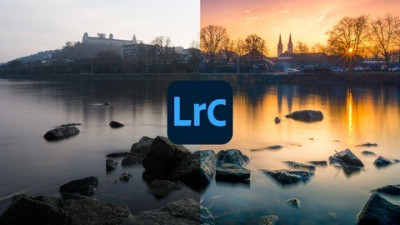
Adobe Lightroom CC Landscape Photography Masterclass 2020

gfxwap1

MyBoerse.bz Pro Member

d19acb53dcf253f3c30a9494c66a6272.jpg

Duration: 3h*14m | Video: .MP4 1920x1080, 30 fps(r) | Audio: AAC, 48000 Hz, 2ch | Size: 2.85 GB
Genre: eLearning | Language: EnglishEdit landscape photos in Adobe Lightroom Classic​


CC like a Pro! ✓ all RAW files ✓ new Adobe Lightroom CC presets
What you'll learn
Learn the techniques to turn your ordinary landscape photo into amazing work of art.
You'll be able to edit photos in Lightroom as you've seen them with your eyes.
Master all basic features of Adobe Lightroom.
You'll be able to work out all the details from your photos.
Your photos will shine in a completely new splendour.
Learn how to work on any RAW image in Lightroom.
I'll explain to you my best tricks and secrets of Lightroom.

Requirements
PC or Mac
Adobe Lightroom Classic CC (at least CS6)

Description
Hi, my name is Fabian Rosshirt. I've been a professional landscape photographer and Lightroom instructor for over 6 years and I'm currently teaching more than 12,000 students. Welcome to my Lightroom course!

Get more out of your photos and take your image processing skills to the next level. You will learn effective and professional techniques, how you can edit your RAW files in Adobe Lightroom Classic CC.

We will also shortly use Adobe Photoshop for the final sharpening and a special effect. In today's world, image processing is necessary to get stunning photographs and to take advantage of the technical possibilities. And the best: It also can make a lot of fun to edit photos - if you know how to do that. Let me show this to you!

To see some before - after comparisons, please watch the course preview.

How is this course structured?

Basics: At the beginning I introduce you to Adobe Lightroom. I will show you all the important features and explain how to import, edit and export photos. I won't bore you with unimportant theory. We will jump right into many practical exercises after the introduction.

Part 01: Now I present you my workflow by showing you a complete processing of the first image. Here you will learn how to edit your photos, step-by-step and with a detailed explanation.

Part 02: In this section I will show you the development of a night-photo. You will learn how to steer the viewer's eye and increase the dynamics by using visual effects. Here we will also briefly use Photoshop to add a special effect.

Part 03: Bad weather does not mean bad photo: Have you ever made that experience? Sometimes you really do not have the right conditions for taking an optimal photo. But unfortunately we can not influence the weather. I show you how to make a great picture out of a supposedly boring photo. Discover the power that Adobe Lightroom Classic CC offers to you.

Part 04: In this part we will repeat a lot of what you have learned so far and apply the knowledge to a fourth photo. You'll see that with my tricks you can get so much more out of your RAW files. We also talk about the importance of colors in landscape photography.

Part 05: This lesson will be amazing. We will edit together my most successful landscape image. With that photo I have won 2 competitions and it also got published in a famous magazine. I tell you all my secrets and explain to you how I achieved that spectacular photo out of the RAW image captured with the camera.

Part 06: Autumn pictures need a special treatment because of their colors, that they catch the viewer and still look natural. I'll show you everything you need to know to edit your waterfall photos with Lightroom.

Bonus: You will receive 11 Lightroom Presets, which I have specially developed for you. With these, you can give your images a whole new look with just one click. In addition I give you all the RAW files I use in this course for explanation. This allows you to put the theory directly into practice and bring routine into your image processing.

Further details about the structure can be found in the curriculum.

Im very happy to help you and I will answer all your questions! Also I'd like to see your progress and give you feedback on your edits with Lightroom.

Short summary:
all explanations - step by step
logical structure to make you familiar with the workflow
all RAW files and 11 Lightroom presets
take advantage of my experiences and tricks as a professional landscape photographer
personal support for questions (you can ask me anything)
also works with the newest version of Adobe Lightroom Classic CC
and much more
updated for 2020!

Please note: Adobe has made some changes to the name of the Lightroom software. In this course we use Adobe Lightroom Classic CC (formerly Adobe Lightroom CC). Of course you can also use your knowledge to work with the new Cloud version as well!

Immerse yourself in the exciting world of image processing!

Who this course is for:
All landscape photographers who want to improve their photos with Lightroom.
Homepage


 
Zurück
Oben Unten