• Regeln für den Video-Bereich:

    In den Börsenbereich gehören nur Angebote die bereits den Allgemeinen Regeln entsprechen.

    Einteilung

    - Folgende Formate gehören in die angegeben Bereiche:
    - Filme: Encodierte Filme von BluRay, DVD, R5, TV, Screener sowie Telesyncs im Format DivX, XviD und x264.
    - DVD: Filme im Format DVD5, DVD9 und HD2DVD.
    - HD: Encodierte Filme mit der Auflösung 720p oder darüber von BluRay, DVD, R5, TV, Screener sowie Telesyncs im Format x264.
    - 3D: Encodierte Filme von BluRay, die in einem 3D Format vorliegen. Dies gilt auch für Dokus, Animation usw.
    - Serien: Cartoon/Zeichentrick, Anime, Tutorials, Dokumentationen, Konzerte/Musik, Sonstiges sind demnach in die entsprechenden Bereiche einzuordnen, auch wenn sie beispielsweise im High Definition-Format oder als DVD5/DVD9/HD2DVD vorliegen. Ausnahme 3D.
    - Bereich Englisch: Englische Releases gehören immer in diesen Bereich.
    - Bereich Talk: Der Bereich, in dem über die Releases diskutiert werden kann, darf, soll und erwünscht ist.


    Angebot/Beitrag erstellen

    - Ein Beitrag darf erst dann erstellt werden, wenn der Upload bei mindestens einem OCH komplett ist. Platzhalter sind untersagt.
    - Bei einem Scenerelease hat der Threadtitel ausschließlich aus dem originalen, unveränderten Releasenamen zu bestehen. Es dürfen keine Veränderungen wie z.B. Sterne, kleine Buchstaben o.ä. vorgenommen werden. Ausnahme Serienbörse:
    - Bei einem Sammelthread für eine Staffel entfällt aus dem Releasename natürlich der Name der Folge. Beispiel: Die Simpsons S21 German DVDRip XviD - ITG
    - Dementsprechend sind also u.a. verboten: Erweiterungen wie "Tipp", "empfehlenswert", "only", "reup", usw. / jegliche andere Zusatzinformation oder Ergänzung, welche nicht in obiger Beschreibung zu finden ist.

    Aufbau des Angebots und Threadtitel

    Der Titel nach folgendem Muster erstellt zu werden. <Name> [3D] [Staffel] [German] <Jahr> <Tonspur> [DL] [Auflösung] <Quelle> <Codec> - <Group>
    Beispiel: The Dark Knight German 2008 AC3 DVDRip XviD - iND
    Beispiel: The Dark Knight 2008 DTS DL BDRip x264 - iND
    Beispiel: The Dark Knight 2008 AC3 DL BDRip XviD - iND
    Beispiel: The Dark Knight German 2008 AC3 720p BluRay x264 iND
    Beispiel: The Dark Knight 2008 DTS DL 1080p BluRay x264 iND
    Beispiel: Die Simpsons S01 German AC3 DVDRip XviD iND
    Beispiel: Die Simpsons S20 German AC3 720p BluRay x264 iND
    Beispiel: Sword Art Online II Ger Sub 2014 AAC 1080p WEBRip x264 - peppermint
    Entsprechend sind also u.a. verboten: Sonderzeichen wie Klammern, Sterne, Ausrufezeichen, Unterstriche, Anführungszeichen / Erweiterungen wie "Tipp", "empfehlenswert", "only", "reup", usw. / jegliche andere Zusatzinformation oder Ergänzung, welche nicht in obiger Beschreibung zu finden ist
    Ausnahmen hiervon können in den Bereichen geregelt sein.

    Die Beiträge sollen wie folgt aufgebaut werden:
    Überschrift entspricht dem Threadtitel
    Cover
    kurze Inhaltsbeschreibung
    Format, Größe, Dauer sind gut lesbar für Downloader außerhalb des Spoilers zu vermerken
    Nfo sind immer Anzugeben und selbige immer im Spoiler in Textform.
    Sind keine Nfo vorhanden z.B. Eigenpublikationen, sind im Spoiler folgende Dateiinformationen zusätzlich anzugeben :
    Quelle
    Video (Auflösung und Bitrate)
    Ton (Sprache, Format und Bitrate der einzelnen Spuren)
    Untertitel (sofern vorhanden)
    Hosterangabe in Textform außerhalb eines Spoiler mit allen enthaltenen Hostern.
    Bei SD kann auf diese zusätzlichen Dateiinformationen verzichtet werden.

    Alle benötigten Passwörter sind, sofern vorhanden, in Textform im Angebot anzugeben.
    Spoiler im Spoiler mit Kommentaren :"Schon Bedankt?" sind unerwünscht.


    Releases

    - Sind Retail-Release verfügbar, sind alle anderen Variationen untersagt. Ausnahmen: Alle deutschen Retail-Release sind CUT, in diesem Fall sind dubbed UNCUT-Release zulässig.
    - Im Serien-Bereich gilt speziell: Wenn ein Retail vor Abschluss einer laufenden Staffel erscheint, darf diese Staffel noch zu Ende gebracht werden.62
    - Gleiche Releases sind unbedingt zusammenzufassen. Das bedeutet, es ist zwingend erforderlich, vor dem Erstellen eines Themas per Suchfunktion zu überprüfen, ob bereits ein Beitrag mit demselben Release besteht. Ist dies der Fall, ist der bereits vorhandene Beitrag zu verwenden.
    - P2P und Scene Releases dürfen nicht verändert oder gar unter einem iND Tag eingestellt werden.


    Support, Diskussionen und Suche

    - Supportanfragen sind entweder per PN oder im Bereich Talk zu stellen.
    - Diskussionen und Bewertungen sind im Talk Bereich zu führen. Fragen an die Uploader haben ausschließlich via PN zu erfolgen, und sind in den Angeboten untersagt.
    - Anfragen zu Upload-Wünschen sind nur im Bereich Suche Video erlaubt. Antworten dürfen nur auf Angebote von MyBoerse.bz verlinkt werden.


    Verbote

    - Untersagt sind mehrere Formate in einem einzigen Angebotsthread, wie beispielsweise das gleichzeitige Anbieten von DivX/XviD, 720p und 1080p in einem Thread. Pro Format, Release und Auflösung ist ein eigener Thread zu eröffnen.
    - Grundsätzlich ebenso verboten sind Dupes. Uploader haben sich an geeigneter Stelle darüber zu informieren, ob es sich bei einem Release um ein Dupe handelt.
    - Gefakte, nur teilweise lauffähige oder unvollständige Angebote sind untersagt. Dies gilt auch für eigene Publikationen, die augenscheinlich nicht selbst von z.B. einer DVD gerippt wurden. Laufende Serien, bei denen noch nicht alle Folgen verfügbar sind, dürfen erstellt und regelmäßig geupdatet werden.
    - Untersagt sind Angebote, welche nur und ausschließlich in einer anderen Sprache als deutsch oder englisch vorliegen. Ausnahmen sind VORHER mit den Moderatoren zu klären.


    Verstoß gegen die Regeln

    - Angebote oder Beiträge, die gegen die Forenregeln verstoßen, sind über den "Melden"-Button im Beitrag zu melden.
  • Bitte registriere dich zunächst um Beiträge zu verfassen und externe Links aufzurufen.

*** Bestes IPTV *** bester Preis *** gratis Test ***


Absolute Beginners 3D character in Blender course

babymore87

MyBoerse.bz Pro Member
be879870d9d25cfd9b024e659ad9126c.webp

Free Download Absolute Beginners 3D character in Blender course
Last updated 2/2022
Created by NIkolay Naydenov
MP4 | Video: h264, 1280x720 | Audio: AAC, 44.1 KHz, 2 Ch
Level: Beginner | Genre: eLearning | Language: English + subtitle | Duration: 36 Lectures ( 14h 28m ) | Size: 13.7 GB

Learn 3D character workflow in Blender for portfolio
What you'll learn
3D character workflow in Blender
Blender sculpting and modelling
Blender
Blender rigging, fur, rendering
Requirements
No previous experience with 3D software required.
Graphic tablet is a plus.
Description
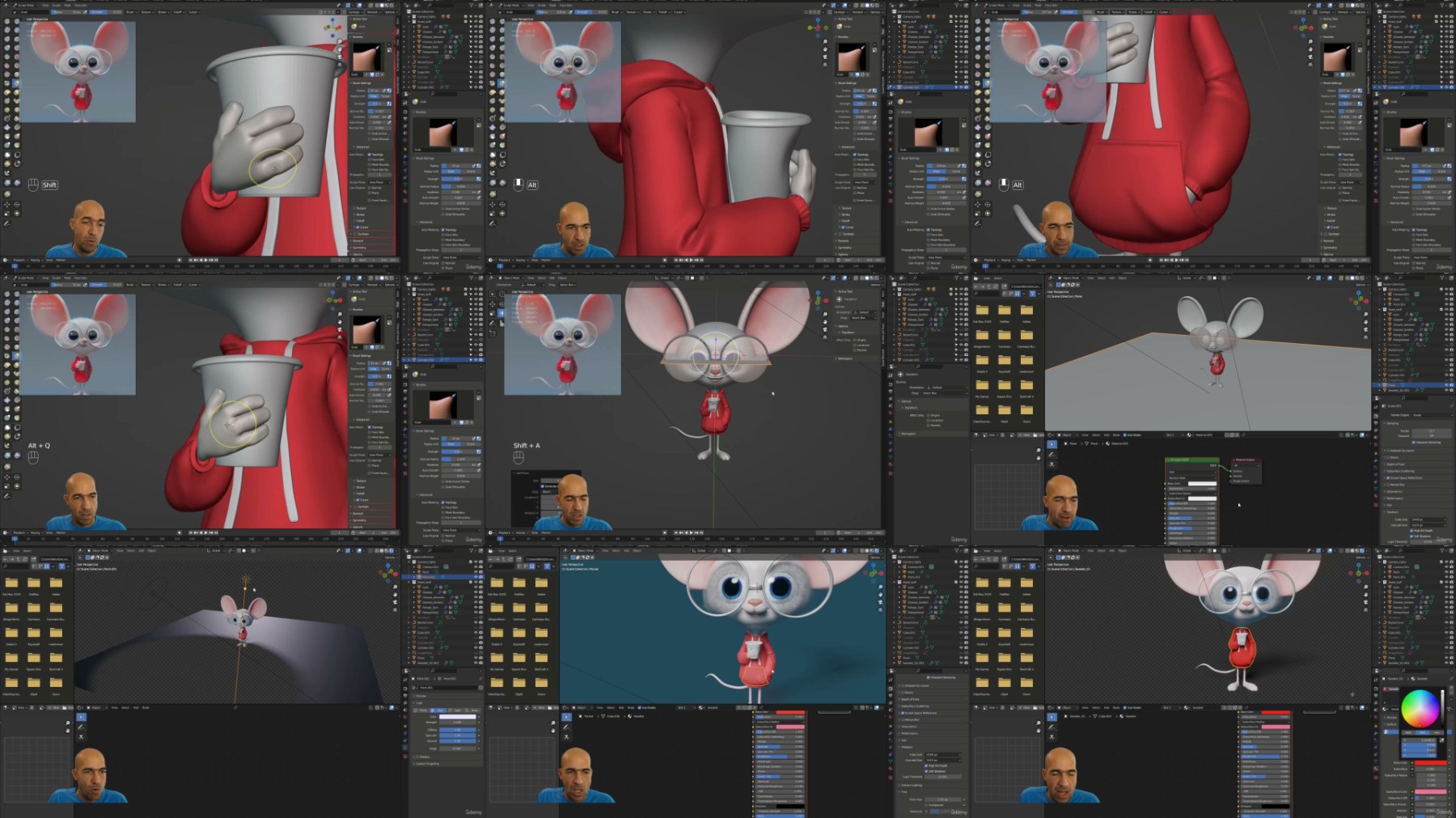
So you have heard about Blender, and you want to jump in on this free but powerful program?Or you already use Blender, but don't know how to make a character inside it?Weather you are a complete beginner or a bit more advanced Blender user, you could find something for you in this course.This is the Absolute Beginners 3D character in Blender course and we will be making this cute guy here concepted by Deema Egorov.My name is Niko and i will be your host trough this creative journey. I am a 3D character artist working in the industry with more than 13 years of experience. I also have more than 15 courses made for character creation, mostly in Zbrush. Now i started to work in Blender only, and i will show you the workflow to create a 3D character in Blender from scratch, rig, pose and present it. We will make some props to practice hard surface modelling in Blender, but since i am a digital sculptor we will emphasize on the sculpting part. I will show you the complete workflow to make a character with clothes, props, pose and present it for your portfolio. In the course we will start by going trough the most important things a beginner should know about Blender. Then we will start sculpting pretty quickly and i will make a basic quick human head to show you that sculpting is not scary at all. Then we will start our mouse hero from the head while i show you all necessary things and guide you trough the whole process of creating a character from concept as well as making it fast and easy in Blender. After that we will make the basics of the body, hands and fingers. With each step we will learn new things and we will repeat the things we already learned to solidify our knowledge. Then we will make the sweater and i will show you few ways of making clothes for your character. After that we will manually retopologize the head of our character, using just the tools that Blender provides by default. Although i will show you much faster and useful addon for automatic retopology - QuadRemesher. We will then detail the head and make the glasses.Following we will be learning basics of lights, cameras and environment textures. Then we will make the tail for a while, before texturing the eyes. We will jump into manual retopologizing the whole body fast and efficient, using various techniques, invented by my humble self :). Refining the sweater and making the hood will be our next tasks which we will finish with great success. After that we will make UVs of the head and ears and make some texturing work on that too. Then i will show you some hardsurface techniques by making a cleaver weapon. We will also see some character examples from the game i worked on for 3 years from Gameloft, since i work there for 15 years already :). It will be time to learn basics of hair and fur making in Blender. We will see how to create, adjust and groom our fur. Then it will be time to learn how simple it is to put bones and rig our character so we can animate or pose it. We will pose it and then fix the pose to achieve best final results. Then we will learn how to make transparent background and floor shadows. Lastly we will see how to make a turntable animation to present our characters from all sides. They are 3D characters after all.This course is for absolute beginners in Blender and in character art, so no previous experience with any 3D software is required. Of course if you like to draw it is definitely a plus :). Some people say Blender is a lot of things, but none of them is at the right level. I would say from experience, that Blender is good enough for everything i need to make a full character from high poly to low poly and UVs. In this course we will do a character for portfolio, so we will do a high poly, posing, lighting and rendering. So if you want to make your first character and eventually start your 3D character career, you first have to try it and see if you like it. So lets dive into the world of 3D character creation in Blender!
Who this course is for
People who want to learn Blender and make 3D characters in it
Homepage


Recommend Download Link Hight Speed | Please Say Thanks Keep Topic Live
No Password - Links are Interchangeable

 

701349680_yxusj-6pph1o8gi108.jpg

Absolute Beginners 3D character in Blender course
Genre: eLearning | MP4 | Video: h264, 1280x720 | Audio: AAC, 44.1 KHz
Language: English | Size: 13.7 GB | Duration: 14h 28m​

Learn 3D character workflow in Blender for portfolio

What you'll learn
3D character workflow in Blender
Blender sculpting and modelling
Blender
Blender rigging, fur, rendering

Requirements
No previous experience with 3D software required.
Graphic tablet is a plus.
Description
So you have heard about Blender, and you want to jump in on this free but powerful program?

Or you already use Blender, but don't know how to make a character inside it?

Weather you are a complete beginner or a bit more advanced Blender user, you could find something for you in this course.

This is the Absolute Beginners 3D character in Blender course and we will be making this cute guy here concepted by Deema Egorov.

My name is Niko and i will be your host trough this creative journey. I am a 3D character artist working in the industry with more than 13 years of experience. I also have more than 15 courses made for character creation, mostly in Zbrush. Now i started to work in Blender only, and i will show you the workflow to create a 3D character in Blender from scratch, rig, pose and present it. We will make some props to practice hard surface modelling in Blender, but since i am a digital sculptor we will emphasize on the sculpting part. I will show you the complete workflow to make a character with clothes, props, pose and present it for your portfolio.

In the course we will start by going trough the most important things a beginner should know about Blender. Then we will start sculpting pretty quickly and i will make a basic quick human head to show you that sculpting is not scary at all. Then we will start our mouse hero from the head while i show you all necessary things and guide you trough the whole process of creating a character from concept as well as making it fast and easy in Blender. After that we will make the basics of the body, hands and fingers. With each step we will learn new things and we will repeat the things we already learned to solidify our knowledge.

Then we will make the sweater and i will show you few ways of making clothes for your character. After that we will manually retopologize the head of our character, using just the tools that Blender provides by default. Although i will show you much faster and useful addon for automatic retopology - QuadRemesher. We will then detail the head and make the glasses.

Following we will be learning basics of lights, cameras and environment textures. Then we will make the tail for a while, before texturing the eyes. We will jump into manual retopologizing the whole body fast and efficient, using various techniques, invented by my humble self :).

Refining the sweater and making the hood will be our next tasks which we will finish with great success. After that we will make UVs of the head and ears and make some texturing work on that too. Then i will show you some hardsurface techniques by making a cleaver weapon. We will also see some character examples from the game i worked on for 3 years from Gameloft, since i work there for 15 years already :).

It will be time to learn basics of hair and fur making in Blender. We will see how to create, adjust and groom our fur. Then it will be time to learn how simple it is to put bones and rig our character so we can animate or pose it. We will pose it and then fix the pose to achieve best final results. Then we will learn how to make transparent background and floor shadows. Lastly we will see how to make a turntable animation to present our characters from all sides. They are 3D characters after all.

This course is for absolute beginners in Blender and in character art, so no previous experience with any 3D software is required. Of course if you like to draw it is definitely a plus :).

Some people say Blender is a lot of things, but none of them is at the right level. I would say from experience, that Blender is good enough for everything i need to make a full character from high poly to low poly and UVs. In this course we will do a character for portfolio, so we will do a high poly, posing, lighting and rendering. So if you want to make your first character and eventually start your 3D character career, you first have to try it and see if you like it. So lets dive into the world of 3D character creation in Blender!

Who this course is for
People who want to learn Blender and make 3D characters in it

701349685_yxusj-r5k0td35k40b.jpg

QUFFTLOF_o.jpg


fcf47bce9e27717397a486d5ec8ad049.jpg

Absolute Beginners 3D character in Blender course
Genre: eLearning | MP4 | Video: h264, 1280x720 | Audio: AAC, 44.1 KHz
Language: English | Size: 13.7 GB | Duration: 14h 28m​

What you'll learn
3D character workflow in Blender
Blender sculpting and modelling
Blender
Blender rigging, fur, rendering

Requirements
No previous experience with 3D software required.
Graphic tablet is a plus.
Description
So you have heard about Blender, and you want to jump in on this free but powerful program?

Or you already use Blender, but don't know how to make a character inside it?

Weather you are a complete beginner or a bit more advanced Blender user, you could find something for you in this course.

This is the Absolute Beginners 3D character in Blender course and we will be making this cute guy here concepted by Deema Egorov.

My name is Niko and i will be your host trough this creative journey. I am a 3D character artist working in the industry with more than 13 years of experience. I also have more than 15 courses made for character creation, mostly in Zbrush. Now i started to work in Blender only, and i will show you the workflow to create a 3D character in Blender from scratch, rig, pose and present it. We will make some props to practice hard surface modelling in Blender, but since i am a digital sculptor we will emphasize on the sculpting part. I will show you the complete workflow to make a character with clothes, props, pose and present it for your portfolio.

In the course we will start by going trough the most important things a beginner should know about Blender. Then we will start sculpting pretty quickly and i will make a basic quick human head to show you that sculpting is not scary at all. Then we will start our mouse hero from the head while i show you all necessary things and guide you trough the whole process of creating a character from concept as well as making it fast and easy in Blender. After that we will make the basics of the body, hands and fingers. With each step we will learn new things and we will repeat the things we already learned to solidify our knowledge.

Then we will make the sweater and i will show you few ways of making clothes for your character. After that we will manually retopologize the head of our character, using just the tools that Blender provides by default. Although i will show you much faster and useful addon for automatic retopology - QuadRemesher. We will then detail the head and make the glasses.

Following we will be learning basics of lights, cameras and environment textures. Then we will make the tail for a while, before texturing the eyes. We will jump into manual retopologizing the whole body fast and efficient, using various techniques, invented by my humble self :).

Refining the sweater and making the hood will be our next tasks which we will finish with great success. After that we will make UVs of the head and ears and make some texturing work on that too. Then i will show you some hardsurface techniques by making a cleaver weapon. We will also see some character examples from the game i worked on for 3 years from Gameloft, since i work there for 15 years already :).

It will be time to learn basics of hair and fur making in Blender. We will see how to create, adjust and groom our fur. Then it will be time to learn how simple it is to put bones and rig our character so we can animate or pose it. We will pose it and then fix the pose to achieve best final results. Then we will learn how to make transparent background and floor shadows. Lastly we will see how to make a turntable animation to present our characters from all sides. They are 3D characters after all.

This course is for absolute beginners in Blender and in character art, so no previous experience with any 3D software is required. Of course if you like to draw it is definitely a plus :).

Some people say Blender is a lot of things, but none of them is at the right level. I would say from experience, that Blender is good enough for everything i need to make a full character from high poly to low poly and UVs. In this course we will do a character for portfolio, so we will do a high poly, posing, lighting and rendering. So if you want to make your first character and eventually start your 3D character career, you first have to try it and see if you like it. So lets dive into the world of 3D character creation in Blender!

Who this course is for
People who want to learn Blender and make 3D characters in it

33-Adjusting-more-things-and-making-a-shadow-catcher.jpg

 
Zurück
Oben Unten