




Last updated 10/2019
MP4 | Video: h264, 1280x720 | Audio: AAC, 44.1 KHz
Language: English | Size: 2.53 GB | Duration: 6h 0m
Use 3ds Max poly modelling, Mudbox Sculpting, Custom Photoshop Textures and Vray Materials to create high poly 3d assets
What you'll learn
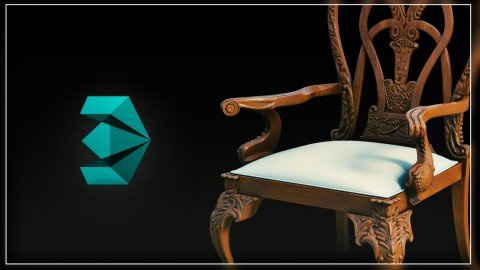
Model a high resolution 3d furniture piece from scratch
Master 3ds Max Poly Modelling tools
Model high-poly furniture for arch viz, and sell it online if they so desire
Unwrap UVWs using standard max tools
Paint custom textures in Photoshop for use with V-Ray renderer
Use the 3ds Max poly modelling tools
Create high-poly, high-quality 3d models for selling
Set up a studio scene using V-Ray lights and cameras
Create V-Ray textures
Render in V-Ray
Use V-Ray + Photoshop to generate nice thumbnails of your models for increasing traffic / sales
Sell 3d models online and potentially make a passive income off of their 3d models.
Requirements
Know your way around 3ds Max UI and Photoshop UI. Be comfortable following my lead within those programs at a fairly rapid pace. If you don't have 3ds Max, V-Ray, or Photoshop, I will show you where to get trial versions in the course.
You don't need to know V-Ray for this course because the parts of V-Ray that I use are basic, and should be familiar to anyone who knows a little bit of 3d.
Description
***MUDBOX workflow included*** ***More lectures coming soon*** ***30 day money back gaurantee, no questions asked.*** WHAT OTHERS ARE SAYING "I've been watching the first chapters and I like the way Adam teaches. His way of teaching is easy to follow and understand" "I wanted to learn more about modeling in Max and I did. The course also has a lot of added bonuses I wasn't expecting. Wasn't too familiar with Vray or Mudbox before. Both are good tools, and they are covered here. The instructor knows what he is doing. The sound is good and he is easy to follow." HIGH DETAIL / HIGH POLY MODELING IN 3DS MAX I do architectural visualization using 3ds Max, so I work on making furniture every day. It is often one of the most challenging parts of my job. In this course, I want to teach you all the various techniques and workflows that I use. You will not only learn how to model furniture, but you will also be educated in the art of poly modeling, and creating high-detail assets in general. This is a valuable skill to have in 3d as it often gives your images that extra realism that it needs to become truly "photo real". *As an added bonus, if you know how to make models like these, you can actually sell them to other people online. There is a huge market for them. The course covers the info you need to do that as well, but most importantly it is about being a great modeler. *Many lectures and new techniques are continually being added. This course is intended to be a true masterclass for furniture modeling, so there are many different techniques and workflows to discuss. As the curriculum is built upon, the price will go up, so get in early. WHY THIS COURSE? First of all, it is cheap! Secondly, you learn a ton about modeling from a practicing professional. There are so many bonuses in this course, including the Mudbox workflow, Photoshop painting, V-Ray materials and rendering setup, and so much more. Plus, you get all my poly modeling techniques along with special tips using cloth modifier and other unique workflows. There is a ton of bang for your buck in this course. There is something here for everyone, and if you follow the course you will definitely leave with a modeling toolbox that is overflowing with options. COURSE STRUCTURE This class focuses on the modeling of high-poly / high-detail furniture. This is something that people in the industry need every day. If you look around the web you will find many architectural renderings that are full of stunning, immaculately modeled, furniture. In this course, I will take you through the process, step by step, on how to create these kinds of models. Follow along with me, and by the end you will have created an organic chair model that looks great. Even better, you will have the skills necessary to create all the custom furniture you need, and sell it online to others if you see fit. I will also provide my files for download so you can tinker with, adjust, study, or sell my model if you like. After I have taken you through the modeling of a chair step by step, we will then get into additional techniques and workflows that will be helpful to anyone trying to create photo real models. In this course we will go over: Creating the basic shape of a modern chair.Using the shell modifier, symmetry, turbosmooth, and poly-modeling techniques to get closer to a finished model.UVW unwrapping furniture using basic 3ds Max tools.Painting a custom map in Photoshop.Applying texture maps in 3ds Max, using V-Ray materials.Setting up a studio shot for your furniture piece.Post-processing your rendering using V-Ray render elements and Photoshop. ***A nice thumbnail image makes for nice sales.BONUS TECHNIQUES Using the cut tool to model in wrinkles.Using the cloth modifier to achieve natural folds and bends in our modelsUsing 3ds Max Graphite modeling toolsAdded fur and fringe to our furniture with V-Ray fur (COMING SOON)3ds Max to Mudbox to 3ds Max workflow for ultra real modelsAlong with all of this, you will pick up nice little tips and tricks along the way as well. You will be able to see how a practicing professional does the job. After you have mastered the art of creating good furniture using 3ds Max, and rendered a beautiful thumbnail using V-Ray, I will show you where to upload your models if you want to sell them, and give you the insight necessary to stand out from the crowd. Join The Course Today Whether you want to learn how to model high-poly furniture for your own personal projects, or if you are interested in creating content to sell, it doesn't matter, this class has the info you need. By the end you will feel comfortable using poly tools with 3ds Max to create just about anything you can imagine. Sign Up Today! IMPORTANT: This course is fully refundable for 30 days, no questions asked. There is no risk to you in signing up for this course. Try it. If you hate it, get a refund. *More lectures will be added to the course in the coming months in order to keep the class up to date. As the course expands, so will the price. Get in early so you can have access to all the lectures as they become available. See you in class.
Overview
Section 1: Introduction
Lecture 1 Intro: What We'll Be Learning
Lecture 2 Class Notes: Objectives, Prerequisites, Etc.
Lecture 3 More Notes
Section 2: Starting The Model From Scratch
Lecture 4 The Easiest Way To Start Any Furniture Model
Lecture 5 The Art Of Pushing And Pulling Verts
Lecture 6 Poly Model Like A Champ, Getting Organic Shapes Just Right
Lecture 7 How Do We Turn Our Simple Polys Into a Fancy 3d Chair?
Section 3: Secrets To Enhancing Our Model So It Will Stand Out
Lecture 8 How Are We Going To Sell This Thing?
Lecture 9 Details: The Secret to Selling Making Your Models Stand Out
Lecture 10 More Effective Detail Tips
Lecture 11 The Easy Way To Create Nice Seams
Lecture 12 Super Simple Way To Create A Seat Cushion
Lecture 13 Another Secret To Making Your Furniture Better Then Everyone Else's
Lecture 14 How Do We Add the Handle?
Lecture 15 Easiest Way To Add Stitching
Lecture 16 Polishing Off The Model
Lecture 17 Get More Modeling Tips / Techniques For All Kinds of Furniture Models
Section 4: The Next Step In Making A Model That Looks Great (and Sells)
Lecture 18 A Simple Way To UVW Unwrap The Chair Using Only Standard 3ds Max Tools
Lecture 19 Now, How Do We Unwrap The Cushion?
Lecture 20 EXTRA: UVW Unwrapping in Max 2014 - Peel and Pin Tools
Lecture 21 We Have Unwrapped The UVs, Now What?
Lecture 22 Painting Custom Materials in Photoshop Like a Pro
Lecture 23 Creating a Realistic Leather Material, Custom Fit To Our Chair
Lecture 24 Setting Up A Studio With V-Ray: Lights, Camera, Action
Lecture 25 Learn To Setup V-Ray Materials Using Our Custom Map
Lecture 26 Generating Reflection, Specular, and Bump Maps To Enhance The Look of Your Model
Section 5: The Final Step: An AWESOME Thumbnail / Rendering
Lecture 27 Congrats On Making It This Far
Lecture 28 Final Render Settings in V-Ray
Lecture 29 Working With V-Ray Render Channels
Lecture 30 Post-Processing For V-Ray Using Photoshop
Section 6: Additional Projects 10/2018
Lecture 31 Modeling a High-Poly Spoon with Poly Modeling Tools in 3ds Max - Time Lapse
Lecture 32 UVW Unwrap This Downloadable Chair For Practice (Max 2018)
Section 7: EXTRA PROJECT II: Modeling A Lamp
Lecture 33 LAMP PROJECT: Importing a Reference Image for Your Modeling Project
Lecture 34 LAMP PROJECT: Reviewing and Using The Basic Poly Modeling Tools
Lecture 35 LAMP PROJECT: Poly Modelling Essentials: Edge Loops and Turbosmooth
Lecture 36 LAMP PROJECT: More Poly Modelling & Continuing to Create our Desk Lamp
Lecture 37 LAMP PROJECT: Creating the Lamp Head with Poly Modelling
Lecture 38 LAMP PROJECT: Finishing Up our Desk Lamp
Section 8: More Techniques And Applications - All Future Lectures Will Be Added Here
Lecture 39 EXTRA: More tips For Adding Detail & Wrinkles
Lecture 40 EXTRA: Use Cloth Modifier To Add More Wrinkles and Variation
Lecture 41 UPDATED WRINKLE WORKFLOW: Model Furniture Like Design Connected
Lecture 42 Graphite Tools Useful For Furniture Workflow
Lecture 43 Create a Realistic Couch Cushion in Seconds With Cloth Mod
Section 9: MudBox Workflow
Lecture 44 Quick Intro To Mudbox Essential Tools - Navigation, Layers, Brushes, etc.
Lecture 45 Modeling Elements For Export To MudBox
Lecture 46 Basic Sculpting In Mudbox - Export Back To 3ds Max
Lecture 47 Using Your Mudbox Sculpture With Furniture in 3ds Max
Lecture 48 Exporting Custom Sculpted Displacement & Normal Maps From Mudbox
Lecture 49 Mudbox Alternative: Just Poly Model The Classical Chair
Section 10: EXTRA: How / Where Do We Sell These Things?
Lecture 50 Now That Our Model Will Stand Out, Where Should We Put It?
Lecture 51 More Tips For Selling Online
Section 11: EXTRA Info: Don't Skip This
Lecture 52 Best Secrets For Selling On Turbosquid
Lecture 53 Learn More And Download My Model
Lecture 54 EXTRA: Get Coupons To My Other Courses
Take this course if you are interested in selling 3d models online,Take this course if you want to enhance your 3d skillset,Take this course if you are an arch viz professional that finds themselves needing to create custom furniture regularly,Do not take this course if you are an absolute beginner to 3d, I have an intro course for that.,Take this course if you already know some 3d basics, and want to go forward learning more advanced subjects
Homepage
Recommend Download Link Hight Speed | Please Say Thanks Keep Topic Live
Links are Interchangeable - No Password - Single Extraction
