




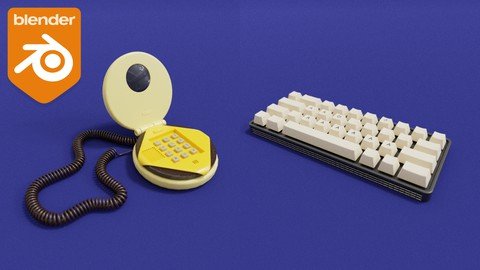
Learn 3D modeling hard surface electronics in Blender for beginners
Published 2/2023
MP4 | Video: h264, 1280x720 | Audio: AAC, 44.1 KHz
Language: English | Size: 4.17 GB | Duration: 4h 25m
What you'll learn
The MODEL workflow to create electronics in under 30 minutes even if you are a beginner
THE BOOL METHOD to create buttons anywhere on your object
The only add-on you MUST activate that will help you save up to 16 clicks every time you create a new shape
How to undo any shape and create unlimited concepts without actually clicking *Undo*
THE DOUBLES METHOD to create parts of your object without slowing down your computer and to work even faster !
THE PARENT TRAP : Why you should never parent your meshes and how this is affecting the performances of your computer (never do this)
The 7 CLICKS METHOD to create any button or controller
The ONE thing you always have to do after extruding your mesh (or your model will look flat)
How to emphasize the details of your models only using this simple hotkey
The simple and fast method to put unlimited icons on your models (brand logos, home button, volume icons.)
THE CIRCLE METHOD to transform any plane to convex screens in only 2 clicks
How to make any surface 100% flat even after deformation or editing
THE TWO PART SCREEN : Why you should never model a screen on your actual mesh and use a different mesh instead (never skip this step!)
The PEN METHOD: Create any cable or chain by drawing it and then watch it appear
How to create unlimited shapes of cables and chains in exactly 4 seconds
The LINE HACK : Use this simple trick to create every length of keyboard keys in just one click
The BEVEL ERROR : Why you should never manually bevel the edges of your keyboard keys (it can cost you to remodel your entire keyboard if you make it)
How to create an entire mechanical keyboard only using one modifier
6 WAYS to create ventilation panels and which method should you use
The GAP PRINCIPLE : The one and only thing you should never NEVER skip when making electronics or else your model will look atrocious
The key detail that will make your model looks realistic and how to use the best of it
The WIREFRAME PLAN : Why you should NOT use the wireframe modifier to make a wireframe mesh, and the best tool to use instead
The 2 best ways to make spiral cables in less than 10 seconds
SHADING ACADEMY : 8 methods to always have a perfect shading on your models, avoid shading problems and artifacts, have smooth surfaces even with ugly topology
Requirements
Have a computer with the latest version of Blender installed
Know how to navigate Blender
Know some 3D basics in Blender (how to move a mesh and create simple shape - square, sphere...)
Description
Do you want to learn how to make electronics in Blender ?Little computers, keyboards, consoles, cables.If yes then keep reading.When I first started Blender, I didn't know what I liked to do. Modeling, animations, making characters, interiors, environments, creating materials? There are a lot of things you can do and as a beginner you are maybe feeling lost. What should you focus on? What is your goal? What are you good at?The first few months of learning 3D, try everything, it will give you basic knowledge on how general 3D works. Once this discovering phase is done, you need to get good at a specific subject or else you will never improve. You can follow hundreds of tutorials on YouTube about every aspects of 3D but if you continue being everywhere and not focusing on one single area in particular, you'll get tired very fast because of too much informations at once, plus, you take the risk of always doing boring work, and never mastering a skill and be good. This is very dangerous because you'll end up thinking that you are not good enough, that you can't improve and at the end you'll eventually give up.Maybe you already tried focusing on one subject but it was too difficult so you decided to try something else but you didn't like it. It's not that it is too difficult to learn, or that you need to already like the subject you are learning to be able to improve.The real problem is that you don't have a main goal for the skill you want to learn. This is very important. What are you learning this for? What do you want to achieve?If you want to master a skill very fast, the first thing you need to do is to set an important goal and stick with it. Then, you need to start practicing with an effective and simple method, not focusing on any other subject. Practice is key.My focus is on modeling human-sized objects, I don't look at anything else, I don't know how to make characters or make good environments, but I know exactly how to create specific objects like electronics because I practiced it a lot and this is my main focus. I created a simple method for beginners who want to specialize in modeling human-sized objects, this will allow you to model electronics very fast and easily.This method is made so that it doesn't feel difficult to learn this skill and it minimizes the feeling of wanting to give up on your goal.After following this method, you will have everything you need to start modeling your own 3D objects : computers, phones, consoles, keyboards. You will be able to model whatever you want. This new workflow will allow you to work very fast, craft concepts and model literally anything.After a few months of practice based on this method, you can expect big changes! Maybe you will have reached your main goal and doing the work you love.But - I'm stopping you right here.To get these results you need to practice regularly, make projects almost everyday, focus only on this and stick to it to really succeed. It will not be magic.When I started focusing on one single subject, setting my goal and starting practicing seriously, my skills improved a lot !By signing up for this course you'll immediately get access to :The MODEL workflow to create electronics in under 30 minutes even if you are a beginnerTHE BOOL METHOD to create buttons anywhere on your objectThe only add-on you MUST activate that will help you save up to 16 clicks every time you create a new shapeHow to undo any shape and create unlimited concepts without actually clicking Undo THE DOUBLES METHOD to create parts of your object without slowing down your computer and to work even faster !THE PARENT TRAP : Why you should never parent your meshes and how this is affecting the performances of your computer (never do this)The 7 CLICKS METHOD to create any button or controllerThe ONE thing you always have to do after extruding your mesh (or your model will look flat)How to emphasize the details of your models only using this simple hotkeyThe simple and fast method to put unlimited icons on your models (brand logos, home button, volume icons.)THE CIRCLE METHOD to transform any plane to convex screens in only 2 clicksHow to make any surface 100% flat even after deformation or editingTHE TWO PART SCREEN : Why you should never model a screen on your actual mesh and use a different mesh instead (never skip this step!)The PEN METHOD: Create any cable or chain by drawing it and then watch it appearHow to create unlimited shapes of cables and chains in exactly 4 secondsThe LINE HACK : Use this simple trick to create every length of keyboard keys in just one clickThe BEVEL ERROR : Why you should never manually bevel the edges of your keyboard keys (it can cost you to remodel your entire keyboard if you make it)How to create an entire mechanical keyboard only using one modifier6 WAYS to create ventilation panels and which method should you useThe GAP PRINCIPLE : The one and only thing you should never NEVER skip when making electronics or else your model will look atrociousThe key detail that will make your model looks realistic and how to use the best of itThe WIREFRAME PLAN : Why you should NOT use the wireframe modifier to make a wireframe mesh, and the best tool to use instead (easier, looks better and just done in one click)The 2 best ways to make spiral cables in less than 10 secondsYou also get a free bonuses :SHADING ACADEMY : 8 methods to always have a perfect shading on your models, avoid shading problems and artifacts, have smooth surfaces even with horrid topology.The complete mind-map of the course with everything written and organized so you don't forget anythingMaybe you are currently struggling to model something that you want, you don't know how to make a particular shape and how to create smooth details to make your model look good. You spend hours, days or maybe weeks trying to make something and your workflow is very slow. All of this time is wasted just because you don't have the right method, you don't know where you are going. The truth is you could speed up your workflow by 3 with the rights tools and techniques, and this will give you more time to learn, practice and create a lot more projects to reach your goal.Practice is the key element to master something, but practicing without a plan is like cycling in place, you are not getting anywhere.This type of plan can cost a lot, there are a lot of premium courses but it is normally only accessible to a few portion of people who can afford it. But, you can access this program for a very cheap price.Maybe you have some questions about the course and you are hesitating.Is this course for total beginners? First you need to follow my free introductory course at school(dot)nicholaspena(dot)com to know how to navigate the software and model simple things. Once this is done you are ready to follow this course, no need to know anything else.Do you need to have a powerful computer? No you don't need one but you must have a computer that is less than 10 years old with minimum 8GB of RAM.Do you need another software or to pay for add-ons to follow correctly the course? No, you just need Blender installed on your computer and nothing else.Is there a personal follow-up with the course? There is no specific type of follow up, but you can message me whenever you encounter a problem and send me or videos, I always reply fast and I am here to help you.
Overview
Section 1: BOLDLY BUILD 3D ELECTRONICS - Full course
Lecture 1 Introduction
Lecture 2 Inspiration
Lecture 3 Model bun
Lecture 4 Model meat
Lecture 5 Model cheese slice
Lecture 6 Boolean method
Lecture 7 Bool tool shortcuts
Lecture 8 Bool tool method
Lecture 9 Apply modifiers
Lecture 10 Buttons method 1
Lecture 11 Buttons method 2 : Create shape
Lecture 12 Buttons method 2 : Modifiers
Lecture 13 Buttons method 2 : Boolean
Lecture 14 Buttons method 2 : Meshes
Lecture 15 Buttons method 3 : Principle
Lecture 16 Buttons method 3 : Create buttons from geometry
Lecture 17 Text on buttons
Lecture 18 Text fonts
Lecture 19 Place text and add thickness
Lecture 20 Add icons
Lecture 21 Boolean details : Shape
Lecture 22 Boolean details : Array and bool tool
Lecture 23 Top button and bevel
Lecture 24 Top button
Lecture 25 Top bun
Lecture 26 Modeling middle part
Lecture 27 Top part button
Lecture 28 Top part shape
Lecture 29 Top part holes
Lecture 30 Basic cable
Lecture 31 Personalized cable
Lecture 32 Spiral cable 1
Lecture 33 Spiral cable 2
Lecture 34 Smooth shading and solving errors
Lecture 35 Scene : parent and joining
Lecture 36 Scale and material for render
Lecture 37 Get the exact same colors as the reference pic
Lecture 38 Material displacement and render
Lecture 39 Render and compositing
Lecture 40 Convex screen
Lecture 41 Screen examples
Lecture 42 Convex screen on burger phone
Lecture 43 Material for screen and render
Lecture 44 Keyboard : model a key
Lecture 45 Create full keyboard
Lecture 46 Base of keyboard
Lecture 47 Supports for keys
Lecture 48 Flat keyboard
Lecture 49 Mechanical keyboard render
Lecture 50 Create ventilation grid method 1 and 2 : extrude and curve
Lecture 51 Grid method 3 : wireframe
Lecture 52 Grid method 4 : skin
Lecture 53 Grid examples and errors
Lecture 54 Placing grid on keyboard
Lecture 55 Icons and text on keys
Lecture 56 Material and render
Beginners who want to level-up their 3D modeling skills,Beginners in 3D who want to specialized in modeling objects,Beginners who want to learn how to model electronics in Blender (computers, keyboards, phones, cables...),Beginners who want to learn how to model in Blender
Homepage
Recommend Download Link Hight Speed | Please Say Thanks Keep Topic Live
Links are Interchangeable - No Password - Single Extraction
