




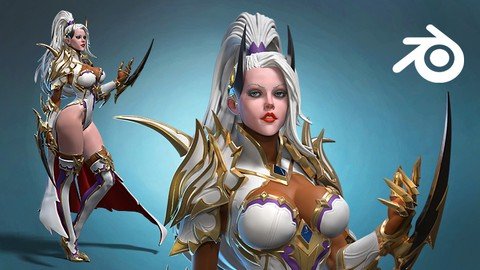
Free Download 3D Female Armored Assassin In Blender Course
Published 6/2023
MP4 | Video: h264, 1280x720 | Audio: AAC, 44.1 KHz
Language: English | Size: 32.01 GB | Duration: 28h 41m
Complex character creation in Blender for 3D print, render or game
What you'll learn
Modelling an armored female 3D character in Blender
Sculpting, modelling
Female body anatomy
Armor and stylized hair making
Requirements
Intermediate Blender knowledge and Blender
Description
This is probably the most complicated character i have done in Blender. And i have recorded and narrated every step in real time to make this course!There is so much talking in this course that you will get sick of hearing my amazing English accent!But let me tell you a bit about me.I am Niko and i am 3D character artist and teacher with more than 20000 students in my courses of Zbrush, Blender, Anatomy and 3D character sculpting. I also have two youtube channels - Speedchar and Speedchar live, where i upload 3D character related content...mostly
 In this course we will make this 3D Female Armored Assassin from zero, only in Blender. The main purpose of this character is to be 3D printed or rendered, but the same techniques can be used to create 3D characters for games.We will start by making the head, as always, a basic hair and then the body, with me giving some anatomical tips while sculpting.Following will be the arms, hands and legs where we will also talk about forms, shapes and anatomy. Next we will do something extraordinary by making all the armors from single meshes, which i call 3D cketching, so we can better understand and translate the 2D forms from the concept to 3D. When we finish all 3D sketches of the armors, we will start making the real armor meshes, by retopologizing the 3D sketches. It will be long and painful process, but at the end it will be worth the effort!After every gold stripe and armor piece is ready, we can get to making the pose, we will do that by posing only the body, and then we will add and adjust all the armors and stripes after we are happy with the pose. When that super relaxing and fun process is over, we can finish the hair with the curves, and do lights setup and materials to render our model.This course is for intermediate Blender users, but beginners who are feeling very lucky and like to feel pain, can try it too . Of course you can always start with one of my two Absolute beginners courses for Blender first, then some of my Anatomy courses, and then get back to this one .I am warning you that in this course there will be stories, drama, action, memories and lots of advices from this wise bearded man with one eyebrow! Even some songs here and there... sorry about that. And now, go, buy the course and start making this nice lady in 3D !
Overview
Section 1: Introduction
Lecture 1 Introduction
Lecture 2 Setup Blender and starting the head
Lecture 3 More head modelling and anatomy
Lecture 4 Adding basic hair and eyelashes
Lecture 5 Making a base torso
Lecture 6 Arms and legs base modelling
Lecture 7 Modelling the hand and fingers
Lecture 8 Refining the arms, hands and legs
Lecture 9 Fixing things here and there
Lecture 10 Starting the 3D sketch and making the shoulder
Lecture 11 3D sketching the forearm weapon armor
Lecture 12 Making a breast and knee armor 3D sketch
Lecture 13 Adding some details and start modelling the shoe
Lecture 14 Finishing the shoe
Lecture 15 Making the hair curves
Lecture 16 Making the horns and start refining the forearm armor
Lecture 17 Developing the forearmor weapon
Lecture 18 Fighting with the forearmor
Lecture 19 Finishing the forearmor
Lecture 20 Start the retopo of the shoulder
Lecture 21 More retopo and refining the shoulder armor
Lecture 22 Finishing the shoulder armor
Lecture 23 Making the chest armor
Lecture 24 Neck armor modelling
Lecture 25 Making of the crown
Lecture 26 Making the knee and finger armors
Lecture 27 Refining some parts
Lecture 28 Making gold stripes on the legs
Lecture 29 Adding a body and golden borders
Lecture 30 Adding more golden borders
Lecture 31 Starting the cape
Lecture 32 Starting the pose
Lecture 33 Starting to adjust the armors and clothes
Lecture 34 More adjusting of armors and clothes
Lecture 35 Finishing the legs
Lecture 36 Finishing touches on forearmor weapons and body
Lecture 37 Fixing, detailing and life thoughts
Lecture 38 Working more on the hair and more life lessons
Lecture 39 Long video about modelling the cape
Lecture 40 Finishing the hair
Lecture 41 Making a lights setup and adding gold material
Lecture 42 Making turntable and shadow plane
Lecture 43 Goodbye
All intermediate Blender users who want to advance their 3D character art
Homepage
Recommend Download Link Hight Speed | Please Say Thanks Keep Topic Live
Links are Interchangeable - Single Extraction
