• Regeln für den Software-Bereich:


    Allgemeines:

    - In erster Linie sind unsere Boardregeln zu beachten, zu finden HIER.
    - Software zur Audiobearbeitung sollte ausschließlich im Unterforum "Audio" eingestellt werden.
    - Für Cracks, Keygens oder sonstige Freischaltungssoftware gibt es das Unterforum "Freischaltung".
    - Portable Software bitte im entsprechenden Unterforum "Portable Software" eintragen.
    - Diskussionen zur Installation und anderen Problemen mit der Software, bitte im enstprechenden Unterforum "Talk" führen.
    - Bei Unklarheiten und Fragen zu den Regeln bitte die Moderatoren kontaktieren.


    Angebot erstellen

    - Die Struktur des Threadtitels muss wie folgt umgesetzt werden: Herstellername - Softwarename - Versionsnummer
    - Unnötige Zusätze im Threadtitel wie "HOT", "NEW" oder Punkte zwischen den Wörtern sind nicht erlaubt.
    - Achtet darauf immer nur die Hauptversion und deren Updates in einem Thread zusammenfassen, konkretes Beispiel: SoftwareXY v3.12 gehört in den selben Thread mit SoftwareXY v3.13; SoftwareXY v.4.1 gehört in einen neuen eigenen Thread. Ausgenommen hiervon sind Sammelthreads und Dauerangebote.
    - Bei nicht bekannten Herstellern oder Angebote einer privaten Software, ist die Programmbezeichnung + Versionsnummer ausreichend.
    - Besondere Beachtung gilt für den ersten Beitrag eines Angebots. Dort muss eine kurze Beschreibung der Software in deutscher Sprache angegeben werden. Für offizielle Releases ist es Pflicht die NFO im Beitrag einzustellen(Spoiler, siehe nächster Punkt).
    - Weitere Informationen wie NFOs oder Changelogs, versteckt ihr bitte in einem Spoiler.


    Software Suche

    - Für Suchanfragen haben wir das Unterforum "Suche" erstellt.
    - Auch hier sollte vorher die Suchfunktion benutzt werden, um Doppelthreads vorzubeugen. Sollte es bereits eine Suchanfrage geben, könnt ihr den Thread gerne mit einem "Danke" pushen.


    Trojaner- und Virusalarm

    - Falls Euer Virenscanner bei einem Angebot Alarm schlägt, solltet ihr zunächst Ruhe bewahren. Viele Virenscanner erkennen Cracks/Keygens oft fälschlicherweise als Bedrohung.
    - Prüft die verdächtige Datei zuerst mit http://virustotal.com , sollte es sich hierbei wirklich um eine Bedrohung handeln, meldet den Beitrag und/oder wendet euch mit dem Bericht von VirusTotal.com an einen Moderator.


    Unerwünschte Angebote

    - Keylogger, Spionagetools, alles rund ums Thema Hacking/Cracking ist nicht erwünscht.
  • Bitte registriere dich zunächst um Beiträge zu verfassen und externe Links aufzurufen.


1stFlip Flipbook Creator v2

mikemike

MyBoerse.bz Pro Member

1stFlip Flipbook Creator 2.4.168


003515f2_mediuml9fii.png


1stFlip Flipbook Creator for Windows helps you turn static PDF file into digital Flash&HTML5 page-flipping magazines, brochures, catalogs, flyers, presentations, e-books, newspapers, photo albums, etc. One-click upload page-flipping books to 1stFlip server or own web host with the built-in FTP client. Read these flipbooks across desktop, tablets and mobile devices, just like reading real books.

1stFlip Flipbook Creator Features:
- Create 3D animated page-turning flipping book with PDF files on Windows.
- Publish HTML5 flipbook available on iPhone, iPad and Android devices.
- Edit flipping pages with customizable templates and built-in scenes.
- Get offline flipbooks in html, zip, exe and app format.
- Upload html flipbook to own web host directly with the built-in FTP.
- One-click publish flipbook to 1stFlip server.
- Readers can search, select copy and paste flip page contents while reading.
- LAN Preview - allows any device on your Local Area Network to preview flipbook.

OS: Windows
Lang: Englisch
Size: 55,72 MB
Format: .exe
Hoster: Uploaded
PW: boerse


Directload
 

1stFlip Flipbook Creator 2.4.170


003515f2_mediuml9fii.png


1stFlip Flipbook Creator for Windows helps you turn static PDF file into digital Flash&HTML5 page-flipping magazines, brochures, catalogs, flyers, presentations, e-books, newspapers, photo albums, etc. One-click upload page-flipping books to 1stFlip server or own web host with the built-in FTP client. Read these flipbooks across desktop, tablets and mobile devices, just like reading real books.

1stFlip Flipbook Creator Features:
- Create 3D animated page-turning flipping book with PDF files on Windows.
- Publish HTML5 flipbook available on iPhone, iPad and Android devices.
- Edit flipping pages with customizable templates and built-in scenes.
- Get offline flipbooks in html, zip, exe and app format.
- Upload html flipbook to own web host directly with the built-in FTP.
- One-click publish flipbook to 1stFlip server.
- Readers can search, select copy and paste flip page contents while reading.
- LAN Preview - allows any device on your Local Area Network to preview flipbook.

OS: Windows
Lang: Englisch
Size: 55,72 MB
Format: .exe
Hoster: Uploaded
PW: boerse


Directload
 
1stFlip FlipBook Creator Pro v2.6.25


9f178588be75f6deb87af5c1d7f0d7ee.jpeg


1stFlip FlipBook Creator Pro v2.6.25 | 149 MB | Language: English


1stFlip PDF to flipbook converter helps you easily convert PDF to flash flip book, HTML5 flip book with realistic page turn effect to read on any Mac, PC, iPhone, iPad and Android devices. With this professional PDF to flipbook converter, you can easily embed local/YouTube/Vimeo video, music, images, button, chart, hyperlinks to any digital page flip book, magazine, brochures, catalogs, eBooks, newsletters.

1stFlip PDF to Flipbook Converter Pro - Convert PDF to HTML5 Flipbooks with Multimedia
- PDF to HTML5 flipbook converter, PDF to Flash-HTML5 flipbook app.
- Page editor allows you to insert line, shape, callout, text, image, GIF, music, video, YouTube video, chart, button and number icon to customize page flip book animation.
- Convert PDF to offline flip book in 4 formats: html, zip, app and exe.
- Upload flipbook to own website using built-in FTP or to 1stFlip cloud storage.
- Support searching flipbook content.
- Book Management lets you easily organize your uploaded flip books.
- Batch convert multiple PDFs to flipbooks. (NEW!)

Insert local video, YouTube video or audio to Flash/HTML5 page flip book
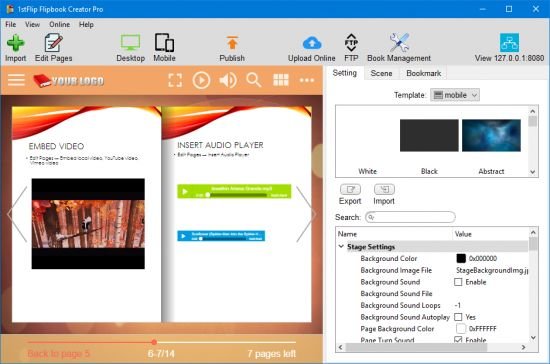
Multimedia makes flip books more attractive. 1stFlip PDF to Flip Book Software's Page Editor allows you to add local video/audio and YouTube/Vimeo video to create amazing flipping pages. Simply click the built-in video/audio player and import local file or enter YouTube video ID.

Enrich flip book page contents with image, text, shapes, callouts, number icons and buttons
1stFlip PDF to flipbook converter for Windows allows you to insert image, GIF, text, line, ellipse, rectangle, triangle, callouts, number icons, charts and many kinds of buttons to flipping pages and add interactive function to the online flipping digital publications. All added image, text, shapes callouts, number icons and buttons in the flip book page can be used to open links, flash window, photo slideshow, call jаvascript function, play audio or jump to certain page.

Add, delete flip book pages or adjust flipping page order
With the page editor of this flipbook app, you can easily add image or pages from any PDF file to the current flipbook as new flipping page. You can also delete unwanted flip book pages or adjust page order as you like.

PDF to flip book software - Customizable flipbook animations and templates
1stFlip PDF to Flash/HTML5 flip book software provides multiple flipbook templates and scenes for you to make animated HTML5 and Flash flip books, e-books and simplify the flip book flash creation. Create flash page flip books along with background music, thumbnails, zoom button, full screen button, auto flip button, language switchable toolbar, etc. Or choose your own image and SWF file as flipping book background.

Output local html, zip, app, exe flipbook to read offline or send by email
Get offline page flip book in 4 formats: html, zip, app and exe. Send ZIP flipbook to readers via email to read with a local URL on their computers. Open app flipping book on Mac and exe flipbook on Windows directly. There's even an option for publishing flipbook to WordPress Plug-in, Joomla module and Drupal module.

One-click to upload digital flipbooks online and share to Facebook, Twitter, etc.
1stFlip PDF to flipbook Converter comes with built-in Instant Upload and FTP client. So you can upload flip books online directly. Get embed code and insert flipbook to webpage and blog. Share flip book to Facebook, Twitter, etc.

View page flip books on mobile devices
1stFlip PDF to flipbook software converts PDF to html5 flipbooks and allows you to easily view these page-flipping e-publications with your iPhone, iPad, or Android device.

Requirements: Windows XP and later.

Home Page -


DOWNLOAD LINKS:


1stFlip FlipBook Creator Pro v2.7.0


e5b7bd3e83389d61b1db8c65c302e3ca.jpg


1stFlip FlipBook Creator Pro v2.7.0 | 331 MB | Language: English


1stFlip PDF to flipbook converter helps you easily convert PDF to flash flip book, HTML5 flip book with realistic page turn effect to read on any Mac, PC, iPhone, iPad and Android devices. With this professional PDF to flipbook converter, you can easily embed local/YouTube/Vimeo video, music, images, button, chart, hyperlinks to any digital page flip book, magazine, brochures, catalogs, eBooks, newsletters.


1stFlip PDF to Flipbook Converter Pro
- Convert PDF to HTML5 Flipbooks with Multimedia
- PDF to HTML5 flipbook converter, PDF to Flash-HTML5 flipbook app.
- Page editor allows you to insert line, shape, callout, text, image, GIF, music, video, YouTube video, chart, button and number icon to customize page flip book animation.
- Convert PDF to offline flip book in 4 formats: html, zip, app and exe.
- Upload flipbook to own website using built-in FTP or to 1stFlip cloud storage.
- Support searching flipbook content.
- Book Management lets you easily organize your uploaded flip books.
- Batch convert multiple PDFs to flipbooks. (NEW!)

Insert local video, YouTube video or audio to Flash/HTML5 page flip book
Multimedia makes flip books more attractive. 1stFlip PDF to Flip Book Software's Page Editor allows you to add local video/audio and YouTube/Vimeo video to create amazing flipping pages. Simply click the built-in video/audio player and import local file or enter YouTube video ID.

Enrich flip book page contents with image, text, shapes, callouts, number icons and buttons
1stFlip PDF to flipbook converter for Windows allows you to insert image, GIF, text, line, ellipse, rectangle, triangle, callouts, number icons, charts and many kinds of buttons to flipping pages and add interactive function to the online flipping digital publications. All added image, text, shapes callouts, number icons and buttons in the flip book page can be used to open links, flash window, photo slideshow, call javascript function, play audio or jump to certain page.

Add, delete flip book pages or adjust flipping page order
With the page editor of this flipbook app, you can easily add image or pages from any PDF file to the current flipbook as new flipping page. You can also delete unwanted flip book pages or adjust page order as you like.

PDF to flip book software - Customizable flipbook animations and templates
1stFlip PDF to Flash/HTML5 flip book software provides multiple flipbook templates and scenes for you to make animated HTML5 and Flash flip books, e-books and simplify the flip book flash creation. Create flash page flip books along with background music, thumbnails, zoom button, full screen button, auto flip button, language switchable toolbar, etc. Or choose your own image and SWF file as flipping book background.

Output local html, zip, app, exe flipbook to read offline or send by email
Get offline page flip book in 4 formats: html, zip, app and exe. Send ZIP flipbook to readers via email to read with a local URL on their computers. Open app flipping book on Mac and exe flipbook on Windows directly. Theres even an option for publishing flipbook to WordPress Plug-in, Joomla module and Drupal module.

One-click to upload digital flipbooks online and share to Facebook, Twitter, etc.
1stFlip PDF to flipbook Converter comes with built-in Instant Upload and FTP client. So you can upload flip books online directly. Get embed code and insert flipbook to webpage and blog. Share flip book to Facebook, Twitter, etc.

View page flip books on mobile devices
1stFlip PDF to flipbook software converts PDF to html5 flipbooks and allows you to easily view these page-flipping e-publications with your iPhone, iPad, or Android device.

Requirements: Windows XP and later.

What's new:
Homepage:


DOWNLOAD LINKS:



1stFlip FlipBook Creator v2.7.3


adccaa804bef75f8e90d048369f42f64.jpg


1stFlip FlipBook Creator v2.7.3 | 250 MB | Language: English


1stFlip PDF to flipbook converter helps you easily convert PDF to flash flip book, HTML5 flip book with realistic page turn effect to read on any Mac, PC, iPhone, iPad and Android devices. With this professional PDF to flipbook converter, you can easily embed local/YouTube/Vimeo video, music, images, button, chart, hyperlinks to any digital page flip book, magazine, brochures, catalogs, eBooks, newsletters.


Insert local video, YouTube video or audio to Flash/HTML5 page flip book
Multimedia makes flip books more attractive. 1stFlip PDF to Flip Book Software's Page Editor allows you to add local video/audio and YouTube/Vimeo video to create amazing flipping pages. Simply click the built-in video/audio player and import local file or enter YouTube video ID.

Enrich flip book page contents with image, text, shapes, callouts, number icons and buttons
1stFlip PDF to flipbook converter for Windows allows you to insert image, GIF, text, line, ellipse, rectangle, triangle, callouts, number icons, charts and many kinds of buttons to flipping pages and add interactive function to the online flipping digital publications. All added image, text, shapes callouts, number icons and buttons in the flip book page can be used to open links, flash window, photo slideshow, call javascript function, play audio or jump to certain page.

Add, delete flip book pages or adjust flipping page order
With the page editor of this flipbook app, you can easily add image or pages from any PDF file to the current flipbook as new flipping page. You can also delete unwanted flip book pages or adjust page order as you like.

PDF to flip book software - Customizable flipbook animations and templates
1stFlip PDF to Flash/HTML5 flip book software provides multiple flipbook templates and scenes for you to make animated HTML5 and Flash flip books, e-books and simplify the flip book flash creation. Create flash page flip books along with background music, thumbnails, zoom button, full screen button, auto flip button, language switchable toolbar, etc. Or choose your own image and SWF file as flipping book background.

Output local html, zip, app, exe flipbook to read offline or send by email
Get offline page flip book in 4 formats: html, zip, app and exe. Send ZIP flipbook to readers via email to read with a local URL on their computers. Open app flipping book on Mac and exe flipbook on Windows directly. Theres even an option for publishing flipbook to WordPress Plug-in, Joomla module and Drupal module.

One-click to upload digital flipbooks online and share to Facebook, Twitter, etc.
1stFlip PDF to flipbook Converter comes with built-in Instant Upload and FTP client. So you can upload flip books online directly. Get embed code and insert flipbook to webpage and blog. Share flip book to Facebook, Twitter, etc.

View page flip books on mobile devices
1stFlip PDF to flipbook software converts PDF to html5 flipbooks and allows you to easily view these page-flipping e-publications with your iPhone, iPad, or Android device.

What's new:
Homepage:


Größe: 250 MB
Sprache: English
Format: .rar / .exe
Plattform: Windows (32 Bit 64 Bit)


HOSTER:

K2s.cc (Keep2Share)

Rapidgator.net

Nitroflare.com

Uploadgig.com


DOWNLOAD


1stFlip FlipBook Creator v2.7.7


c9f9a4cddb68f87be6a4756554f1db1d.jpg


1stFlip FlipBook Creator v2.7.7 | 247 MB | Language: English


1stFlip PDF to flipbook converter helps you easily convert PDF to flash flip book, HTML5 flip book with realistic page turn effect to read on any Mac, PC, iPhone, iPad and Android devices. With this professional PDF to flipbook converter, you can easily embed local/YouTube/Vimeo video, music, images, button, chart, hyperlinks to any digital page flip book, magazine, brochures, catalogs, eBooks, newsletters.


Insert local video, YouTube video or audio to Flash/HTML5 page flip book
Multimedia makes flip books more attractive. 1stFlip PDF to Flip Book Software's Page Editor allows you to add local video/audio and YouTube/Vimeo video to create amazing flipping pages. Simply click the built-in video/audio player and import local file or enter YouTube video ID.

Enrich flip book page contents with image, text, shapes, callouts, number icons and buttons
1stFlip PDF to flipbook converter for Windows allows you to insert image, GIF, text, line, ellipse, rectangle, triangle, callouts, number icons, charts and many kinds of buttons to flipping pages and add interactive function to the online flipping digital publications. All added image, text, shapes callouts, number icons and buttons in the flip book page can be used to open links, flash window, photo slideshow, call javascript function, play audio or jump to certain page.

Add, delete flip book pages or adjust flipping page order
With the page editor of this flipbook app, you can easily add image or pages from any PDF file to the current flipbook as new flipping page. You can also delete unwanted flip book pages or adjust page order as you like.

PDF to flip book software - Customizable flipbook animations and templates
1stFlip PDF to Flash/HTML5 flip book software provides multiple flipbook templates and scenes for you to make animated HTML5 and Flash flip books, e-books and simplify the flip book flash creation. Create flash page flip books along with background music, thumbnails, zoom button, full screen button, auto flip button, language switchable toolbar, etc. Or choose your own image and SWF file as flipping book background.

Output local html, zip, app, exe flipbook to read offline or send by email
Get offline page flip book in 4 formats: html, zip, app and exe. Send ZIP flipbook to readers via email to read with a local URL on their computers. Open app flipping book on Mac and exe flipbook on Windows directly. Theres even an option for publishing flipbook to WordPress Plug-in, Joomla module and Drupal module.

One-click to upload digital flipbooks online and share to Facebook, Twitter, etc.
1stFlip PDF to flipbook Converter comes with built-in Instant Upload and FTP client. So you can upload flip books online directly. Get embed code and insert flipbook to webpage and blog. Share flip book to Facebook, Twitter, etc.

View page flip books on mobile devices
1stFlip PDF to flipbook software converts PDF to html5 flipbooks and allows you to easily view these page-flipping e-publications with your iPhone, iPad, or Android device.

What's new:
Homepage:


Größe: 247 MB
Sprache: English
Format: .rar / .exe
Plattform: Windows (32 Bit 64 Bit)


HOSTER:

K2s.cc (Keep2Share)

Rapidgator.net

Nitroflare.com

Uploadgig.com


DOWNLOAD


1stFlip FlipBook Creator Pro v2.7.7


479e4ac0d038fa1629e15e55aff3997d.jpg


1stFlip FlipBook Creator Pro v2.7.7 | 329 MB | Language: English


1stFlip PDF to flipbook converter helps you easily convert PDF to flash flip book, HTML5 flip book with realistic page turn effect to read on any Mac, PC, iPhone, iPad and Android devices. With this professional PDF to flipbook converter, you can easily embed local/YouTube/Vimeo video, music, images, button, chart, hyperlinks to any digital page flip book, magazine, brochures, catalogs, eBooks, newsletters.


1stFlip PDF to Flipbook Converter Pro - Convert PDF to HTML5 Flipbooks with Multimedia
- PDF to HTML5 flipbook converter, PDF to Flash-HTML5 flipbook app.
- Page editor allows you to insert line, shape, callout, text, image, GIF, music, video, YouTube video, chart, button and number icon to customize page flip book animation.
- Convert PDF to offline flip book in 4 formats: html, zip, app and exe.
- Upload flipbook to own website using built-in FTP or to 1stFlip cloud storage.
- Support searching flipbook content.
- Book Management lets you easily organize your uploaded flip books.
- Batch convert multiple PDFs to flipbooks. (NEW!)

Insert local video, YouTube video or audio to Flash/HTML5 page flip book
Multimedia makes flip books more attractive. 1stFlip PDF to Flip Book Software's Page Editor allows you to add local video/audio and YouTube/Vimeo video to create amazing flipping pages. Simply click the built-in video/audio player and import local file or enter YouTube video ID.

Enrich flip book page contents with image, text, shapes, callouts, number icons and buttons
1stFlip PDF to flipbook converter for Windows allows you to insert image, GIF, text, line, ellipse, rectangle, triangle, callouts, number icons, charts and many kinds of buttons to flipping pages and add interactive function to the online flipping digital publications. All added image, text, shapes callouts, number icons and buttons in the flip book page can be used to open links, flash window, photo slideshow, call javascript function, play audio or jump to certain page.

Add, delete flip book pages or adjust flipping page order
With the page editor of this flipbook app, you can easily add image or pages from any PDF file to the current flipbook as new flipping page. You can also delete unwanted flip book pages or adjust page order as you like.

PDF to flip book software - Customizable flipbook animations and templates
1stFlip PDF to Flash/HTML5 flip book software provides multiple flipbook templates and scenes for you to make animated HTML5 and Flash flip books, e-books and simplify the flip book flash creation. Create flash page flip books along with background music, thumbnails, zoom button, full screen button, auto flip button, language switchable toolbar, etc. Or choose your own image and SWF file as flipping book background.

Output local html, zip, app, exe flipbook to read offline or send by email
Get offline page flip book in 4 formats: html, zip, app and exe. Send ZIP flipbook to readers via email to read with a local URL on their computers. Open app flipping book on Mac and exe flipbook on Windows directly. Theres even an option for publishing flipbook to WordPress Plug-in, Joomla module and Drupal module.

One-click to upload digital flipbooks online and share to Facebook, Twitter, etc.
1stFlip PDF to flipbook Converter comes with built-in Instant Upload and FTP client. So you can upload flip books online directly. Get embed code and insert flipbook to webpage and blog. Share flip book to Facebook, Twitter, etc.

View page flip books on mobile devices
1stFlip PDF to flipbook software converts PDF to html5 flipbooks and allows you to easily view these page-flipping e-publications with your iPhone, iPad, or Android device.

Requirements: Windows XP and later.

What's new:
Homepage:


Größe: 329 MB
Sprache: English
Format: .rar / .exe
Plattform: Windows (32 Bit 64 Bit)


HOSTER:

K2s.cc (Keep2Share)

Rapidgator.net

Nitroflare.com

Uploadgig.com


DOWNLOAD


1stFlip FlipBook Creator v2.7.7

th_8pl60btyathrkxm7fl2gjzp.jpg


1stFlip FlipBook Creator v2.7.7

Größe: 247 MB
Sprache: Englisch
Format: Exe
Plattform: Windows

Mit 1stFlip PDF to Flipbook Converter können Sie PDF einfach in Flash Flipbook konvertieren. HTML5 Flipbook mit realistischem Umblätternseffekt kann auf jedem Mac, PC, iPhone, iPad und Android-Gerät gelesen werden. Mit diesem professionellen PDF-zu-Flipbook-Konverter können Sie problemlos lokale / YouTube / Vimeo-Videos, Musik, Bilder, Schaltflächen, Diagramme und Hyperlinks zu jedem digitalen Seiten-Flipbook, Magazin, Broschüren, Katalogen, eBooks und Newslettern einbetten. Fügen Sie lokales Video, YouTube-Video oder Audio in das Flash / HTML5-Seiten-Daumenkino ein
Multimedia macht Daumenkino attraktiver. Mit dem Seiteneditor von 1stFlip PDF to Flip Book Software können Sie lokales Video / Audio und YouTube / Vimeo-Video hinzufügen, um erstaunliche Seiten zu erstellen. Klicken Sie einfach auf den integrierten Video- / Audio-Player und importieren Sie die lokale Datei oder geben Sie die YouTube-Video-ID ein.

Uploaded.net.com
Rapidgator.net

BA9187C47C.png


Zurück
Oben Unten