• Regeln für den Software-Bereich:


    Allgemeines:

    - In erster Linie sind unsere Boardregeln zu beachten, zu finden HIER.
    - Software zur Audiobearbeitung sollte ausschließlich im Unterforum "Audio" eingestellt werden.
    - Für Cracks, Keygens oder sonstige Freischaltungssoftware gibt es das Unterforum "Freischaltung".
    - Portable Software bitte im entsprechenden Unterforum "Portable Software" eintragen.
    - Diskussionen zur Installation und anderen Problemen mit der Software, bitte im enstprechenden Unterforum "Talk" führen.
    - Bei Unklarheiten und Fragen zu den Regeln bitte die Moderatoren kontaktieren.


    Angebot erstellen

    - Die Struktur des Threadtitels muss wie folgt umgesetzt werden: Herstellername - Softwarename - Versionsnummer
    - Unnötige Zusätze im Threadtitel wie "HOT", "NEW" oder Punkte zwischen den Wörtern sind nicht erlaubt.
    - Achtet darauf immer nur die Hauptversion und deren Updates in einem Thread zusammenfassen, konkretes Beispiel: SoftwareXY v3.12 gehört in den selben Thread mit SoftwareXY v3.13; SoftwareXY v.4.1 gehört in einen neuen eigenen Thread. Ausgenommen hiervon sind Sammelthreads und Dauerangebote.
    - Bei nicht bekannten Herstellern oder Angebote einer privaten Software, ist die Programmbezeichnung + Versionsnummer ausreichend.
    - Besondere Beachtung gilt für den ersten Beitrag eines Angebots. Dort muss eine kurze Beschreibung der Software in deutscher Sprache angegeben werden. Für offizielle Releases ist es Pflicht die NFO im Beitrag einzustellen(Spoiler, siehe nächster Punkt).
    - Weitere Informationen wie NFOs oder Changelogs, versteckt ihr bitte in einem Spoiler.


    Software Suche

    - Für Suchanfragen haben wir das Unterforum "Suche" erstellt.
    - Auch hier sollte vorher die Suchfunktion benutzt werden, um Doppelthreads vorzubeugen. Sollte es bereits eine Suchanfrage geben, könnt ihr den Thread gerne mit einem "Danke" pushen.


    Trojaner- und Virusalarm

    - Falls Euer Virenscanner bei einem Angebot Alarm schlägt, solltet ihr zunächst Ruhe bewahren. Viele Virenscanner erkennen Cracks/Keygens oft fälschlicherweise als Bedrohung.
    - Prüft die verdächtige Datei zuerst mit http://virustotal.com , sollte es sich hierbei wirklich um eine Bedrohung handeln, meldet den Beitrag und/oder wendet euch mit dem Bericht von VirusTotal.com an einen Moderator.


    Unerwünschte Angebote

    - Keylogger, Spionagetools, alles rund ums Thema Hacking/Cracking ist nicht erwünscht.
  • Bitte registriere dich zunächst um Beiträge zu verfassen und externe Links aufzurufen.

++ Premium IPTV ++ 7000 Live Sender ++ UHD Qualität ++ Mediathek mit 18.000 Inhalten ++


VenneTV


HWiNFO64 Pro v8

alexz

MyBoerse.bz Pro Member


HWiNFO64 Pro 8.54.6090 Corporate (x64)


c35445ee50815570fdc5f472aecc32ec.avif


HWiNFO64 Pro 8.54.6090 Corporate (x64)


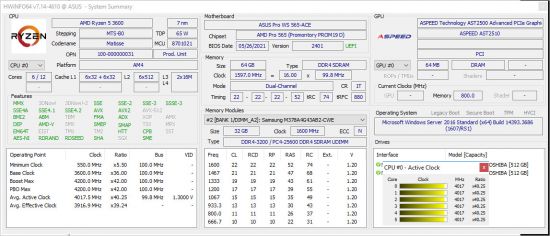
HWiNFO64 ist ein professionelles Tool zur Hardware-Information und -Diagnose, das aktuelle Komponenten, Industrietechnologien und Standards unterstützt. Die Software wurde entwickelt, um ein Maximum an Informationen über die Hardware eines Computers zu erfassen und übersichtlich darzustellen. Damit eignet sie sich ideal für Anwender, die nach Treiber-Updates suchen, sowie für Computerhersteller, Systemintegratoren und technische Experten. Die erfassten Daten werden logisch und leicht verständlich aufbereitet und lassen sich in verschiedene Berichtsformate exportieren.


Sprache: English | Größe: 61 MB | Format: RAR, EXE | Plattform: Windows 7, 8/8.1, 10, 11 (64Bit)


Hoster:
RapidGator.net | NitroFlare.com | DDownload.com


DOWNLOAD Links:


​
 
e7026578792a22e458df9d790c62628c.webp

Free Download HWiNFO64 Pro 8.60.6120 (x64) | 20.8 Mb
HWiNFO64 Pro is a comprehensive hardware information, system monitoring, and diagnostic utility for Windows. It provides detailed information about computer components, from a quick system overview to in-depth technical specifications covering individual hardware devices.
The application also monitors system sensors in real time, helping users track temperatures, voltages, fan speeds, clock frequencies, and other available hardware parameters. Its reporting and logging tools make it useful for system diagnostics, hardware inventory, and performance monitoring.​

Software Overview
HWiNFO64 Pro is designed to give users a detailed picture of their computer's hardware configuration and operating status. It identifies and displays information about processors, graphics cards, motherboards, memory, storage devices, and connected peripherals.
Beyond hardware identification, the software provides real-time sensor monitoring with configurable tables, graphs, tray icons, and on-screen display options. These features help users observe changing system conditions and investigate issues such as overheating, excessive load, or unusual hardware behavior.
For documentation and analysis, HWiNFO64 Pro can generate reports in XML, CSV, and HTML formats. It also supports status logging, customizable alerts, and integration with compatible external applications through its monitoring interfaces.
Key Features
  • Detailed Hardware Information: Identify and examine installed hardware components with extensive technical details.
  • CPU Information: Display processor specifications and available operating parameters.
  • GPU Information: Inspect graphics hardware details and supported monitoring data.
  • Motherboard and Memory Details: Retrieve information about the mainboard, memory modules, and related components.
  • Storage and Peripheral Information: Examine supported drives and connected hardware devices.
  • Real-Time Sensor Monitoring: Track available temperatures, voltages, fan speeds, clock rates, and other system parameters.
  • System Health Monitoring: Observe hardware conditions to help identify overheating, excessive load, and potential performance problems.
  • Customizable Monitoring Interface: Display sensor information through tables, graphs, tray icons, and on-screen displays.
  • Hardware Reports: Export detailed hardware information and summaries to XML, CSV, and HTML files.
  • Status Logging: Record hardware and sensor information for later examination.
  • Custom Alerts: Configure notifications and user-defined actions for monitored parameters.
  • External Application Integration: Share monitoring information with compatible applications and third-party extensions.
  • SHM Interface: Expose the available sensor data set through the Shared Memory interface.
  • Low Monitoring Overhead: Designed to monitor system hardware while keeping resource usage low.
Why Choose HWiNFO64 Pro
HWiNFO64 Pro combines hardware identification, sensor monitoring, and reporting in one application. Its detailed component information is valuable when checking system specifications, preparing hardware inventories, or troubleshooting computer problems.
The configurable monitoring tools are particularly useful for observing system temperatures and other sensor readings during demanding workloads. Custom alerts, logging, and external application integration also provide additional flexibility for users who need ongoing hardware diagnostics.
System Requirements
  • Operating System: Windows (64-bit)
  • Architecture: x64
  • Disk Space: 20.8 Mb for the application package
Specific processor and memory requirements were not provided. Refer to the official HWiNFO website for current compatibility information.
FAQ
What is HWiNFO64 Pro used for?
It is used to identify computer hardware, inspect component specifications, monitor system sensors, and generate diagnostic reports.
Can HWiNFO64 monitor CPU and GPU temperatures?
Yes. It can display available temperature and other sensor readings for supported CPUs, GPUs, and additional hardware components.
Can I export a hardware report?
Yes. HWiNFO supports report exports in XML, CSV, and HTML formats.
Does HWiNFO support customizable alerts?
Yes. Users can configure alerts for monitored parameters and define actions to be performed when specified conditions are met.
Can HWiNFO share sensor data with other applications?
Yes. It provides monitoring interfaces, including SHM, for compatible applications and extensions.
Home Page
Product Information
  • Software Name: HWiNFO64 Pro
  • Version: 8.60.6120
  • Architecture: x64
  • Languages: English
  • License type: Full Version
  • File Size: 20.8 Mb


FileHost : RapidGator | FreeDL | DDownload | AlfaFile​
 
HWiNFO64 Pro 8.60.6120 (x64)

th-Xm-Io-APPTTIi-HVT9MIz-Yjxcii-V11380Ea.jpg


HWiNFO64 are professional hardware information and diagnostic tools supporting latest components, industry technologies and standards. These tools are designed to collect and present the maximum amount of information possible about computer's hardware which makes them suitable for users searching for driver updates, computer manufacturers, system integrators and technical experts as well. Retrieved information is presented in a logical and easily understandable form and can be exported into various types of reports.

Features
- comprehensive hardware information of your computer
- system health monitoring (Thermal, Voltage, Fan, Power)
- table, Logfile, Graph, Tray, Gadget, LG LCD reporting
- text, CSV, XML, HTML, MHTML report formats
- frequent updates
- available as SDK (custom client)
- 3rd party add-ons (Rainmeter plug-in, Samurize plug-in, Sidebar Gadget to display any sensor value, LCDHost plug-in, Mini WebServer, RivaTuner/MSI Afterburner/EVGA Precision On-Screen Display, HWiNFOMonitor Sidebar Gadget including graphs, bars, etc.)

Language: English

File Size: 20.8 MB

Format: RAR, EXE

Platform: Windows 7, 8/8.1, 10, 11 (64Bit)


Hoster:

RapidGator.net
Ddownload.com


DOWNLOAD:

1542b02c1dc93a1775aec0bc739865cd.gif


Zurück
Oben Unten