



• Regeln für den Video-Bereich:

    In den Börsenbereich gehören nur Angebote die bereits den Allgemeinen Regeln entsprechen.

    Einteilung

    - Folgende Formate gehören in die angegeben Bereiche:
    - Filme: Encodierte Filme von BluRay, DVD, R5, TV, Screener sowie Telesyncs im Format DivX, XviD und x264.
    - DVD: Filme im Format DVD5, DVD9 und HD2DVD.
    - HD: Encodierte Filme mit der Auflösung 720p oder darüber von BluRay, DVD, R5, TV, Screener sowie Telesyncs im Format x264.
    - 3D: Encodierte Filme von BluRay, die in einem 3D Format vorliegen. Dies gilt auch für Dokus, Animation usw.
    - Serien: Cartoon/Zeichentrick, Anime, Tutorials, Dokumentationen, Konzerte/Musik, Sonstiges sind demnach in die entsprechenden Bereiche einzuordnen, auch wenn sie beispielsweise im High Definition-Format oder als DVD5/DVD9/HD2DVD vorliegen. Ausnahme 3D.
    - Bereich Englisch: Englische Releases gehören immer in diesen Bereich.
    - Bereich Talk: Der Bereich, in dem über die Releases diskutiert werden kann, darf, soll und erwünscht ist.


    Angebot/Beitrag erstellen

    - Ein Beitrag darf erst dann erstellt werden, wenn der Upload bei mindestens einem OCH komplett ist. Platzhalter sind untersagt.
    - Bei einem Scenerelease hat der Threadtitel ausschließlich aus dem originalen, unveränderten Releasenamen zu bestehen. Es dürfen keine Veränderungen wie z.B. Sterne, kleine Buchstaben o.ä. vorgenommen werden. Ausnahme Serienbörse:
    - Bei einem Sammelthread für eine Staffel entfällt aus dem Releasename natürlich der Name der Folge. Beispiel: Die Simpsons S21 German DVDRip XviD - ITG
    - Dementsprechend sind also u.a. verboten: Erweiterungen wie "Tipp", "empfehlenswert", "only", "reup", usw. / jegliche andere Zusatzinformation oder Ergänzung, welche nicht in obiger Beschreibung zu finden ist.

    Aufbau des Angebots und Threadtitel

    Der Titel nach folgendem Muster erstellt zu werden. <Name> [3D] [Staffel] [German] <Jahr> <Tonspur> [DL] [Auflösung] <Quelle> <Codec> - <Group>
    Beispiel: The Dark Knight German 2008 AC3 DVDRip XviD - iND
    Beispiel: The Dark Knight 2008 DTS DL BDRip x264 - iND
    Beispiel: The Dark Knight 2008 AC3 DL BDRip XviD - iND
    Beispiel: The Dark Knight German 2008 AC3 720p BluRay x264 iND
    Beispiel: The Dark Knight 2008 DTS DL 1080p BluRay x264 iND
    Beispiel: Die Simpsons S01 German AC3 DVDRip XviD iND
    Beispiel: Die Simpsons S20 German AC3 720p BluRay x264 iND
    Beispiel: Sword Art Online II Ger Sub 2014 AAC 1080p WEBRip x264 - peppermint
    Entsprechend sind also u.a. verboten: Sonderzeichen wie Klammern, Sterne, Ausrufezeichen, Unterstriche, Anführungszeichen / Erweiterungen wie "Tipp", "empfehlenswert", "only", "reup", usw. / jegliche andere Zusatzinformation oder Ergänzung, welche nicht in obiger Beschreibung zu finden ist
    Ausnahmen hiervon können in den Bereichen geregelt sein.

    Die Beiträge sollen wie folgt aufgebaut werden:
    Überschrift entspricht dem Threadtitel
    Cover
    kurze Inhaltsbeschreibung
    Format, Größe, Dauer sind gut lesbar für Downloader außerhalb des Spoilers zu vermerken
    Nfo sind immer Anzugeben und selbige immer im Spoiler in Textform.
    Sind keine Nfo vorhanden z.B. Eigenpublikationen, sind im Spoiler folgende Dateiinformationen zusätzlich anzugeben :
    Quelle
    Video (Auflösung und Bitrate)
    Ton (Sprache, Format und Bitrate der einzelnen Spuren)
    Untertitel (sofern vorhanden)
    Hosterangabe in Textform außerhalb eines Spoiler mit allen enthaltenen Hostern.
    Bei SD kann auf diese zusätzlichen Dateiinformationen verzichtet werden.

    Alle benötigten Passwörter sind, sofern vorhanden, in Textform im Angebot anzugeben.
    Spoiler im Spoiler mit Kommentaren :"Schon Bedankt?" sind unerwünscht.


    Releases

    - Sind Retail-Release verfügbar, sind alle anderen Variationen untersagt. Ausnahmen: Alle deutschen Retail-Release sind CUT, in diesem Fall sind dubbed UNCUT-Release zulässig.
    - Im Serien-Bereich gilt speziell: Wenn ein Retail vor Abschluss einer laufenden Staffel erscheint, darf diese Staffel noch zu Ende gebracht werden.62
    - Gleiche Releases sind unbedingt zusammenzufassen. Das bedeutet, es ist zwingend erforderlich, vor dem Erstellen eines Themas per Suchfunktion zu überprüfen, ob bereits ein Beitrag mit demselben Release besteht. Ist dies der Fall, ist der bereits vorhandene Beitrag zu verwenden.
    - P2P und Scene Releases dürfen nicht verändert oder gar unter einem iND Tag eingestellt werden.


    Support, Diskussionen und Suche

    - Supportanfragen sind entweder per PN oder im Bereich Talk zu stellen.
    - Diskussionen und Bewertungen sind im Talk Bereich zu führen. Fragen an die Uploader haben ausschließlich via PN zu erfolgen, und sind in den Angeboten untersagt.
    - Anfragen zu Upload-Wünschen sind nur im Bereich Suche Video erlaubt. Antworten dürfen nur auf Angebote von MyBoerse.bz verlinkt werden.


    Verbote

    - Untersagt sind mehrere Formate in einem einzigen Angebotsthread, wie beispielsweise das gleichzeitige Anbieten von DivX/XviD, 720p und 1080p in einem Thread. Pro Format, Release und Auflösung ist ein eigener Thread zu eröffnen.
    - Grundsätzlich ebenso verboten sind Dupes. Uploader haben sich an geeigneter Stelle darüber zu informieren, ob es sich bei einem Release um ein Dupe handelt.
    - Gefakte, nur teilweise lauffähige oder unvollständige Angebote sind untersagt. Dies gilt auch für eigene Publikationen, die augenscheinlich nicht selbst von z.B. einer DVD gerippt wurden. Laufende Serien, bei denen noch nicht alle Folgen verfügbar sind, dürfen erstellt und regelmäßig geupdatet werden.
    - Untersagt sind Angebote, welche nur und ausschließlich in einer anderen Sprache als deutsch oder englisch vorliegen. Ausnahmen sind VORHER mit den Moderatoren zu klären.


    Verstoß gegen die Regeln

    - Angebote oder Beiträge, die gegen die Forenregeln verstoßen, sind über den "Melden"-Button im Beitrag zu melden.
  • Bitte registriere dich zunächst um Beiträge zu verfassen und externe Links aufzurufen.

*** Bestes IPTV *** bester Preis *** gratis Test ***


3D Modelling a Hobbit Door Scene in Blender 2.9 & Adobe Photoshop

0nelove

MyBoerse.bz Pro Member
EbrwQ3u6AAHSQ4liYQhHOcImLFKfA9qB.jpg

3D Modelling a Hobbit Door Scene in Blender 2.9 & Adobe PhotoshopDuration: 4h 21m | Video: .MP4, 1280x720, 30 fps | Audio: AAC, 48 kHz, 2ch | Size: 3.92 GB
Genre: eLearning | Language: English
Course Description​

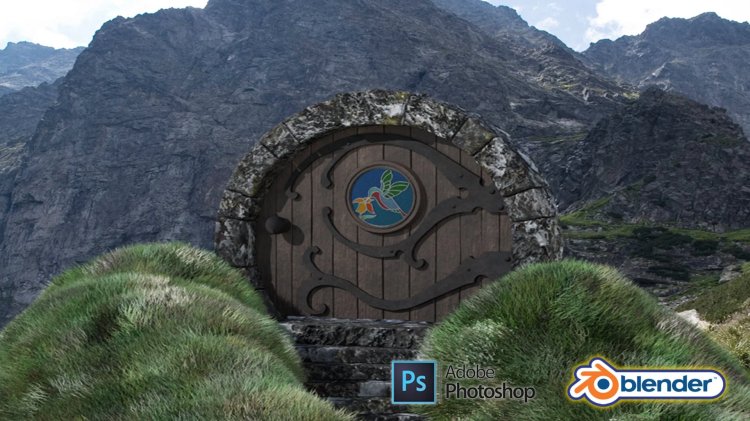
Hi and welcome to my newest Blender 2.9 fantasy genre 3D art course. '3D Modelling a Hobbit Door Scene in Blender 2.9 & Adobe Photoshop' a complete guide into creating a 3D fantasy scene with the backdrop of a remotely towering mountain.

'3D Modelling a Hobbit Door Scene in Blender 2.9 & Adobe Photoshop is one of the few 3D modelling courses that will show you how to create grass foliage. It will also be one of the first fantasy genre courses for aspiring 3D modellers. As another first, this course will include a full introduction into basic Adobe Photoshop features.

One of the most sought-after learning experiences of this course is learning how to create Scalable Vector Graphics (SVGs) from scratch. Other exciting course content includes 3D modelling a round door, making procedural materials, learning how to use HDRIs as backgrounds to feature your 3D models in, and learning how to blend a render into a real-world environment using various Adobe Photoshop techniques.

'3D Modelling a Hobbit Door Scene in Blender 2.9 & Adobe Photoshop'teaches you the very basics of both Blender 2.9 and Abobe Photoshop, moving on to professional techniques in a short time of accelerated learning.

Best of all, anyone can follow along even if you do not have to have Adobe Photoshop. This is because course resources include ready-to-use hinges and stained glass which can be imported into Blender 2.9 straight away. As such, this provides you with a course shortcut that you can take if you so choose.

Taking all the great tools and screen tooltips from past courses, '3D Modelling a Hobbit Door Scene in Blender 2.9 & Adobe Photoshop' will give you the most comprehensive learning process out there.

You will have access to a full course handbook as part of this course, allowing you to identify which parts of the course you would like to jump ahead to if you are a non-linear 3D modeller. The '3D Modelling a Hobbit Door Scene in Blender 2.9 & Adobe Photoshop' course handbook features 8 sections, each focusing on an asset or set of assets. The handbook will transform the learning experience for 3D modelers who love to organise their learning process and take the steering wheel into their own hands.

Following the success of my latest course, we will be modelling, texturing, and finalising every individual asset before moving onto the next. Students have said that this has helped them in staying excited throughout the creation process, being able to see how their scene comes closer to the course preview step-by-step.

Whether you are a beginner 3D modeller eager to learn how to build a 3D Hobbit Door scene and an enthusiast of Blender who wants to fast-track their understanding of its new and exciting changes, this course has something in the bag for you.'3D Modelling a Hobbit Door Scene in Blender 2.9 & Adobe Photoshop's also ideal for beginner Adobe Photoshop users who are eager to learn how to use this software for 3D modelling or mid-level 3D modellers who want to take their modelling to a new level and improve their workflow with tips and tricks.

In addition to learning a super-fast industry-standard workflow, you will learn how to continuously assess the quality of your scene, and how to tweak smaller sub-components you want to make better through render reviews.

'3D Modelling a Hobbit Door Scene in Blender 2.9 & Adobe Photoshop' freebies include a course handbook, 6 references, an option of backgrounds, two types of metal materials, a glass overlay for Adobe Photoshop, a grass texture, an HDRI map, a rock and a weathered texture (including roughness, normal, metallic, displacement, and color maps), a stained glass SVG and a metal hinge SVG.

Because of how versatile every '3D Modelling a Hobbit Door Scene in Blender 2.9 & Adobe Photoshop' 3D asset is, this course will show introduce you to interesting functionalities, including new and creative ways of using Blender 2.9 and Adobe Photoshop:

Following through a complete guide on creating a 3D Hobbit Door scene in Blender 2.9 and Adobe Photoshop
Using Blender 2.9 (the newest software version) and understanding its interface and shortcuts
Creating a stunning unique 3D Hobbit Door scene
Learning an industry-standard 3D modelling professional workflow within Blender 2.9 and Adobe Photoshop
Effective problem-solving in Blender 2.9
Learning the basics of Adobe Photoshop
Creating a Scalable Vector Graphic (SVG) from scratch
Learning how to blend a render into a real-world environment using various Adobe Photoshop techniques
Learning how to use HDRIs as backgrounds to feature your 3D models in
Maintaining and optimising fantasy scene aesthetics for a Hobbit Door scene
Marking Seams, Sharps, and fixing Normals
Smoothing and preparing meshes for texturing
Adding materials using Blender 2.9's node system
Creating procedural materials in Blender 2.9
Mesh deforming and using Booleans
Learning how to make loop cuts in Blender 2.9
Fixing Ngons within Blender 2.9
Complete guide on marking seams & texture resolutions
Complete UV Mapping Guide: UV mapping and UV unwrapping your model
Creating procedural, stained glass, and metal materials
Creating Collections of Objects and Meshes using a Hierarchy System
Learning how to use rendering to improve the quality of presentation for your 3D environment
Rendering a 3D fantasy Hobbit Door scene to a high level.

Download

 
Zurück
Oben Unten