• Regeln für den Software-Bereich:


    Allgemeines:

    - In erster Linie sind unsere Boardregeln zu beachten, zu finden HIER.
    - Software zur Audiobearbeitung sollte ausschließlich im Unterforum "Audio" eingestellt werden.
    - Für Cracks, Keygens oder sonstige Freischaltungssoftware gibt es das Unterforum "Freischaltung".
    - Portable Software bitte im entsprechenden Unterforum "Portable Software" eintragen.
    - Diskussionen zur Installation und anderen Problemen mit der Software, bitte im enstprechenden Unterforum "Talk" führen.
    - Bei Unklarheiten und Fragen zu den Regeln bitte die Moderatoren kontaktieren.


    Angebot erstellen

    - Die Struktur des Threadtitels muss wie folgt umgesetzt werden: Herstellername - Softwarename - Versionsnummer
    - Unnötige Zusätze im Threadtitel wie "HOT", "NEW" oder Punkte zwischen den Wörtern sind nicht erlaubt.
    - Achtet darauf immer nur die Hauptversion und deren Updates in einem Thread zusammenfassen, konkretes Beispiel: SoftwareXY v3.12 gehört in den selben Thread mit SoftwareXY v3.13; SoftwareXY v.4.1 gehört in einen neuen eigenen Thread. Ausgenommen hiervon sind Sammelthreads und Dauerangebote.
    - Bei nicht bekannten Herstellern oder Angebote einer privaten Software, ist die Programmbezeichnung + Versionsnummer ausreichend.
    - Besondere Beachtung gilt für den ersten Beitrag eines Angebots. Dort muss eine kurze Beschreibung der Software in deutscher Sprache angegeben werden. Für offizielle Releases ist es Pflicht die NFO im Beitrag einzustellen(Spoiler, siehe nächster Punkt).
    - Weitere Informationen wie NFOs oder Changelogs, versteckt ihr bitte in einem Spoiler.


    Software Suche

    - Für Suchanfragen haben wir das Unterforum "Suche" erstellt.
    - Auch hier sollte vorher die Suchfunktion benutzt werden, um Doppelthreads vorzubeugen. Sollte es bereits eine Suchanfrage geben, könnt ihr den Thread gerne mit einem "Danke" pushen.


    Trojaner- und Virusalarm

    - Falls Euer Virenscanner bei einem Angebot Alarm schlägt, solltet ihr zunächst Ruhe bewahren. Viele Virenscanner erkennen Cracks/Keygens oft fälschlicherweise als Bedrohung.
    - Prüft die verdächtige Datei zuerst mit http://virustotal.com , sollte es sich hierbei wirklich um eine Bedrohung handeln, meldet den Beitrag und/oder wendet euch mit dem Bericht von VirusTotal.com an einen Moderator.


    Unerwünschte Angebote

    - Keylogger, Spionagetools, alles rund ums Thema Hacking/Cracking ist nicht erwünscht.
  • Bitte registriere dich zunächst um Beiträge zu verfassen und externe Links aufzurufen.

++ Premium IPTV ++ 7000 Live Sender ++ UHD Qualität ++ Mediathek mit 18.000 Inhalten ++


VenneTV


SysNucleus WebHarvy v7

Dutch Holland

MyBoerse.bz Pro Member

SysNucleus WebHarvy v7.7.0.239

b20302513571457b551c4650420cf08b.webp


SysNucleus WebHarvy v7.7.0.239 || 136.87 MB || Sprache: Englisch


Beschreibung:


Sprache: Englisch
File Size: 136.87 MB
Format: .Rar und .Exe
Plattform: Windows 11, 10, 8.1, 8, 7 (32 und 64 Bit)
Passwort: Wird nicht benötigt
Hoster: nitroflare.com , ddownload.com , rapidgator.net

Mirrors sind untereinander kompatibel


Download Links


​
 
nM5Kd4.gVgc.png


SysNucleus WebHarvy 7.7.0.242 (32 oder 64-Bit)


Plattform: windows 10 , 8 , 8.1 , 7 , 11 (32 oder 64-Bit)
Größe: 136.6 MB
Sprache(n) -> Englisch
Format: rar / exe
Hoster: rapidgator / ddownload / nitroflare


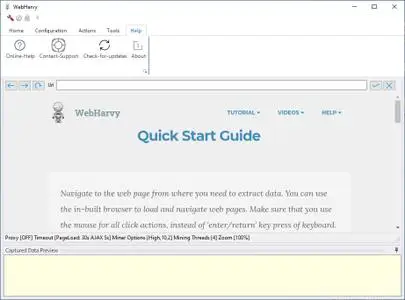
WebHarvy extrahiert problemlos Text, HTML, Bilder, URLs und E-Mails von Websites und speichert die extrahierten Inhalte in verschiedenen Formaten.Web Scraping ist dank der Point-and-Click-Oberfläche von WebHarvy kinderleicht.Sie laden Websites einfach über den integrierten Browser von WebHarvy Daten per Mausklick aus.WebHarvy erkennt automatisch Muster in Daten auf Webseiten.Wenn Sie also eine Liste von Elementen von einer Webseite extrahieren möchten, ist keine zusätzliche Konfiguration erforderlich.Wiederholte Daten werden von WebHarvy automatisch extrahiert.

Download:
jndlpic.gif


​
 
SysNucleus WebHarvy 7.7.0.242

Englisch // Patch Madata


49983002vo.png


Beschreibung:

Intuitiver, leistungsstarker und visueller Web Scraper. WebHarvy extrahiert automatisch Text, Bilder, URLs und E-Mails von Websites und speichert die extrahierten Inhalte in verschiedenen Formaten. WebHarvy ist eine Anwendung, die Ihnen das Scrapen von Bildern, Texten und anderen auf Webseiten angezeigten Daten mithilfe eines integrierten Browsers und einer benutzerfreundlichen Point-and-Click-Oberfläche ermöglicht.

– Unglaublich benutzerfreundlich, starten Sie das Scraping innerhalb weniger Minuten.
– Extrahieren Sie Daten aus mehreren Seiten/Kategorien/Schlüsselwörtern.
– Speichern Sie extrahierte Daten in einer Datei oder Datenbank.
– Integrierter Scheduler und Proxy-Unterstützung.

_________________________________________________

Größe: 136 MB
Sprache: Englisch
Format: RAR/MSI
Plattform: Windows 7/8/10/11 (32/64-bit)
Hoster: RapidGator|Ddownload
________________________________________


49759657zh.png


​


SysNucleus WebHarvy 7.9.0.245


09516066a7a73061bc6ab3b2492539d7.png


SysNucleus WebHarvy 7.9.0.245


Intuitiver und leistungsstarker visueller Web-Scraper. WebHarvy extrahiert automatisch Texte, Bilder, URLs und E-Mails von Webseiten und speichert die extrahierten Inhalte in verschiedenen Formaten. WebHarvy ist eine Anwendung, mit der Sie Bilder, Texte und beliebige Daten von Webseiten mithilfe eines fortschrittlichen, integrierten Browsers und einer intuitiven Point-and-Click-Oberfläche extrahieren können.


Sprache: English | Größe: 150 MB | Format: RAR, EXE | Plattform: Windows 7, 8/8.1, 10, 11 (32/64Bit)


Hoster:
RapidGator.net | NitroFlare.com | DDownload.com


DOWNLOAD Links:


​
 

SysNucleus WebHarvy v7.9.0.246

sx-J8Tm-Z.jpg


SysNucleus WebHarvy v7.9.0.246 || Patch-MADARA || 150.28 MB || Sprache: Englisch


Beschreibung:


Sprache: Englisch
File Size: 150.28 MB
Format: .Rar und .Exe
Plattform: Windows 11, 10, 8.1, 8, 7 (32 und 64 Bit)
Passwort: Wird nicht benötigt
Hoster: nitroflare.com , ddownload.com , rapidgator.net

Mirrors sind untereinander kompatibel


​
 
2e3592faff0656ec957c3c6ff82cdc53.webp

Free Download SysNucleus WebHarvy 8.5.0.258 | 176 Mb
WebHarvy is a visual web scraping application designed to extract structured information from websites without requiring programming knowledge. It can collect text, HTML content, images, URLs, and email addresses, allowing users to gather information from online sources through an interactive point-and-click interface.
The software uses an integrated browser to load target websites and lets users select the information they want to collect directly from displayed web pages. Its automatic pattern detection engine identifies repeating data structures, making it easier to extract records such as product names, addresses, email addresses, and prices without manually defining every extraction rule.
WebHarvy also supports multi-page crawling, automated keyword submissions, and several export options. Extracted information can be saved in spreadsheet and structured data formats or transferred directly to an SQL database, making it suitable for research, product data collection, directory extraction, and other web-based information gathering tasks.​

Software OverviewWebHarvy simplifies website data extraction by combining visual selection tools with automatic content pattern recognition. Users can navigate websites through its built-in browser, identify the elements they need, and configure extraction tasks using mouse interactions rather than writing custom scripts.
One of its main capabilities is intelligent pattern detection. When a webpage contains repeating information, such as product listings or directory entries, WebHarvy can recognize the recurring structure and extract corresponding fields automatically. This reduces the amount of manual configuration required when collecting multiple records from the same page.
For websites that distribute information across multiple pages, the application provides automatic crawling. Users can identify the navigation link used to access the next page, allowing WebHarvy to continue collecting information from subsequent pages without manually opening each one.
The software also supports automated searches using lists of keywords. Input terms can be submitted through website search forms, including multiple text fields, and the resulting information can be collected across different keyword combinations. Completed scraping jobs can be exported to Excel, XML, CSV, JSON, and TSV files or saved to SQL databases.
Key Features
  • Visual point-and-click web scraping without requiring programming or scripting knowledge.
  • Integrated browser for navigating websites and selecting information for extraction.
  • Extraction of text, HTML content, images, URLs, and email addresses.
  • Automatic pattern recognition for identifying repeating data structures.
  • Extraction of structured records such as product names, addresses, email addresses, and prices.
  • Automatic crawling of multiple website pages.
  • Pagination support through configurable next-page links.
  • Automated keyword submission through website search forms.
  • Support for submitting multiple keywords across multiple input fields.
  • Collection of search results generated from different keyword combinations.
  • Export extracted information to Excel, XML, CSV, JSON, and TSV formats.
  • Direct export of collected data to SQL databases.
  • Proxy server support for accessing target websites.
  • VPN connectivity options for privacy-conscious scraping activities.
  • Support for using a single proxy address or a list of proxy servers.
Why Choose WebHarvyWebHarvy is suitable for users who need to collect information from websites but do not have the programming experience required to build custom scraping scripts. Its visual interface makes it possible to configure extraction tasks by selecting page elements directly, while automatic pattern recognition helps handle repeating information.
The combination of pagination crawling, keyword-based searches, and multiple export formats makes the application useful for gathering information from product catalogs, online directories, search results, and other data-rich websites. Database export also provides an option for incorporating collected information into existing data management workflows.
System Requirements
  • Operating System: Windows 7, 8/8.1, 10, 11
Frequently Asked Questions
What is WebHarvy used for?WebHarvy is used to extract information from websites, including text, HTML, images, URLs, email addresses, and structured records. It can collect data from individual pages as well as multi-page website listings.
Does WebHarvy require programming knowledge?No. Its point-and-click interface allows users to select website elements through the integrated browser without writing custom scraping scripts.
Can WebHarvy extract data from multiple pages automatically?Yes. Users can identify the link used to navigate to the next page, allowing the software to crawl subsequent pages and collect information automatically.
Which formats are supported for exporting extracted data?WebHarvy supports Excel, XML, CSV, JSON, and TSV exports. It can also save collected information directly to SQL databases.
Does WebHarvy support proxy servers?Yes. The application supports accessing target websites through individual proxy addresses or lists of proxy servers. VPN connectivity is also available as an option.
Home Page Product Information
  • Software Name: SysNucleus WebHarvy
  • Version: 8.5.0.258
  • Languages: English
  • License type: Full Version
  • File Size: 176 Mb

FileHost : RapidGator | FreeDL | DDownload | AlfaFile​
 
Zurück
Oben Unten