• Regeln für den Video-Bereich:

    In den Börsenbereich gehören nur Angebote die bereits den Allgemeinen Regeln entsprechen.

    Einteilung

    - Folgende Formate gehören in die angegeben Bereiche:
    - Filme: Encodierte Filme von BluRay, DVD, R5, TV, Screener sowie Telesyncs im Format DivX, XviD und x264.
    - DVD: Filme im Format DVD5, DVD9 und HD2DVD.
    - HD: Encodierte Filme mit der Auflösung 720p oder darüber von BluRay, DVD, R5, TV, Screener sowie Telesyncs im Format x264.
    - 3D: Encodierte Filme von BluRay, die in einem 3D Format vorliegen. Dies gilt auch für Dokus, Animation usw.
    - Serien: Cartoon/Zeichentrick, Anime, Tutorials, Dokumentationen, Konzerte/Musik, Sonstiges sind demnach in die entsprechenden Bereiche einzuordnen, auch wenn sie beispielsweise im High Definition-Format oder als DVD5/DVD9/HD2DVD vorliegen. Ausnahme 3D.
    - Bereich Englisch: Englische Releases gehören immer in diesen Bereich.
    - Bereich Talk: Der Bereich, in dem über die Releases diskutiert werden kann, darf, soll und erwünscht ist.


    Angebot/Beitrag erstellen

    - Ein Beitrag darf erst dann erstellt werden, wenn der Upload bei mindestens einem OCH komplett ist. Platzhalter sind untersagt.
    - Bei einem Scenerelease hat der Threadtitel ausschließlich aus dem originalen, unveränderten Releasenamen zu bestehen. Es dürfen keine Veränderungen wie z.B. Sterne, kleine Buchstaben o.ä. vorgenommen werden. Ausnahme Serienbörse:
    - Bei einem Sammelthread für eine Staffel entfällt aus dem Releasename natürlich der Name der Folge. Beispiel: Die Simpsons S21 German DVDRip XviD - ITG
    - Dementsprechend sind also u.a. verboten: Erweiterungen wie "Tipp", "empfehlenswert", "only", "reup", usw. / jegliche andere Zusatzinformation oder Ergänzung, welche nicht in obiger Beschreibung zu finden ist.

    Aufbau des Angebots und Threadtitel

    Der Titel nach folgendem Muster erstellt zu werden. <Name> [3D] [Staffel] [German] <Jahr> <Tonspur> [DL] [Auflösung] <Quelle> <Codec> - <Group>
    Beispiel: The Dark Knight German 2008 AC3 DVDRip XviD - iND
    Beispiel: The Dark Knight 2008 DTS DL BDRip x264 - iND
    Beispiel: The Dark Knight 2008 AC3 DL BDRip XviD - iND
    Beispiel: The Dark Knight German 2008 AC3 720p BluRay x264 iND
    Beispiel: The Dark Knight 2008 DTS DL 1080p BluRay x264 iND
    Beispiel: Die Simpsons S01 German AC3 DVDRip XviD iND
    Beispiel: Die Simpsons S20 German AC3 720p BluRay x264 iND
    Beispiel: Sword Art Online II Ger Sub 2014 AAC 1080p WEBRip x264 - peppermint
    Entsprechend sind also u.a. verboten: Sonderzeichen wie Klammern, Sterne, Ausrufezeichen, Unterstriche, Anführungszeichen / Erweiterungen wie "Tipp", "empfehlenswert", "only", "reup", usw. / jegliche andere Zusatzinformation oder Ergänzung, welche nicht in obiger Beschreibung zu finden ist
    Ausnahmen hiervon können in den Bereichen geregelt sein.

    Die Beiträge sollen wie folgt aufgebaut werden:
    Überschrift entspricht dem Threadtitel
    Cover
    kurze Inhaltsbeschreibung
    Format, Größe, Dauer sind gut lesbar für Downloader außerhalb des Spoilers zu vermerken
    Nfo sind immer Anzugeben und selbige immer im Spoiler in Textform.
    Sind keine Nfo vorhanden z.B. Eigenpublikationen, sind im Spoiler folgende Dateiinformationen zusätzlich anzugeben :
    Quelle
    Video (Auflösung und Bitrate)
    Ton (Sprache, Format und Bitrate der einzelnen Spuren)
    Untertitel (sofern vorhanden)
    Hosterangabe in Textform außerhalb eines Spoiler mit allen enthaltenen Hostern.
    Bei SD kann auf diese zusätzlichen Dateiinformationen verzichtet werden.

    Alle benötigten Passwörter sind, sofern vorhanden, in Textform im Angebot anzugeben.
    Spoiler im Spoiler mit Kommentaren :"Schon Bedankt?" sind unerwünscht.


    Releases

    - Sind Retail-Release verfügbar, sind alle anderen Variationen untersagt. Ausnahmen: Alle deutschen Retail-Release sind CUT, in diesem Fall sind dubbed UNCUT-Release zulässig.
    - Im Serien-Bereich gilt speziell: Wenn ein Retail vor Abschluss einer laufenden Staffel erscheint, darf diese Staffel noch zu Ende gebracht werden.62
    - Gleiche Releases sind unbedingt zusammenzufassen. Das bedeutet, es ist zwingend erforderlich, vor dem Erstellen eines Themas per Suchfunktion zu überprüfen, ob bereits ein Beitrag mit demselben Release besteht. Ist dies der Fall, ist der bereits vorhandene Beitrag zu verwenden.
    - P2P und Scene Releases dürfen nicht verändert oder gar unter einem iND Tag eingestellt werden.


    Support, Diskussionen und Suche

    - Supportanfragen sind entweder per PN oder im Bereich Talk zu stellen.
    - Diskussionen und Bewertungen sind im Talk Bereich zu führen. Fragen an die Uploader haben ausschließlich via PN zu erfolgen, und sind in den Angeboten untersagt.
    - Anfragen zu Upload-Wünschen sind nur im Bereich Suche Video erlaubt. Antworten dürfen nur auf Angebote von MyBoerse.bz verlinkt werden.


    Verbote

    - Untersagt sind mehrere Formate in einem einzigen Angebotsthread, wie beispielsweise das gleichzeitige Anbieten von DivX/XviD, 720p und 1080p in einem Thread. Pro Format, Release und Auflösung ist ein eigener Thread zu eröffnen.
    - Grundsätzlich ebenso verboten sind Dupes. Uploader haben sich an geeigneter Stelle darüber zu informieren, ob es sich bei einem Release um ein Dupe handelt.
    - Gefakte, nur teilweise lauffähige oder unvollständige Angebote sind untersagt. Dies gilt auch für eigene Publikationen, die augenscheinlich nicht selbst von z.B. einer DVD gerippt wurden. Laufende Serien, bei denen noch nicht alle Folgen verfügbar sind, dürfen erstellt und regelmäßig geupdatet werden.
    - Untersagt sind Angebote, welche nur und ausschließlich in einer anderen Sprache als deutsch oder englisch vorliegen. Ausnahmen sind VORHER mit den Moderatoren zu klären.


    Verstoß gegen die Regeln

    - Angebote oder Beiträge, die gegen die Forenregeln verstoßen, sind über den "Melden"-Button im Beitrag zu melden.
  • Bitte registriere dich zunächst um Beiträge zu verfassen und externe Links aufzurufen.

++ Premium IPTV ++ 7000 Live Sender ++ UHD Qualität ++ Mediathek mit 18.000 Inhalten ++


VenneTV


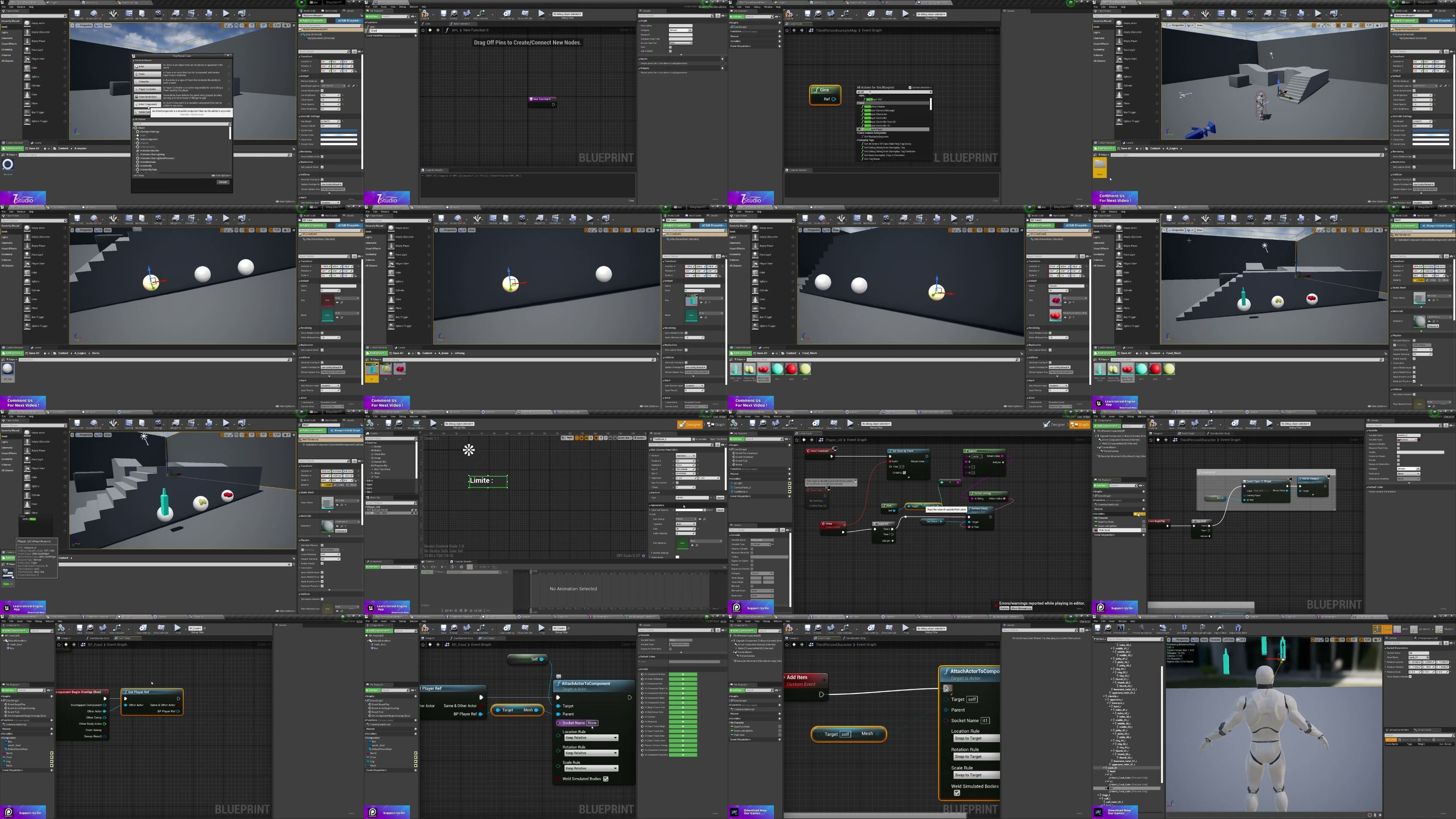
Simple Super Store With Blueprints System Unreal Engine 5

babymore87

MyBoerse.bz Pro Member
1d8439fc4f2a879f6781a40140622726.webp

Simple Super Store With Blueprints System Unreal Engine 5
MP4 | Video: h264, 1280x720 | Audio: AAC, 44.1 KHz
Language: English | Size: 1.76 GB | Duration: 2h 38m
Build a Simple Super Store System in Unreal Engine 5.6 using Blueprints, Item Interaction, Inventory, Checkout System
What you'll learn
Build a complete and reusable Super Store System in Unreal Engine 5.6 using Blueprints.

Create item pickup, placement, and shelf management systems.
Develop interactive store mechanics, including product selection and inventory handling.
Build a checkout and payment system for a supermarket game.
Design modular Blueprint systems that are easy to expand and maintain.
Create reusable interaction systems for players and store objects.
Organize a professional Unreal Engine project using best practices.
Implement save and load functionality for store progress and game data.
Apply the techniques learned to create supermarket, convenience store, retail, or shop simulation games.
Requirements
A Windows PC capable of running Unreal Engine 5.6.
Unreal Engine 5.6 installed on your computer (installation guidance will be provided).
No prior experience with Super Store or simulation game development is required.
Basic computer skills and a willingness to learn Unreal Engine Blueprints. No C++ programming knowledge is required.
Description
Want to learn how to create a complete Super Store System in Unreal Engine 5.6? This hands-on course will guide you through building a modular and reusable supermarket gameplay system using Unreal Engine 5.6 and Blueprints-no C++ required.Instead of creating a one-time project, you'll learn how to build scalable systems that can be expanded into a complete supermarket, convenience store, or retail simulation game.What You'll BuildBy the end of this course, you'll have a fully functional Super Store System featuring:Interactive product pickup and placementShelf management systemPlayer interaction systemShopping mechanicsCheckout and payment systemInventory managementReusable Blueprint componentsSave and load functionalityModular project architecture for future expansionWhat you'll learnBuild a complete Super Store System using Unreal Engine 5.6Create interactive gameplay using BlueprintsDevelop pickup and item placement mechanicsDesign inventory and shelf management systemsBuild a checkout and payment workflowOrganize scalable Blueprint architectureImplement save and load systemsApply Unreal Engine best practices for gameplay developmentWhy Take This Course?This course focuses on practical game development by building a real gameplay system that you can reuse in your own projects. Every Blueprint is designed to be modular, clean, and easy to expand, allowing you to add new products, store features, NPC customers, and gameplay mechanics as your project grows.Whether you're creating a supermarket simulator, convenience store game, retail simulator, or another management-style project, the systems you'll build in this course provide a strong foundation for future development.Who this course is forBeginners learning Unreal Engine 5.6Blueprint developers who want to build gameplay systems without C++Indie game developers creating simulation or management gamesDevelopers interested in supermarket, retail, or shop mechanicsAnyone looking to improve their Unreal Engine Blueprint skills through a practical, project-based courseBy the end of this course, you'll have the knowledge and confidence to build your own interactive Super Store System and expand it into a complete simulation game.
Beginners who want to learn Unreal Engine 5.6 Blueprint development through a practical project.,Game developers interested in building supermarket, retail, or store simulation games.,Unreal Engine developers who want to create modular and reusable gameplay systems.,Indie developers looking to add interactive shopping and inventory mechanics to their games.,Students who prefer visual scripting with Blueprints instead of C++.,Anyone who wants to improve their Unreal Engine skills by building a complete, real-world gameplay system from scratch.
Homepage

Recommend Download Link Hight Speed | Please Say Thanks Keep Topic Live
No Password - Links are Interchangeable

 

763400144_yxusj-i25h6gpqv188.jpg

Simple Super Store with Blueprints System Unreal Engine 5
MP4 | Video: h264, 1920x1080 | Audio: AAC, 44.1 KHz, 2 Ch
Genre: eLearning | Language: English (US) | Duration: 2.5 h | Size: 1.76 GB​

Want to learn how to create a complete Super Store System in Unreal Engine 5.6? This hands-on course will guide you through building a modular and reusable supermarket gameplay system using
Unreal Engine 5.6
and
Blueprints
-no C++ required.
Instead of creating a one-time project, you'll learn how to build scalable systems that can be expanded into a complete supermarket, convenience store, or retail simulation game.
What You'll Build
By the end of this course, you'll have a fully functional Super Store System featuring:

Interactive product pickup and placement

Shelf management system

Player interaction system

Shopping mechanics

Checkout and payment system

Inventory management

Reusable Blueprint components

Save and load functionality

Modular project architecture for future expansion
What You'll Learn

Build a complete Super Store System using Unreal Engine 5.6

Create interactive gameplay using Blueprints

Develop pickup and item placement mechanics

Design inventory and shelf management systems

Build a checkout and payment workflow

Organize scalable Blueprint architecture

Implement save and load systems

Apply Unreal Engine best practices for gameplay development
Why Take This Course?
This course focuses on practical game development by building a real gameplay system that you can reuse in your own projects. Every Blueprint is designed to be modular, clean, and easy to expand, allowing you to add new products, store features, NPC customers, and gameplay mechanics as your project grows.
Whether you're creating a supermarket simulator, convenience store game, retail simulator, or another management-style project, the systems you'll build in this course provide a strong foundation for future development.
Who This Course Is For

Beginners learning Unreal Engine 5.6

Blueprint developers who want to build gameplay systems without C++

Indie game developers creating simulation or management games

Developers interested in supermarket, retail, or shop mechanics

Anyone looking to improve their Unreal Engine Blueprint skills through a practical, project-based course
By the end of this course, you'll have the knowledge and confidence to build your own interactive Super Store System and expand it into a complete simulation game.


yxusj-1-Introduction.jpg

763400316_yxusj-0xmf13h37z6c.jpg

 
Zurück
Oben Unten