Follow along with the video below to see how to install our site as a web app on your home screen.
Anmerkung: This feature currently requires accessing the site using the built-in Safari browser.
Regeln für den Software-Bereich:
Allgemeines:
- In erster Linie sind unsere Boardregeln zu beachten, zu finden HIER.
- Software zur Audiobearbeitung sollte ausschließlich im Unterforum "Audio" eingestellt werden.
- Für Cracks, Keygens oder sonstige Freischaltungssoftware gibt es das Unterforum "Freischaltung".
- Portable Software bitte im entsprechenden Unterforum "Portable Software" eintragen.
- Diskussionen zur Installation und anderen Problemen mit der Software, bitte im enstprechenden Unterforum "Talk" führen.
- Bei Unklarheiten und Fragen zu den Regeln bitte die Moderatoren kontaktieren.
Angebot erstellen
- Die Struktur des Threadtitels muss wie folgt umgesetzt werden: Herstellername - Softwarename - Versionsnummer
- Unnötige Zusätze im Threadtitel wie "HOT", "NEW" oder Punkte zwischen den Wörtern sind nicht erlaubt.
- Achtet darauf immer nur die Hauptversion und deren Updates in einem Thread zusammenfassen, konkretes Beispiel: SoftwareXY v3.12 gehört in den selben Thread mit SoftwareXY v3.13; SoftwareXY v.4.1 gehört in einen neuen eigenen Thread. Ausgenommen hiervon sind Sammelthreads und Dauerangebote.
- Bei nicht bekannten Herstellern oder Angebote einer privaten Software, ist die Programmbezeichnung + Versionsnummer ausreichend.
- Besondere Beachtung gilt für den ersten Beitrag eines Angebots. Dort muss eine kurze Beschreibung der Software in deutscher Sprache angegeben werden. Für offizielle Releases ist es Pflicht die NFO im Beitrag einzustellen(Spoiler, siehe nächster Punkt).
- Weitere Informationen wie NFOs oder Changelogs, versteckt ihr bitte in einem Spoiler.
Software Suche
- Für Suchanfragen haben wir das Unterforum "Suche" erstellt.
- Auch hier sollte vorher die Suchfunktion benutzt werden, um Doppelthreads vorzubeugen. Sollte es bereits eine Suchanfrage geben, könnt ihr den Thread gerne mit einem "Danke" pushen.
Trojaner- und Virusalarm
- Falls Euer Virenscanner bei einem Angebot Alarm schlägt, solltet ihr zunächst Ruhe bewahren. Viele Virenscanner erkennen Cracks/Keygens oft fälschlicherweise als Bedrohung.
- Prüft die verdächtige Datei zuerst mit http://virustotal.com , sollte es sich hierbei wirklich um eine Bedrohung handeln, meldet den Beitrag und/oder wendet euch mit dem Bericht von VirusTotal.com an einen Moderator.
Unerwünschte Angebote
- Keylogger, Spionagetools, alles rund ums Thema Hacking/Cracking ist nicht erwünscht.
Du verwendest einen veralteten Browser. Es ist möglich, dass diese oder andere Websites nicht korrekt angezeigt werden. Du solltest ein Upgrade durchführen oder einen alternativen Browser verwenden.
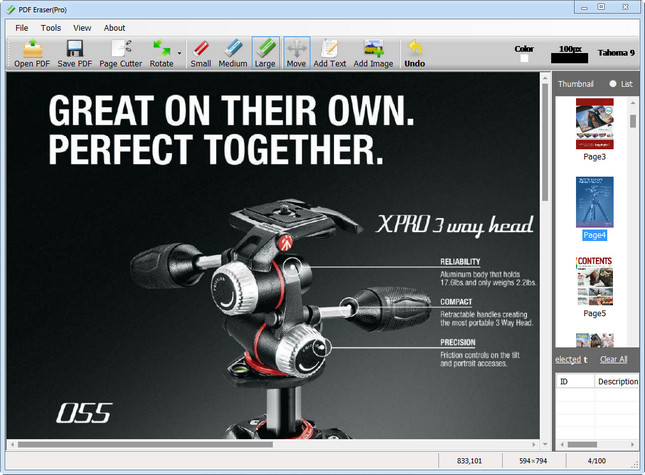
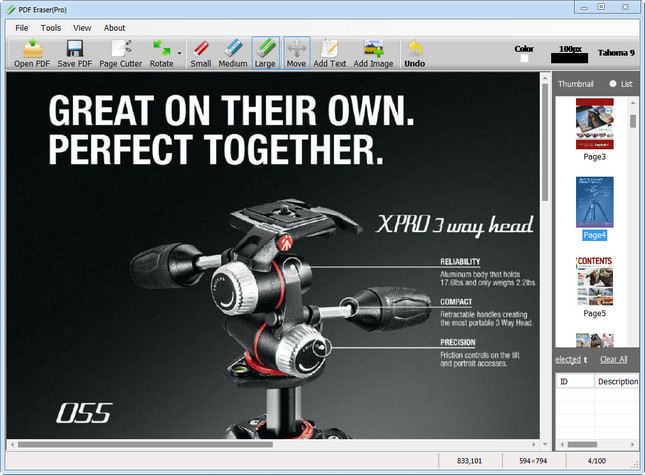
PDF Eraser is a Windows application that deletes and erases text, images, logos and all unnecessary objects from PDF files. Users can use the program to remove some original content from a PDF file, and then add their text and images. Besides that, PDF Eraser has a built-in PDF Page Cutter, which allows users to delete unnecessary PDF pages. Considering lots of scanned PDF documents, PDF Eraser also added the PDF Rotating function rotates PDF pages properly with 2 clicks.
What Can PDF Eraser Do
If you got a PDF document contains unwanted text and images, you can use PDF Eraser to erase them and save to a new PDF file.
Erasing is not the only thing PDF Eraser can do. You can use the program to add your own text and pictures into the PDF as well.
PDF Eraser can rotate the PDF pages also. It will help you to rotate the PDF pages to the correct orientation.
You might find some PDF pages are unnecessary, so you can use the built-in PDF Page Cutter to delete unwanted pages.
PDF Eraser is a Windows application that deletes and erases text, images, logos and all unnecessary objects from PDF files. Users can use the program to remove some original content from a PDF file, and then add their text and images. Besides that, PDF Eraser has a built-in PDF Page Cutter, which allows users to delete unnecessary PDF pages. Considering lots of scanned PDF documents, PDF Eraser also added the PDF Rotating function rotates PDF pages properly with 2 clicks.
What Can PDF Eraser Do
If you got a PDF document contains unwanted text and images, you can use PDF Eraser to erase them and save to a new PDF file.
Erasing is not the only thing PDF Eraser can do. You can use the program to add your own text and pictures into the PDF as well.
PDF Eraser can rotate the PDF pages also. It will help you to rotate the PDF pages to the correct orientation.
You might find some PDF pages are unnecessary, so you can use the built-in PDF Page Cutter to delete unwanted pages.
Plattform: windows 10 , 8 , 8.1 , 7 , 11 (32 oder 64-Bit)
Größe: 6.15 MB
Sprache -> Englisch
Format: rar / exe
Hoster: rapidgator / ddownload / nitroflare
PDF Eraser ist eine Windows-Anwendung, die Text, Bilder, Logos und alle unnötigen Objekte aus PDF-Dateien löscht und entfernt. Benutzer können das Programm verwenden, um einige Originalinhalte aus einer PDF-Datei zu entfernen und dann ihren Text und ihre Bilder hinzuzufügen. Außerdem verfügt PDF Eraser über einen integrierten PDF-Seitenschneider, mit dem Benutzer unnötige PDF-Seiten löschen können. In Anbetracht vieler gescannter PDF-Dokumente hat PDF Eraser auch die PDF-Rotationsfunktion hinzugefügt, um PDF-Seiten mit 2 Klicks richtig zu drehen zu einer neuen PDF-Datei. Das Löschen ist nicht das einzige, was PDF Eraser tun kann. Sie können das Programm auch verwenden, um Ihren eigenen Text und Bilder in das PDF einzufügen. PDF Eraser kann die PDF-Seiten auch drehen. Es wird Ihnen helfen, die PDF-Seiten in die richtige Ausrichtung zu drehen. Möglicherweise finden Sie einige PDF-Seiten unnötig, sodass Sie den integrierten PDF-Seitenschneider verwenden können, um unerwünschte Seiten zu löschen.
PDF Eraser is a Windows application that deletes and erases text, images, logos and all unnecessary objects from PDF files. Users can use the program to remove some original content from a PDF file, and then add their text and images. Besides that, PDF Eraser has a built-in PDF Page Cutter, which allows users to delete unnecessary PDF pages. Considering lots of scanned PDF documents, PDF Eraser also added the PDF Rotating function rotates PDF pages properly with 2 clicks.
What Can PDF Eraser Do
If you got a PDF document contains unwanted text and images, you can use PDF Eraser to erase them and save to a new PDF file.
Erasing is not the only thing PDF Eraser can do. You can use the program to add your own text and pictures into the PDF as well.
PDF Eraser can rotate the PDF pages also. It will help you to rotate the PDF pages to the correct orientation.
You might find some PDF pages are unnecessary, so you can use the built-in PDF Page Cutter to delete unwanted pages.
PDF Eraser ist eine Windows-Anwendung, die Text, Bilder, Logos und alle unnötigen Objekte aus PDF-Dateien entfernt. Benutzer können mit dem Programm Originalinhalte aus einer PDF-Datei entfernen und anschließend eigene Texte und Bilder hinzufügen. Darüber hinaus verfügt PDF Eraser über einen integrierten PDF-Seitenschneider, mit dem Benutzer überflüssige PDF-Seiten löschen können. Angesichts der vielen gescannten PDF-Dokumente bietet PDF Eraser auch eine PDF-Drehfunktion, mit der PDF-Seiten mit nur zwei Klicks korrekt gedreht werden können.







 -> Englisch